Efficient accounting and financial management are more crucial than ever in today’s growing business environment. QuickBooks Desktop 2024 (version 24.0) is the last annual platform release of QuickBooks Desktop. It introduced several updates, including enhanced search, customer prepayments, improved security, and workflow enhancements. This guide explains its features, system requirements, download options, installation process, upgrades, updates, and common issues. The release includes features designed to improve everyday accounting, inventory, customer management, and financial workflows for small and midsize businesses.
It ease the workflow, improve accuracy, and help you make informed decisions. Explore the major updates, functionalities of QuickBooks Desktop 2024 and how they can benefit any business. Learn what makes this version a valuable asset for the financial management to enhanced user experience.
QuickBooks Desktop 2024 is Intuit’s version 24.0 desktop accounting software. It provides tools for bookkeeping, invoicing, payroll, inventory, reporting, and other business accounting tasks. Intuit has since moved away from its traditional annual Desktop release cycle toward a continuous update and maintenance model.
QuickBooks Desktop 2024 introduced several updates, including enhanced security, improved search capabilities, customer prepayment functionality, and workflow improvements. Intuit continues to release maintenance, security, and feature updates for the 2024 platform.
Customer Prepayments – Manage and log deposits straight on sales orders or estimates. It applies to them when converted to invoices.
Multi-Level Item Categorization – Options for multi-level organization and bulk editing for inventory items as well as pricing rules.
Invoice Profitability Insights – Detailed tracking of line items to analyze exact profit margins, markups, and returns for each transaction.
It offers enhanced security and inventory management features. Check out the complete details on a QuickBooks desktop 2024 version. The new tools and features are as follows:
This program brings improved security measures, upgraded search capabilities, and a change in support timelines compared to previous editions such as 2022, 2023, etc. Look at the table below for additional information:
| Feature / Attribute | QuickBooks Desktop 2022 | QuickBooks Desktop 2023 | QuickBooks Desktop 2024 |
| Data Encryption | AES 128-bit encryption | AES 128-bit encryption | Upgraded to robust AES 256-bit encryption |
| Search & Lists | Standard search fields | Standard search fields | Enhanced list searching (memorized, payroll, fixed assets) |
| Updates Notification | Interrupting update pop-ups | Interrupting update pop-ups | Seamless toolbar notifications with release information |
| Software Support Lifecycle | Standard three-year sunset window | Standard three-year sunset window | Continuous support and maintenance (moved away from 3-year rule) |
| New Sales / Availability | Discontinued | Discontinued for new buyers | Continuous support and maintenance under Intuit’s updated release model |
Data Service Team Tip: Version 24.0 enhances security by upgrading data encryption from 128-bit to 256-bit. Intuit revised its support approach for QuickBooks Desktop 2024. It offers current product maintenance rather than a rigid three-year termination.
It improves business accounting because of advanced security, faster list and account searching, and streamlined data management tools. The key improvements are:
Download QuickBooks Desktop 2024 from Intuit’s official Downloads & Updates page. The available products and download options depend on your product, subscription, country, and account eligibility.
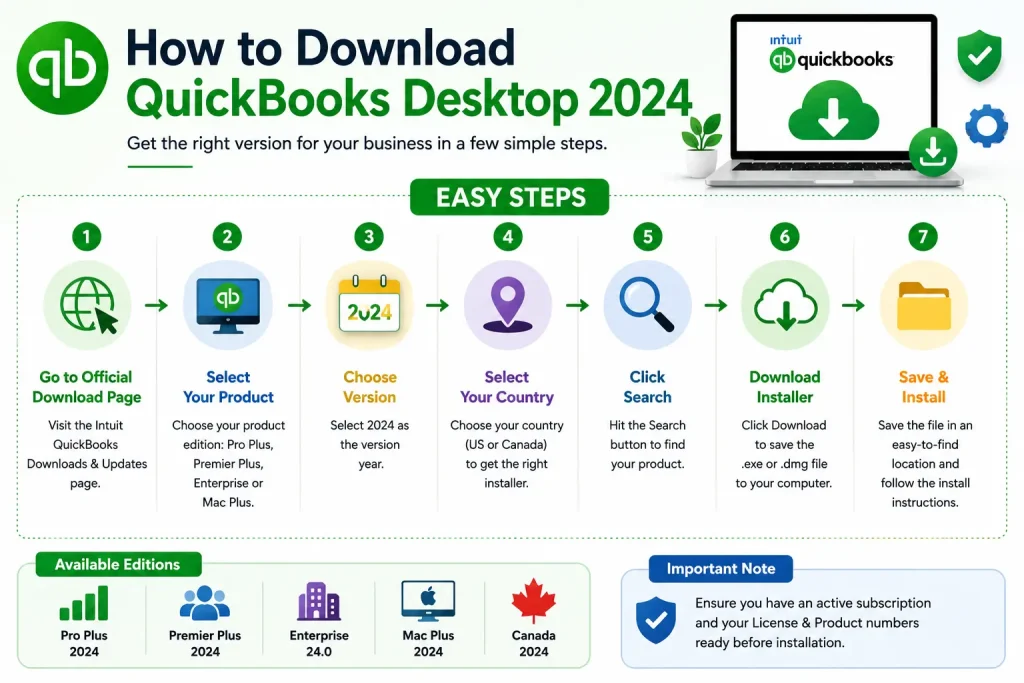
If your QuickBooks account provides an upgrade option within the Desktop application, you may be able to start the upgrade from the Help menu. The available options depend on your product and subscription.
Need to grab your copy of QuickBooks Desktop 2024? Here’s a straightforward walkthrough for each edition.
Important Note: Product availability, licensing, and subscription requirements vary by QuickBooks Desktop edition and customer account. Check the applicable Intuit product page before downloading or upgrading.
Note: during setup, you’ll need to pick the industry edition that fits your business best (Contractor, Manufacturing & Wholesale, Professional Services, etc.).
Important Note: Enterprise gives you a choice between “Full Install” (for individual workstations) and “Server Only” (if you’re just hosting the database on a server). Pick whichever matches your setup.
Data Service Team Tip: Availability varies by product, country, subscription, and account. Always confirm the applicable version on Intuit’s official download page before installing.
It requires a 64-bit Windows operating system, a 2.4 GHz processor, and 8 GB of RAM for better performance. Users can check out the complete specifications at the official Intuit System Requirements Guide.
If you use QuickBooks Desktop, confirm your product and account eligibility for QuickBooks Desktop 2024 and review the applicable licensing requirements before upgrading. You can upgrade directly through the QuickBooks Desktop application by following these steps:
Check the account status and proceed to upgrade process to the 2024 version. Users can find instructions on the QuickBooks renewal process to prevent installation issues related to expired licenses.
Follow the provided instructions to obtain the latest version of QuickBooks:
Consider these steps for the installation once you have downloaded the installer:
Search and download your QuickBooks versions. You can view and download the purchased product versions by signing into your Intuit account.
Users may need to convert the company file to the updated format upon installing the new QuickBooks Desktop version. Here is the procedure:
Here are the steps to maintain data integrity post-upgrade:
Follow the directions below to install the latest available maintenance release for QuickBooks Desktop 2024.
It might be required for the computer to restart after the updates have been installed. Relaunch Desktop to start using the updated version of the program.
Users of QuickBooks Desktop encounter particular technical challenges such as Unrecoverable Errors, issues with Installation or Updates, and Network or Multi-User Errors.
| Error Type / Name | Common Cause | Quick Fix / Resolution |
| Unrecoverable Error | Damaged program files, background browser processes (libcef.dll), or minor company file corruption. | Suppress QuickBooks on startup or Download the latest version of the QuickBooks Tool Hub to repair. |
| Installation Errors (e.g., 1603, 1904) | Damaged Microsoft components, active antivirus interference, or insufficient admin rights. | Run the QuickBooks Install Diagnostic Tool via QuickBooks Tool Hub and install as administrator. |
| Network Error H202 | Block firewall settings or incorrect multi-user host configuration on the server. | Verify QuickBooks Database Server Manager is running and re-configure firewall ports. |
| Error 6123, 0 | Damaged network data files or opening a company file across a bad network path. | Move the company file to a local folder or use the QuickBooks Tool Hub file doctor utility. |
| Payroll Update Errors (e.g., 15270) | Incomplete background updates or incorrect digital signature verification. | Select Reset Update under the Get Payroll Updates menu and run as administrator. |
Data Service Team: QuickBooks Desktop products provide a platform for accounting, payroll, inventory, multiple company management, cloud hosting, industry editions, and more. Contact us for additional guidance.
It provides robust data protection, improved customer prepayments record system, and list searches. These updates can help users improve data security, search efficiency, transaction management, and reporting workflows.
Intuit has transitioned version 24.0 into a long-term maintained platform without a traditional sunset deadline. So, QuickBooks Desktop 2024 users have access to continuous technical assistance and self-service tools.
Make QuickBooks Work Smarter for Your Business
Spend less time managing data and more time growing your business. Whether you need help setting up QuickBooks, cleaning up your books, reconciling accounts, or resolving errors, our team is here to make accounting easier. Get quick solutions that save time, improve accuracy, and keep your business finances on track.
QuickBooks Desktop 2024 offers a collection of features designed to streamline financial management for businesses of all sizes. It stands out as a powerful software for accounts professionals and small business owners. This article provided instructions to install and set up QuickBooks Desktop.
We have explored its important updates and benefits throughout this blog. It is clear that latest QuickBooks Desktop edition can lead to more efficient workflows, better financial insights, and informed decision-making. Contact Data Service Team +1(888)-718-7888 experts for additional information. Get the official links to Download QuickBooks Desktop 2024 and find the right version guide.
Yes! Users can reinstall it without a CD with the installation of the official setup file from QB Product Download page of Intuit. But you need to have the original license number and product number ready for activation.
It fails to install due to damaged MSXML or .NET Framework components, and an incompatible 32-bit operating system.
The installation of QB Desktop 2024 takes about 15 to 45 minutes based on the internet download speed and computer performance. Review the official requirements and steps.
Yes! Users can install QuickBooks Desktop on a new computer. You need your license and product numbers, a compatible 64-bit Windows system, and a company file backup.
It runs slowly due to oversized company files, background resource conflicts, or unfinished software updates. Experience delays from large transaction log files or hardware failure to meet process specifications.
QB Desktop 2024 needs an installed 64-bit Windows operating system with a 2.4 GHz minimum processor and 8 GB RAM, 2.5 GB of free disk space plus an SSD for data files along with internet access for online features.
Create a manual backup of your company file, use the in-product Upgrade QuickBooks tool through the Help menu, and sign in with your 2024 license details to upgrade from QuickBooks Desktop 2023 to 2024.
Installation may fail because of insufficient permissions, damaged installation files, antivirus interference, or missing Windows components. Run the installer as administrator and check system compatibility.
Installation typically takes several minutes to half an hour, depending on your computer, internet speed, and setup type. Updates and activation may require additional time.
Yes, if you have a compatible computer and valid product credentials. Install the appropriate edition, activate it, and restore a verified company-file backup.
Slow performance may result from limited memory, large company files, outdated software, background applications, or network problems. Check system resources and update QuickBooks.
Requirements depend on the edition and configuration. Check Intuit’s official system requirements for supported Windows versions, processor, memory, storage, and additional software before installing.
Verify licensing eligibility, back up your company file, install QuickBooks Desktop 2024, and open the backup or company file. Follow prompts to convert and verify your data.

Get Free Consultation for QuickBooks Upgrade
(2021, 2022, 2023)


