Getting locked out of QuickBooks is frustrating especially when you’re in the middle of running payroll or pulling a report for a client. Whether you’ve forgotten your admin credentials or a team member can’t get into their account, the steps to reset QuickBooks password depend on which version you’re using and what type of password needs changing.
This guide covers every scenario QuickBooks Desktop (2019 and earlier, 2020 and later), QuickBooks Online, and the QuickBooks password reset tool in plain, step-by-step terms.
Before jumping into steps, it helps to know what you’re actually dealing with. There are two distinct password types in QuickBooks Desktop:
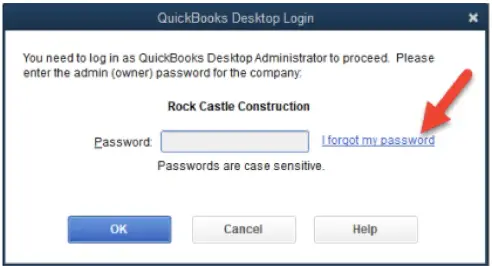
For QuickBooks Online, the login is tied to your Intuit account credentials so the process is different from Desktop entirely.
If you know the admin password and just need to change a password for another user on the account, you don’t need any external tool. Here’s how to do it directly from inside QuickBooks:
The user can now log into the system using the new password. If he is logged into the QuickBooks system from any other computer, then he will have to log out and log back in.
For QuickBooks Desktop 2020 and later versions, Intuit built a more streamlined way to reset QuickBooks password for the admin account. Here’s the process:
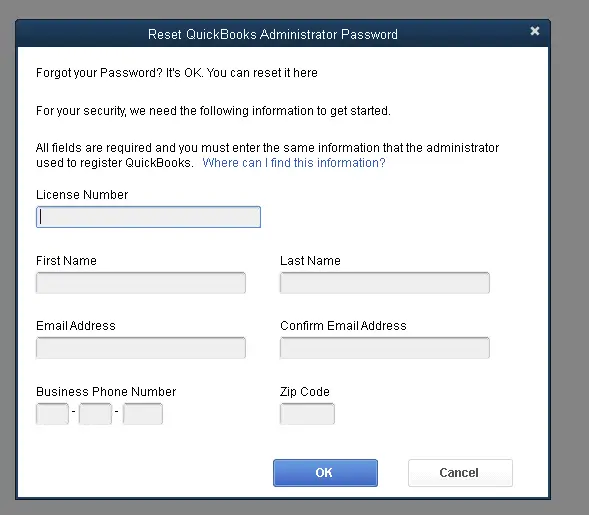
For older versions, the password reset QuickBooks process uses a form-based verification method rather than an email token. Here’s how it works:
Important: All the information you enter must match exactly what’s in Intuit’s system, including the email, phone number, and ZIP code. If any of it is off, the verification will fail. You can check and confirm your registration details by logging into the CAMPS (Customer Account Management Portal) at camps.intuit.com.
When the built-in I forgot my password option doesn’t work or if you need to reset company file password in QuickBooks Desktop and the above methods have failed the Reset QuickBooks password reset tool is the next step.
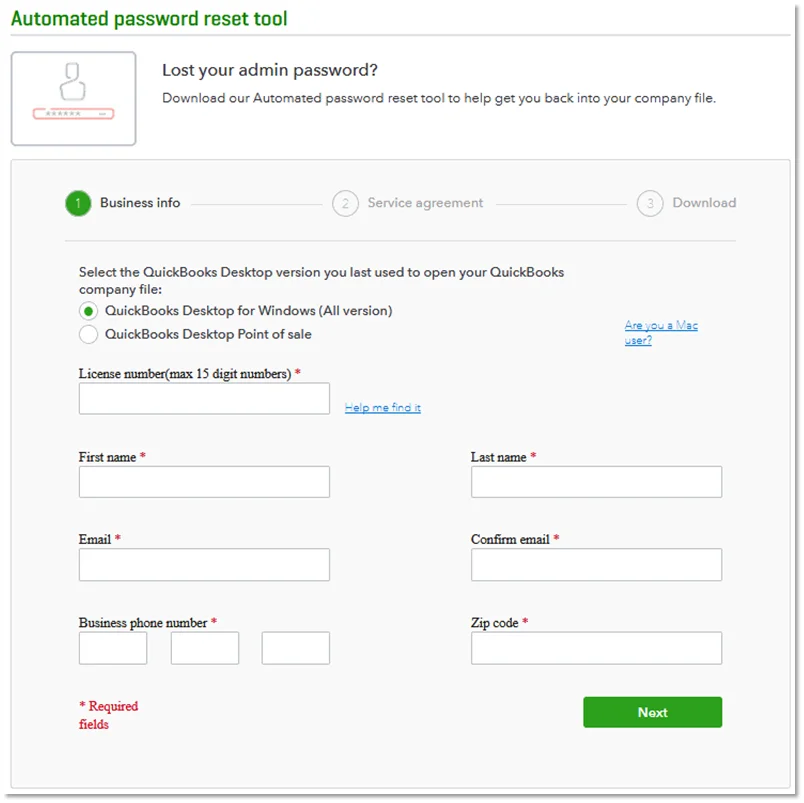
The QuickBooks automated password reset tool download free is available on Intuit’s official website. Here’s the full process:
Before downloading, you’ll need to fill out a verification form on Intuit’s password reset page. Have this info ready:
All of this must match what’s in CAMPS not what you think it is, but what’s actually on file. If anything has changed (like a phone number or ZIP code), update it in CAMPS first before submitting the form.
QuickBooks will confirm the reset is complete. You can then log in with the new password. Keep in mind the QuickBooks automated password reset tool is one-time use the token expires after a single session. If you need to use it again, you’ll have to go through the verification form again to generate a fresh token.
The process for how to reset QuickBooks password Online is completely separate from the Desktop version. Since QuickBooks Online uses your Intuit account credentials to sign in, the reset happens through Intuit’s account system, not inside the software itself.
Here’s how to do it:
Tip: Don’t close the password reset tab while you’re checking your email or phone for the code, keep it open and active the whole time.
If you see the message “unable to reset the QuickBooks administrator password at this time”, it typically means one of the following:
If none of the above resolves it, the QuickBooks Tool Hub has a Password Reset tab that links directly to the Automated Password Reset Tool, try running it from there as an alternative path.
| Situation | Method to Use |
| Resetting a non-admin user’s password (you know the admin password) | Set Up Users and Passwords inside QuickBooks |
| Forgot admin password: QuickBooks Desktop 2020 or later | “I forgot my password” → email token |
| Forgot admin password: QuickBooks Desktop 2019 or earlier | “I forgot my password” → form + email code |
| Token method not working, need to reset company file password | QuickBooks automated password reset tool |
| Locked out of QuickBooks Online | Intuit account recovery at qbo.intuit.com |
| Seeing “unable to reset” error | Check CAMPS info, internet, and firewall settings |
Getting back into your account doesn’t have to be a long ordeal. Once you know which password type you’re dealing with and which version of QuickBooks you’re on, the right steps to reset QuickBooks password are straightforward.
For most Desktop users on 2020 and later, the built-in email token method gets it done in a few minutes. For trickier situations, the QuickBooks automated password reset tool is Intuit’s official fallback that is free, reliable, and designed exactly for cases where everything else hasn’t worked.
Still stuck after trying everything above? Don’t keep troubleshooting in circles. A certified Data Service Team can walk you through the fix in real time, give a call at +1(888)-718-7888 and get back into your account today.
Yes. The QuickBooks automated password reset tool download free is available at no cost on Intuit’s official website. There’s no charge to download or use it, you just need to complete the identity verification form first to receive the access token.
To QuickBooks reset admin password, you’ll need your license number, the name and email address used when registering QuickBooks, your primary business phone number, and your ZIP code. All of this must match exactly what’s in your CAMPS account.
No. Only the admin can reset passwords for other users inside QuickBooks. If you’ve lost admin access and need to reset QuickBooks password for your own account, you’ll need to go through the “I forgot my password” process or use the Automated Password Reset Tool.
Check your spam and junk folders first. If the email still isn’t there, log into camps.intuit.com and confirm the primary email on file is one you can currently access. If it’s an old address, you’ll need to contact Intuit to update it before the reset company file password in QuickBooks Desktop process will work.
No. The QuickBooks automated password reset tool is for QuickBooks Desktop only. For how to reset password for QuickBooks Online, you go through Intuit’s account recovery at qbo.intuit.com, not through the Tool Hub or the Desktop reset tool.




