If you’re a QuickBooks Desktop user, errors are something you’ve probably dealt with; company file issues, network problems, installation failures, you name it. QuickBooks Tool Hub 1.6.0.8 is Intuit’s all-in-one, free utility that puts every major repair and diagnostic tool under one roof. Instead of hunting for separate tools, you get everything in one place.
This guide walks you through exactly what it is, how to get it on your machine, and how to actually use it to get things working again.
Before 2022, Intuit’s individual repair utilities like QuickBooks File Doctor, the QuickBooks Install Diagnostic Tool, and the QuickBooks Database Server Manager all had to be downloaded separately. That was a lot of back-and-forth, especially when you weren’t sure which one to use.
QuickBooks Tool Hub 1.6.0.8 changes that. It’s a centralized desktop application developed by Intuit that pulls all those individual tools into a single, tabbed interface. You open it, pick the category that matches your problem, and run the right tool from there, no guesswork, no additional downloads.
Understanding what is QuickBooks Tool Hub and how to install it goes hand in hand. The tool is free, built for QuickBooks Desktop (not QuickBooks Online), and works across versions from 2018 through 2025. The latest is 1.6.0.8 and is the most current version Intuit has issued.
Before you go ahead and install anything, make sure your system is ready. Running QuickBooks Tool Hub 1.6.0.8 on an unsupported setup can lead to install failures or tools not working correctly.
Note: The tool does not work on macOS, Linux, or Windows 10 S Mode. It is strictly a Windows-based utility.
So, how do I download QuickBooks Tool Hub? It’s a straightforward process, but you want to make sure you’re pulling it from the right place. Only use the official QuickBooks Tool Hub download link or verified support pages.
The QuickBooks Tool Hub free download is completely without cost, there’s no license fee, no subscription required. It’s an official Intuit utility, so you won’t be charged anything to use it.
Heads Up: If your browser or antivirus blocks QuickBooksToolHub.exe and says it may harm your device, this is a false positive. You can simply temporarily disable your antivirus or add an exception for the file, then re-download. Alternatively, try a different browser.
Once you have the file saved, installation is quick. Follow these exact steps:
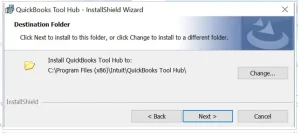
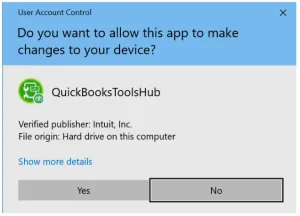
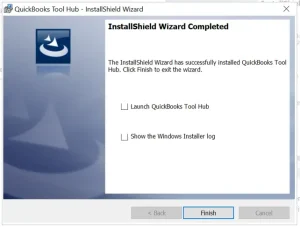
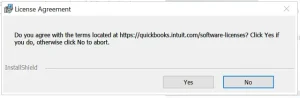
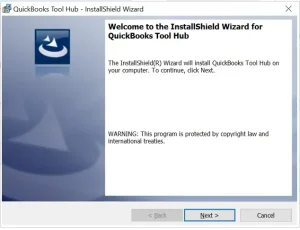
That’s it. QuickBooks Tool Hub 1.6.0.8 is now installed on your machine and ready to use.
Note: If you install a specific tool from within the Tool Hub (like the QuickBooks Install Diagnostic Tool), it downloads in the background and may take 2–3 minutes. Keep the Tool Hub open until that finishes.
Once installed, the icon should appear on your Windows desktop. To open it, just double-click the QuickBooks Tool Hub icon.
If you can’t find the icon, here’s how to locate the QuickBooks Tool Hub manually:
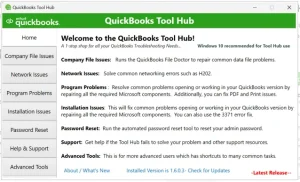
The tool will open to the Home tab, which gives you a quick overview of all the available sections and what each one does. At the bottom of the Home tab, you’ll also see the version number, this is useful if you ever need to confirm you’re on 1.6.0.8.
QuickBooks Tool Hub 1.6.0.8 is organized into 8 tabs. Each one targets a specific category of problem. Here’s a breakdown:
| Tab Name | What It Handles | Key Tool(s) Inside |
| Home | Overview and version info | Navigation guide |
| Company File Issues | Corrupted or unopenable company files | QuickBooks File Doctor, Quick Fix My File |
| Network Issues | Multi-user mode, H-series errors | QuickBooks Database Server Manager |
| Program Problems | Crashes, freezes, PDF/print failures | Quick Fix My Program, PDF & Print Repair Tool |
| Installation Issues | Update and install errors | QuickBooks Install Diagnostic Tool, Clean Install Tool |
| Password Reset | Forgotten admin password | Automated Password Reset Tool |
| Help & Support | Contact Intuit, access community forums | CAMPs portal, QB specialist contact |
| Advanced Tools | Windows-level shortcuts and advanced repair options | Registry shortcuts, system tools |
This is where the real value of QuickBooks Tool Hub 1.6.0.8 shows up. To fix common problems with QuickBooks Tool Hub, you need to match your issue to the right tab. Here’s how each one works in practice:
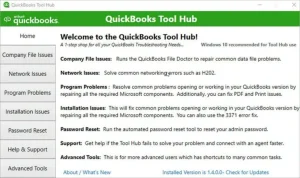
If QuickBooks won’t open your company file, or you’re seeing 6000 series errors (like Error 6000, -82 or Error 6147), go to the Company File Issues tab. You can download QuickBooks Tool Hub and run QuickBooks File Doctor directly from here. QuickBooks File Doctor scans your file, detects damage, and repairs it automatically without you needing to dig into file directories manually.

Click Quick Fix My File for minor corruption, or Run QuickBooks File Doctor for a deeper scan that also covers network-related file access issues.
The Network Issues tab is where you go when you’re running QuickBooks in multi-user mode and hitting H202 error, H303, or H505 errors. These typically happen when workstations can’t reach the company file on the server.

Run QuickBooks Database Server Manager from this tab but run it on the server computer, not the workstations.
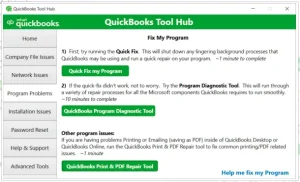
If QuickBooks is freezing, crashing on launch, or having PDF and printing issues, the Program Problems tab is your first stop. Quick Fix My Program closes background QuickBooks processes and restarts the program fresh. The PDF & Print Repair Tool specifically targets issues where QuickBooks can’t print or save as PDF.
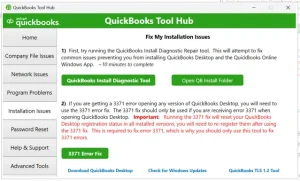
For errors during updates or fresh installs like error codes 1935, 1904, or 15XXX payroll errors use the Installation Issues tab. The QuickBooks Install Diagnostic Tool repairs damaged Microsoft components that QuickBooks depends on, like .NET Framework and C++ redistributable files. The Clean Install Tool takes it a step further by fully removing QuickBooks so you can do a fresh reinstall.
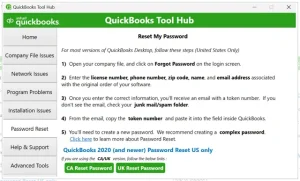
Locked out? The Password Reset tab lets you download and run Intuit’s Automated Password Reset Tool. You’ll need your license number and the email on file. Once submitted, Intuit sends a token to your email enter it in the tool to reset your credentials.
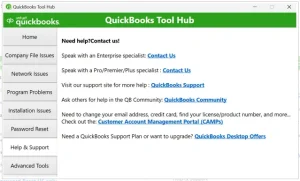
Stuck on something? No worries! Just open the Help & Support tab and find the help you need. You can browse resources on your own or call an expert anytime for live assistance.
The Advanced Tools tab will serve all of your needs when it comes to dealing with QuickBooks installation problems. Not only that but you’ll also find a Download QuickBooks Desktop link on it if you have uninstalled it by mistake.
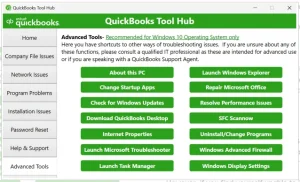
Note: If QuickBooks runs slowly or becomes unresponsive, the QuickBooks Refresher Tool can help refresh background processes and restore smooth performance without affecting your company file.
If you’ve had QuickBooks Tool Hub installed for a while, it’s worth confirming you’re on the latest version. Older versions don’t have the updated repair logic and may miss certain error types entirely. Below is how you can check for it:
QuickBooks Tool Hub 1.6.0.8 resolves the majority of common QuickBooks Desktop errors, it has around an 80% success rate on 6000 series and H-series issues. But it does have boundaries worth knowing:
If the Tool Hub runs through its options and the issue persists, the next step is typically a clean reinstall of QuickBooks itself, or reaching out to a certified QuickBooks ProAdvisor.
QuickBooks Tool Hub 1.6.0.8 is one of those tools you want installed and ready before something goes wrong not after. It’s free, it’s from Intuit directly, and it handles the kind of errors that would otherwise eat up hours of your time.
Whether you’re dealing with a company file that won’t open, a network that dropped multi user access, or an installation that stalled out, this tool gives you a structured way to work through it without needing technical training.
And if you’re still running into issues after trying the Tool Hub? A certified QuickBooks ProAdvisor can walk you through next steps, so get in touch with by dialing +1(888)-718-7888 now!
Yes, the QuickBooks Tool Hub 1.6.0.8 download is completely free. Intuit provides it as a no-cost utility for QuickBooks Desktop users. There’s no subscription or one-time fee involved.
QuickBooks Tool Hub 1.6.0.8 supports QuickBooks Desktop versions from 2018 through 2025. It does not work with QuickBooks Online or QuickBooks for Mac.
Yes, QuickBooks Tool Hub Windows 11 is fully supported. A 64-bit system is recommended for the best performance. Make sure your .NET Framework and Visual C++ packages are current before installing.
This is a common false positive. Add QuickBooksToolHub.exe as an exception in your antivirus settings, or temporarily disable real-time protection during installation. You can also try downloading the file using a different browser.
Match your problem to the tab, for company file errors go to Company File Issues, multi-user network issues go to Network Issues, crashes and PDF problems go to Program Problems, and install failures go to Installation Issues. The Home tab also describes each section to help you decide.

