Are you using QuickBooks Online for your business? As one of the best accounting solutions available, QuickBooks Online New Features and Updates have evolved to meet the growing requirements of users. If you’re new to the software, you can first learn more about What is QuickBooks and how its different versions support business accounting. The latest updates include AI-powered automation, headless automation, stronger security features, improved reporting dashboards, and enhanced Salesforce integration capabilities.
Here, we will explore the latest features & updates that have been introduced, designed to enhance the experience and streamline accounting processes. It helps you make the best financial decisions for the growth of your business.
Top QuickBooks Online New Features and Updates You Should Know
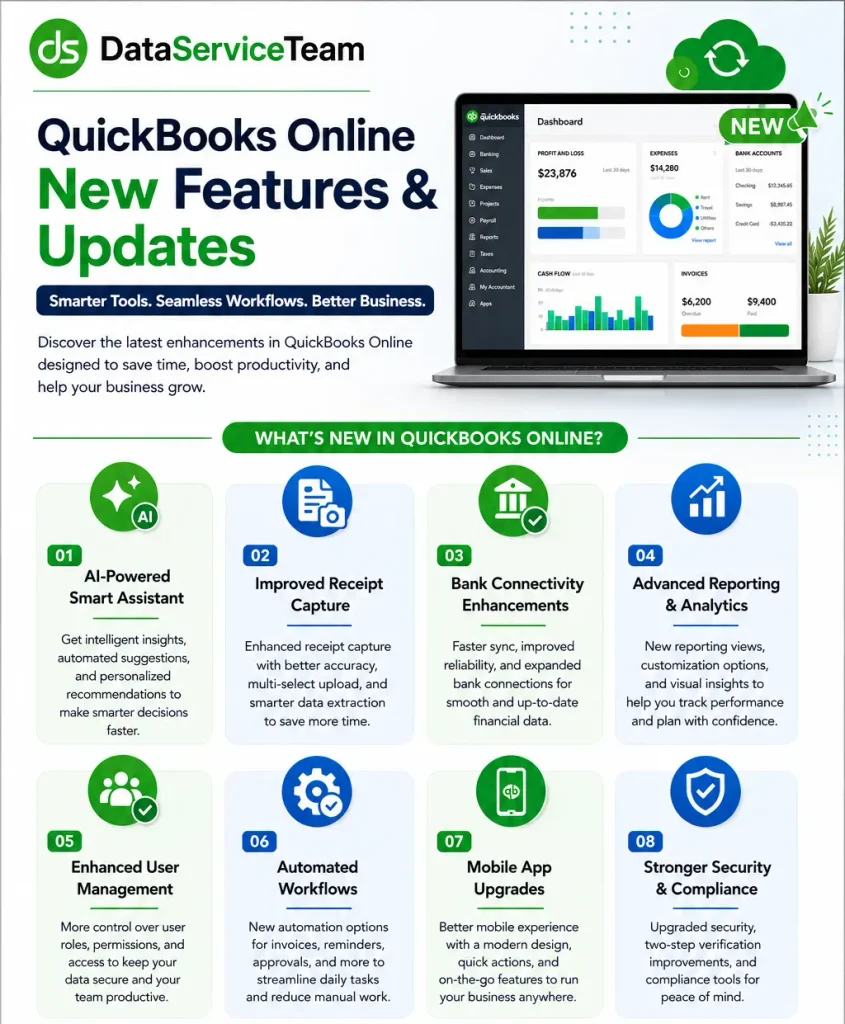
QuickBooks Online 2026 features significant performance enhancements, complimentary standard ACH bill payments, integrated time tracking through QuickBooks Time, and AI-driven auto – categorization. The platform also offers a streamlined homepage, quicker bank matching, integration with conversational AI to create and oversee billing workflows. QuickBooks Online New Features and Updates ensure you can work with confidence without worrying about accidental data loss with the new autosave feature and pop-up warnings.
What Are the Key Features Launched in QuickBooks 2026?
QB introduces enhanced AI-driven bookkeeping, advanced multi-step workflow automation and tools tailored for specific industries. The updates aim to minimize manual data input and accelerate regular tasks across all plans. The main features & updates include:
AI-Driven Bank Feeds – Prioritizes smarter transaction matching that highlights the most confident matches first and identifies duplicate rules.
Integrated Bill Pay Elite – It includes free standard ACH transfers, custom approval workflows, audit trails, and unlimited 1099 e-filing.
Built-In Industry Solutions – Incorporates native workflows for construction and professional services such as job costing, WIP reporting, and change order management in more advanced plans.
Expert Books Maintenance – Merges automated AI transaction matching with expert verification and quarterly reviews to ensure books are kept updated.
Revamped Payroll Filtering – Offers an enhanced payroll run interface with batch actions, search functionalities, and sorting options by work location.
Customized Homepage Dashboards – Unveils streamlined layouts featuring resizable and reordering widgets to diminish interface friction as well as reduce load times.
Advanced customization and visuals – Users can add almost any attribute as a column, use new grouping and pivot functionalities, and display data in visual chart formats.
Security Features & Updates That Safeguard Your Financial Data in 2026
It is crucial to safeguard sensitive financial records for modern businesses. QuickBooks incorporates advanced and multi-layered security protocols to protect the enterprise against cyber threats. The QuickBooks Online New Features are:
QB uses robust MFA checkpoints to verify identity across multiple vectors. It recognizes users’ trusted devices alongside an authentication code to grant entry to the account.
All financial records and sensitive metadata are stored within the QuickBooks ecosystem. This information is protected through the Advanced Encryption Standard with 256-bit keys and ensures top-tier cryptographic security.
Automated security algorithms monitor network traffic and account activities around the clock. It intercepts and blocks suspicious sign-in attempts before compromising the data.
Business owners can assign precise and multi-level permission roles to team members. It restricts access to the modules necessary for certain jobs.
QuickBooks maintains an unalterable activity log and audit trail. It allows administration to track each change made to the books and monitor user logins.
QB establishes secure and tokenized read-only connections that allow software to import transactions without storing bank details when it links business bank accounts.
How the Latest QuickBooks Online New Features Benefit Small Businesses
Conversational AI lets you ask questions and generate custom reports along with draft invoices using plain language.
The latest QuickBooks Online New features and updates for 2026 automatically suggest transaction categories and match payees faster with high accuracy.
Snap mobile pictures of receipts as optical character recognition extracts data and matches it to entries.
Schedules and auto-runs repeat bills and journal entries. It recurs client invoices without manual prompts.
QuickBooks Online New Features and Updates set automated rules to dispatch overdue invoice notifications, payment reminders, task assignments, etc.
It syncs sales, fee tracking, and inventory data from major e-commerce platforms.
How to Check for QuickBooks Online New Features Updates?
Since QuickBooks Online operates in the cloud, it eliminates the need for user-initiated software updates. It manages all feature updates, security enhancements, and interface improvements without requirement of action from users. If you’re considering moving from the desktop version to the cloud-based platform, learn how to Migrate from QuickBooks Desktop to Online.
Select the Update Now tab at the top of the window.
Tick the Reset Update box to eliminate any previously failed temporary download files (optional).
Click on Get Updates to initiate the download of the latest version.
Install the Update
Exit QuickBooks once the download is complete.
Restart QuickBooks.
Select Install Now when the prompt appears on your display.
Reboot your computer if necessary to complete the installation.
Smarter & More Accurate Matching
The 2026 update to QuickBooks Online introduces a smarter bank matching feature designed to eliminate guesswork and manual review fatigue in the banking feed. The system evaluates and sorts match suggestions by a calculated confidence level. The latest QuickBooks Online features and updates for 2026 do not force users to scan a long and unstructured list of potential entries. It surfaces the correct match at the very top.
This updated matching logic widens its automatic date-range window for delayed deposit payouts. It incorporates active duplicate warnings before a transaction is posted. A dedicated loading indicator clarifies when a match search is running versus returning a true zero-result dead end. It reduces the risk of accidental double-entries. For more help with matching and reviewing transactions, check our guide on QuickBooks Bank Reconciliation.
Enhanced Integration Capabilities Between Salesforce and QuickBooks
The Salesforce-to-QuickBooks integration capabilities streamline data flow between CRM and financial systems to remove duplication.
Real-time bi-directional sync – Automatically keeps account, contact, and product records aligned across Salesforce and QuickBooks Online without manual importing.
Automated quote-to-cash workflows – It triggers invoice generation in QuickBooks the moment an opportunity hits the “Closed Won” stage in Salesforce.
Financial visibility for sales teams – Empowers sales reps to view live invoice statuses, payment histories, and outstanding customer balances directly inside their Salesforce dashboard.
No-code and low-code setup options – Utilizes platforms like MuleSoft Composer to let business users map and configure flows with minimal IT support.
AI-driven workflow readiness – Connects live financial metrics into modern automation frameworks to generate cross-system business insights.
Discrepancy and address resolution – Flags mismatched billing data between platforms so teams can correct errors with a few clicks.
Businesses moving financial information between systems may also benefit from professional Data Migration Services.
Categorization
The updated categorization feature comes with the latest QuickBooks Online features and updates for 2026. It uses advanced AI to process bank feeds over 50% faster and suggest accurate expense categories.
AI-Powered Suggestions – QuickBooks Online learns from your history to predict and assign correct income and expense categories faster.
Rule Conflict Detection – The updated rules engine flags duplicate rules instead of blindly applying the first one it encounters.
In-Line Editing – Users can review, edit, and correct categories inside the main review list without the need for individual entries.
Smart Transfer Handling – Transfers and credit card payments are mapped with improved logic to reduce double-counting.
Faster Processing – Redesigned bank feeds let you work faster. Along with this, background rows finish loading and updating processes.
How Real-Time Sync Improves Financial Operations?
QuickBooks Online continues to receive regular updates, while real-time synchronization helps businesses work with current financial information. The advantages of Real-Time Sync include:
Immediate updates eliminate manual entry errors and keep records updated across all devices.
Leaders make decisions based on updated data instead of outdated reports.
All users access the same figures without delays.
Real-time notifications can help users identify banking or connection issues sooner.
Up-to-date transaction data gives businesses a clearer view of outstanding bills and payments.
Enhanced Tools for Reporting and Financial Forecasting
QuickBooks Online New Features and Updates introduce upgraded reports and AI-driven forecasting tools. It features conversational scenario models and real-time KPI scorecards to eliminate the need for static spreadsheet work.
Query financial variances and model future scenarios to generate board-ready commentary using plain-language prompts.
Access built-in KPI scorecards, drag-and-drop dashboards, and presentation-ready management reports inside the platform.
Leverage automated forecasting to map cash flow trends and compare actual performance against projections.
Build tailored reports while embedded AI flags operational and financial anomalies as they emerge.
Get optimized screen navigation and efficient scrolling layouts designed for detailed financial datasets.
QuickBooks Security Update: Enhanced Protection Features Coming in 2026
QuickBooks Online New Features and Updates offer advanced security guardrails, automated compliance mandates, enhanced data protection, etc. These features are available across its cloud and active enterprise ecosystems to combat sophisticated AI-driven cyber threats. Security and Protection Highlights are:
Automated Tax Filing Mandate – QuickBooks Workforce now automates payroll tax payments and filings. It removes manual override risks to ensure strict compliance timeliness.
Reconciliation Guardrails – New protective checks trigger immediate warnings if a user edits an already-cleared transaction to prevent accidental beginning-balance corruption.
Granular Admin Controls – The “Undo Reconcile” utility is expanded to Primary Admins securely rather than being locked behind specific accountant designations.
Smart Duplicate Rule Detection – Modernized transaction matching and rules engines proactively flag duplicate user rules before application.
Targeted Bank Connection Warnings – Real-time alerts warn users about expiring bank connection tokens before re-authorization fails. If you experience problems connecting your bank account, you may also encounter QuickBooks Error 324.
Secure Client Data Portals – Client collaboration tools route requests for missing info through isolated secure channels instead of exposing data across whole organizations.
End-of-Support Enforcements – Older legacy desktop editions (such as 2023 versions) reach their final sunset milestones and cut off unpatched connection vulnerabilities.
Continuous Cloud Autosave – Enhanced cloud data protection frameworks ensure persistent autosave security without exposing sensitive local machine records to ransomware risks.
QuickBooks Online New Features for Accountants and Bookkeepers
The latest QuickBooks Online features and updates for 2026 introduce AI tools to streamline practice management.
Major features include portfolio-level detection and a modernized My Menu navigation interface.
It helps to reduce manual data entry as well as speed up year-end closes.
This will benefit from smarter bank transactions and enhanced duplication guardrails for reconciliations.
Accountants can leverage streamlined vendor bill payments and robust in-line modification to manage client data.
What to Expect From QuickBooks Online in the Future?
QuickBooks Online New Features and Updates focus on automation, artificial intelligence, real-time financial tracking, etc. It helps small business owners save time and reduce manual data entry. The expectations are:
Automated conversational tools will predict cash flow and draft reports in a short period.
Routine tasks such as receipt matching and invoice reconciliation will occur without human intervention.
Better syncing with modern e-commerce platforms and other apps will streamline operations.
Predictive analytics will offer proactive tax estimates and spend advice.
Advanced fraud detection and granular user permissions will protect sensitive data.
How to Use New QuickBooks Online Features?
Here are the steps to use the new features and updates in QuickBooks:
Sign in to QuickBooks Online.
Examine the modifications to your dashboard.
Access commonly used accounting tools.
Experiment with the latest reporting features.
Adjust your workflow in accordance with the new enhancements.
Data Service Team Tip: Familiarizing yourself with QuickBooks new features enables businesses to fully leverage the advantages of QuickBooks Online updates.
Tips To Prevent Issues When Updating QuickBooks Online
To prevent QuickBooks Online update errors, consider the provided prevention tips below.
Stable Connection – Check your internet speed before starting work.
Browser Cache – Remove the browser cache and cookies.
Operating System – Keep your computer’s OS fully updated.
Off-Peak Hours – Perform major tasks outside peak business hours.
Conclusion!
QuickBooks Online New Features and Updates continue to evolve with features designed to make accounting faster and smarter. These updates can help businesses reduce repetitive work and gain better results in their finances. Automation works best when merged with human review and sound accounting practices. QuickBooks Online Keep Releasing New Updates, so businesses should evaluate which features align with their specific needs and workflows. Stay informed about these updates to make better use of QuickBooks and manage finances with greater confidence.
Have any queries or concerns? Get in touch with Data Service Team at +1(888)-718-7888 professionals who have good experience with QuickBooks and are able to resolve your queries quickly.
Frequently Asked Questions (FAQ’s)
Recent updates to QuickBooks include smarter AI-powered bank transaction matching and categorization, an integrated native time-tracking experience through QuickBooks Time, free standard ACH bill payments, and modernized financial reports with frozen headers.
QuickBooks Online receives new updates and features on a monthly basis. It deploys these enhancements in progressive batches to user accounts. This means new tools and interface updates, along with AI capabilities, appear without the need for manual downloads.
No! You do not need to update QuickBooks Online manually. It is a cloud-based software and updates the platform in the background. New features, bug fixes, and tax table updates appear later when you log in. It does not require installation steps on the computer.
Recent updates to QuickBooks Online introduce smart AI-driven automation and enhanced inventory tools. It reduces manual data entry for small businesses. Features like AI invoice generation and PDF-to-transaction conversion save hours of routine bookkeeping. Integrated free ACH bill payments and built-in time tracking help owners better manage cash flow. It also helps maintain accurate financial records with less effort.
The latest updates are performance enhancements and interface updates on a monthly basis. QuickBooks Online New Features and Updates deploys these changes in rolling waves to user accounts and tweaks happen almost constantly. The larger functional rollouts are detailed in quarterly and monthly product updates.
Check the official What’s New in QuickBooks Online page, read the monthly product updates on the QuickBooks Blog, and check the release notes on your dashboard to know what is new in QuickBooks Online.
Yes! QuickBooks Online updates happen in the background with no requirement for manual installations. You are always utilizing the latest version of the software whenever you log into the cloud-based account.
About The Author
Steven Moody is a bookkeeping and payroll specialist dedicated to helping businesses maintain accurate financial records and efficient payroll operations. His expertise includes payroll management, tax compliance, bookkeeping solutions, and financial reporting. Steven regularly shares insights on accounting best practices and business finance strategies. Outside of work, he enjoys traveling, exploring new places, and keeping up with the latest developments in business technology.