QuickBooks Enterprise is a powerful accounting and business management solution designed for established businesses with more complex financial needs. Unlike standard QuickBooks products, it offers advanced features to manage accounting, inventory, sales, payroll, reporting, and users from a centralized platform. QuickBooks Enterprise can be tailored to different business requirements and workflows with multiple versions. But is it the right solution for your company? You will get the answer to this further down!
Go through the detailed guide below and explore QuickBooks Enterprise’s features, benefits, available versions, and ideal users. This overview will help you make an informed decision whether you are considering an upgrade, researching accounting software, or learning What is QuickBooks.
This software is one-stop solution built to manage businesses and the bottom line. QuickBooks Enterprise software enhances business productivity and simplifies the workflow. It is designed for large and medium-sized businesses with complex financial needs. This version provides a wider range of features than standard QuickBooks products.
It helps businesses manage stock, accounting, purchasing, payroll, and operations from one platform. The major advantage of QuickBooks Enterprise versions is its ability to support multiple users, large amounts of business data, and detailed workflows. It comes with a commercial edition and tools to help businesses customize the software as per requirements.
Important Note: QuickBooks Enterprise is available through subscription plans, and pricing varies based on the edition, number of users, payroll options, and other selected services. Check the current QuickBooks Enterprise pricing page for the latest plan and promotional pricing.
The software is a business management solution designed for larger businesses and provides more advanced features with stronger control.
Important Tip: QuickBooks Enterprise is best suited for growing and larger businesses with stock, reports, multi-user requirements, etc.
Here is a detailed explanation of the features offered by QuickBooks Enterprise industry editions to its users:
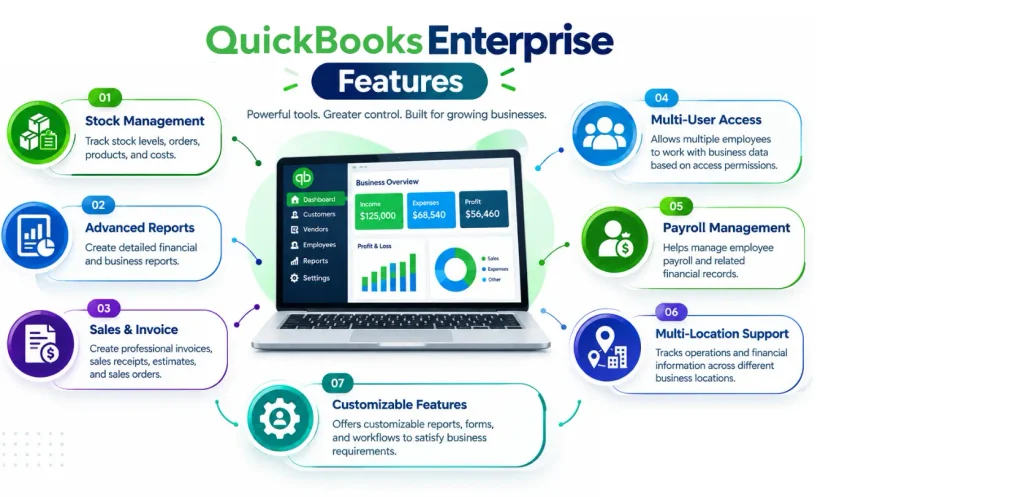
It helps businesses efficiently track and manage inventory. QuickBooks Enterprise software provides businesses with better visibility into available inventory, product costs, and sales orders. This makes it convenient to monitor stock levels, reduce errors, and avoid issues such as running out of important products.
It is useful for businesses that handle large inventories, such as wholesalers, retailers, manufacturers, and distributors. QuickBooks Enterprise also allows tracking of advanced inventory and reports. It helps businesses understand inventory performance and make informed decisions to purchase.
The Enterprise version of QuickBooks provides advanced reporting and job costing tools that help businesses monitor financial performance, track project expenses, and understand profitability.
The capabilities allow multiple employees to access and work on the same company data at the same time. QuickBooks Enterprise multi-user feature supports teamwork, improves productivity, and provides better control over user access.
This edition is designed to meet the unique accounting and business management needs of different industries. QuickBooks Enterprise industry editions provide specialized tools and workflows for businesses. It includes construction, manufacturing, wholesale and distribution. Do not go for a one-size-fits-all approach.
These features help businesses manage tasks like job costing and project management for construction, along with inventory. It provides relevant tools and reports. QuickBooks Enterprise can help businesses streamline their operations and make better financial decisions.
The Enterprise version provides Gold, Platinum, and Diamond editions tailored to various business needs. The major distinctions lie in advanced stock features, cost, workflow approvals, payroll capabilities, and the maximum number of users.
| Feature | QuickBooks Enterprise Gold | QuickBooks Enterprise Platinum | QuickBooks Enterprise Diamond |
| Core Accounting & Reporting | Included | Included | Included |
| Maximum User Limit | Up to 30 users | Up to 30 users | Up to 40 users |
| Payroll Integration | Built-in Enhanced Payroll | Built-in Enhanced Payroll | Assisted Payroll |
| Advanced Inventory | Not included | Included | Included |
| Advanced Cost | Not included | Included | Included |
| Workflow Approvals | Not included | Included | Included |
| Time Tracking | Not included | Not included | Included via QuickBooks Time Elite |
| Salesforce CRM Integration | Not included | Not included | Included |
| Support & Services | Priority Circle | Priority Circle | Priority Circle with dedicated account team |
It allows businesses to access QuickBooks Enterprise software and company data through a secure cloud environment instead of a local computer. QuickBooks Desktop Enterprise hosting can make remote access and collaboration easier for businesses with distributed teams.
All these accounting solutions are designed for different business sizes and requirements. If you are comparing QuickBooks Pro vs Premier vs Enterprise, the table below highlights their key differences.
| Feature | QuickBooks Pro | QuickBooks Premier | QuickBooks Enterprise |
| Best For | Small businesses | Large businesses | Large and complex businesses |
| Maximum Users | Up to 3 users | Up to 5 users | Up to 40 users |
| Industry Tools | General tracking | Specific industries | Advanced industry tools |
| Data Capacity | Small files | Medium files | Massive files |
| Inventory | Basic tracking | Basic tracking | Advanced tracking |
| Support | Pay extra | Pay extra | Included free |
| Price | Lower cost | Moderate cost | High cost |
Important Note: QuickBooks Desktop Enterprise provides the advanced tools to manage inventory across multiple locations and scales up to 40 users.
Learn these frequent issues to resolve them quickly and ensure seamless operations:
No! It is sold as a subscription, not as a perpetual purchase. QuickBooks Desktop Enterprise is available on a monthly plan / an annual plan. The annual option commits you to a 12-month term, and the monthly option continues until you cancel.
This means you need an active subscription to continue using Enterprise products and its services based on subscription. It states that QuickBooks Enterprise Diamond is available on a monthly payment plan. Cloud hosting is an additional monthly subscription when selected.
Important Note: QuickBooks Enterprise is a recurring subscription and starts around $2,210 per year for a single-user Gold plan after Intuit’s 2026 increase.
Selecting the right plan for QuickBooks Enterprise software depends on different factors. Comparing these factors helps you select the best plan that provides the right capabilities.
Important Note: The best Enterprise plan is the one that meets your current requirements and provides enough room for future growth. QuickBooks Enterprise Platinum and Diamond subscribers have access to the most powerful inventory management too.
Make QuickBooks Work Smarter for Your Business
Spend less time managing data and more time growing your business. Whether you need help setting up QuickBooks, cleaning up your books, reconciling accounts, or resolving errors, our team is here to make accounting easier. Get quick solutions that save time, improve accuracy, and keep your business finances on track.
QuickBooks Enterprise is a powerful solution for large businesses that need more than basic accounting software. It can help businesses manage complex financial and operational needs. The software offers advanced inventory management, detailed reporting, job cost, multi-user access, industry-specific tools, and flexible plan options. Choosing the right edition depends on the business size, users, workflows, industry requirements, and future growth plans. Understanding these factors can help you get greater value from your QuickBooks Enterprise investment and keep financial data accessible.
Ready to make your QuickBooks Enterprise software work smarter? Connect with our Data Service Team at +1(888)-718-7888 experts for reliable guidance, seamless data management, and solutions tailored to all business needs.
QuickBooks Enterprise is desktop accounting software that helps businesses manage finances, sales, purchasing, inventory, job costs, and reporting from a centralized company file. Depending on the subscription edition, it can support up to 40 users and provide advanced inventory and pricing capabilities.
It is particularly useful for businesses with complex accounting workflows, larger inventories, multiple employees, or detailed reporting requirements. However, businesses should compare its subscription costs, system requirements, implementation needs, and available alternatives before choosing it.
This QuickBooks version is built for medium-sized and growing businesses that require advanced operational controls. It is the best choice for companies to support 40 users and manage massive data files with up to one million customers. It generates detailed and industry-specific reports. QuickBooks Enterprise serves as a powerful solution for sectors like wholesale, construction, and retail.
It is a comprehensive business management and accounting software that features advanced inventory tracking, Customizable reports, and supports 40 users with six times the data capacity of standard desktop versions. QuickBooks Desktop Enterprise offers a specialized industry edition with powerful built-in tools like advanced cost control and automated workflow approvals.
It allows for 40 users to access a single company file at the same time based on the subscription level. Standard plans such as Gold and Platinum restrict the number of simultaneous users to 30, whereas the premium Diamond edition accommodates the full limit of 40 users.
The Gold includes core financial features paired with in-house enhanced payroll for self-managed tax filings for 30 users. Platinum builds upon Gold as it adds powerful Advanced Inventory along with workflow approval for product-centric operations. Diamond serves as the premier monthly tier to expand user capacity to around 40 users, and bundles managed assisted payroll.
Yes! It supports an integrated Advanced Inventory module available in its Platinum and Diamond subscription. This powerful tool lets you track stock across multiple warehouses, manage bins and serial numbers, use FIFO and average cost, and integrate mobile barcode scanning for seamless picking.
Yes! This version of QuickBooks can be hosted in the cloud and set up the desktop application on a secure remote server overseen by a certified provider. It enables a team to access it from anywhere with an internet connection. A majority of Facebook users concur that this arrangement allows you to retain your standard desktop license and advanced features. QuickBooks Enterprise hosting incorporates remote access, automatic backups, and improved collaboration among multiple users.
Absolutely! Users can upgrade a company file from QuickBooks Pro / Premier to QuickBooks Desktop Enterprise and keep their historical information. The process is a simple automated conversion that ensures lists, vendors, customers, and financial records are integrated into the more robust Enterprise database format.
Indeed! It is ideal for managing multiple companies since one license allows you to create multiple company files. QuickBooks Enterprise oversees an unlimited number of unique company files, each with its own chart of accounts, user permissions, and reports. It enables you to access two company files simultaneously.
You should first evaluate significant expenses and determine if the business truly needs its sophisticated, large-scale functionalities to decide on QuickBooks Enterprise. This software helps to expand businesses that have moved beyond basic accounting solutions. It makes it ideal if you need to monitor up to one million items, oversee various inventory sites.
No. It may suit businesses that need more advanced accounting, inventory, job costing, and multi-user workflows, but companies with more specialized operational or ERP requirements should compare alternative systems before committing.
Yes, you can generally migrate a compatible QuickBooks Desktop company file to Enterprise. Create a backup first, verify version compatibility, and follow Intuit’s recommended upgrade process to protect your financial data.
QuickBooks Enterprise requires a compatible Windows operating system, sufficient memory, storage space, and supported hardware. Check Intuit’s official system requirements for your specific version before installation or upgrading your computers.
QuickBooks Enterprise Desktop can perform many accounting tasks offline after installation and activation. However, internet access may be required for activation, updates, payroll services, connected applications, and other subscription-related features.

Get Free Consultation for QuickBooks Upgrade
(2021, 2022, 2023)


