
In today’s fast-paced business environment, efficient financial data management is essential to maintain accuracy and improve productivity. QuickBooks Enterprise offers powerful accounting and business management capabilities with QuickBooks Desktop Enterprise Hosting for businesses that need secure access to their accounting environment. API integration allows businesses to connect Enterprise with other applications.
QuickBooks Enterprise API Integration enables organizations to automate data exchange and streamline processes such as customer management. Businesses can use APIs to create a more connected and efficient workflow instead of transferring information between different platforms.
In this guide, we will explore what QuickBooks API integration is, how it works, its notable benefits, common use cases, and important considerations to implement an effective integration.
It is a set of programming interfaces that enables businesses and developers to connect it with other applications. Data such as customers and invoices can be exchanged between QuickBooks Enterprise and external platforms through API integration. It helps reduce manual data entry and automate repetitive accounting tasks to create efficient workflows. Businesses can use the QuickBooks Enterprise data integration to build customized integrations. It connects the accounting data with CRM systems, payroll solutions, and other business applications.
QuickBooks Enterprise API Integration benefits businesses as it allows proper management of finances and automates tasks such as payroll, invoicing, and reporting. Consider the given pointers to gain additional information:
Discover the benefits of integrating the QuickBooks API into your custom applications, streamlining financial management, and improving productivity. Here are the benefits of QuickBooks API integration:
| Benefit | Short Description |
| Automated Data Sync | Eradicates manual entry by synchronizing customers, vendors, and payments. |
| Real-Time Visibility | Provides instant access to current transactional data for rapid cash flow tracking. |
| Reduced Human Error | Prevents duplicate data entries and mismatched invoicing by using validated data fields. |
| Operational Efficiency | Links multi-department workflows across procurement, inventory, and sales systems. |
| Scalable Architecture | Expands alongside growing transaction volumes, custom fields, and new application layers. |
| Unified Reporting | Blends live financial benchmarks with active operational milestones for quick decision-making. |
Note: Integrate QuickBooks alongside dozens of other accounting and ERP systems. Contact Data Service Team experts now at +1(888)-718-7888.
QuickBooks Enterprise API Integration process data through the QuickBooks Desktop SDK via qbXML to power enterprise-level automation. An API integration establishes communication between QuickBooks Enterprise and another application.
QuickBooks Enterprise data integration relies on structured data management and communication layers to exchange financial records with external platforms.
QuickBooks Enterprise API Integration allows large-scale businesses to automate complex financial workflows. It bridges the core accounting ledger with external enterprise software. The top use cases include:
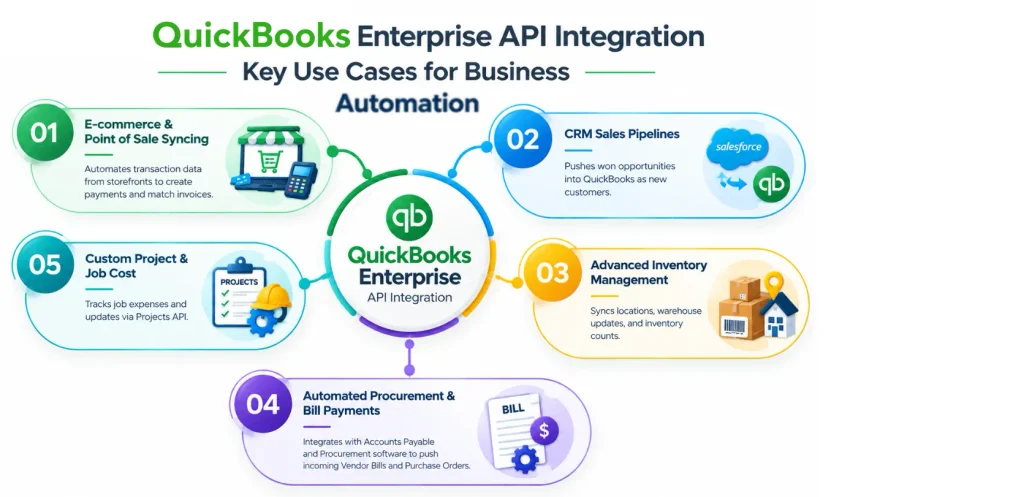
Connect QuickBooks with custom software for real-time financial data access, automated accounting workflows, and secure financial integrations. Here are the common Integration scenarios:
Here are the main challenges and considerations broken down into 7 short points:
The QuickBooks Online New Features & Updates and QuickBooks Enterprise APIs use completely different architectures, connection types, and data processing models. Here is the direct comparison of these two APIs:
| Feature | QuickBooks Online API | QuickBooks Enterprise API (Desktop SDK) |
| Architecture | Modern & cloud-native REST API. | Legacy XML-based SDK / Web Connector. |
| Data Format | JSON | XML (QBXML). |
| Hosting & Access | Cloud-based and accessible from anywhere over HTTPS. | Local machine or hosted server. It requires a local middleman app (Web Connector). |
| Authentication | Modern standard OAuth 2.0. | Standard username/password + local security certificate matching. |
| Data Sync | Real-time & instant updates. | Polled/scheduled queues |
| Capability Limit | Up to 25 users and optimized for lower data overhead. | Up to 40 users and scalable for massive transaction payloads. |
To achieve a seamless and secure QuickBooks integration, follow these essential industry best practices:
QuickBooks Enterprise API integration can help businesses streamline financial workflows, automate repetitive tasks, and connect QuickBooks with other essential business systems. It enables seamless data exchange; organizations can improve accuracy, reduce manual effort, and gain better visibility into their financial operations. However, successful integration requires careful planning, secure implementation, and maintenance to ensure reliable performance. The right integration approach can make QuickBooks Enterprise more powerful and adaptable to all business needs, whether you need to connect CRM, ERP, e-commerce, payroll, or custom applications.
Ready to simplify your accounting workflows? Partner with the Data Service Team for reliable QuickBooks Enterprise API integration solution tailored to your business. Call them now at +1(888)-718-7888!
Yes! You can integrate QuickBooks Enterprise with a wide range of third-party applications through built-in connectors or data synchronization tools. This connection allows data like customer details and invoices to flow. It flows between QuickBooks and the other business systems.
Yes! It supports the QuickBooks Web Connector. The Web Connector is a free Windows middleware application developed by Intuit. It acts as a secure data bridge between desktop-based editions like QuickBooks Enterprise and third-party web services. The Web Connector passes information through the QuickBooks SDK and allows businesses to sync critical data like invoices and customer profiles.
It is an XML-based configuration file used by the QuickBooks Web Connector to bridge data between a third-party web application and the software program. This file holds vital metadata, like the unique internal QuickBooks identifiers, rather than containing financial data itself. It creates a dedicated communication channel that permits those platforms to pass requests and exchange data with the local file.
It is the structured message language used to facilitate communication between QuickBooks Enterprise and external software applications. It acts as a standardized data translator and allows third-party tools like CRMs, e-commerce platforms, etc. qbXML operates through a request and response system. It develops bundle data into a formatted XML request tag that QuickBooks processes before returning a match response payload.
Indeed! QB can integrate with a Customer Relationship Management system. Because Enterprise is desktop-based software, its integrations depend on specialized two-way synchronization tools. Leading CRM platforms like Method: CRM and Zoho CRM allow businesses to pass data between both systems.
Yes! It can integrate with major e-commerce platforms like WooCommerce and eBay. QuickBooks Enterprise requires a specialized third-party connector like True Commerce to bridge the desktop-based software with online storefronts. This integration syncs vital business data in real time like sales receipts and customer details. It eliminates manual data entry and reduces accounting errors.
Indeed! It can be automated by leveraging scheduled custom scripts or modern connective middleware. QuickBooks Enterprise API integration interacts with the Desktop/Enterprise framework, like the QBXML Web Connector. It allows data like invoices and customers to sync in the background without manual intervention.
No! It is not the same as the QuickBooks Online API. QuickBooks Enterprise API uses different architectures and integration methods. QB relies on a cloud-based REST API through OAuth authentication, whereas QuickBooks Enterprise uses an installed XML-based software development kit and the QBXML API. It requires a local connector like the QuickBooks Web Connector.
You need to back up the company file, audit, and clean the data to integrate QuickBooks Enterprise with another application. Test the connection through a cloned file to prevent corrupting your live financial records.




