Are you feeling overwhelmed by the bookkeeping tasks and unsure of where to begin? Many business owners struggle to keep the financial records updated, and it can lead to stress and valuable time lost. That is where QuickBooks Catch-Up Bookkeeping comes into play. This vital service helps businesses regain control over their financial documents and ensures everything is accurate. Catch-up ensures your records are complete.
In this detailed guidance, we will delve into what catch-up bookkeeping is, its benefits, and the specific situations that may prompt you to consider this essential service.
QuickBooks catch-up bookkeeping is the process of bringing outdated financial records up to date. It helps to review past transactions, enter missing income & expenses, categorize transactions, reconcile bank and credit card accounts, and correct bookkeeping errors. Businesses need catch-up bookkeeping services when their records have fallen behind due to limited time or staff changes. Once completed, it provides a more accurate view of a business’s financial position and creates organized records. It can support financial reporting, tax preparation, and better day-to-day financial management.
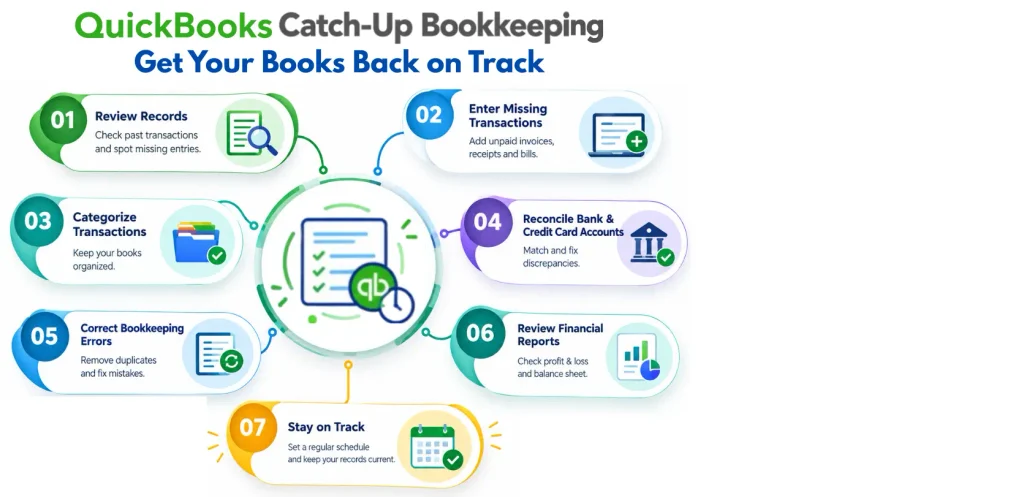
Businesses may need bookkeeping when the financial records are incomplete. Keep books current to maintain accurate financial information and avoid issues with taxes:
There are various reasons that contribute to your QuickBooks records falling behind. Go through the table below to learn about this:
| Reason | How It Causes QuickBooks Records to Fall Behind? |
| Lack of Time | Business owners may be too busy to manage daily operations to record transactions on time. |
| Missing Financial Documents | Missing receipts, invoices, bank statements, or bills can delay bookkeeping updates. |
| High Transaction Volume | A large number of sales, purchases, and expenses can make it difficult to keep records current. |
| Bookkeeping Errors | Incorrect entries, duplicate transactions, or miscategorized expenses may require additional cleanup. |
| Bank Reconciliation Issues | Unreconciled bank accounts can leave QuickBooks balances inaccurate. |
| Change in Bookkeeping Staff | Switching bookkeepers can interrupt bookkeeping activities on daily basis. |
| Limited QuickBooks Knowledge | Users unfamiliar with QuickBooks features may struggle to record and organize transactions. |
| Neglected Bookkeeping | Skipping regular bookkeeping can allow a backlog of transactions to build up over several months. |
Catch-up bookkeeping is the process of reconstructing and completing the financial records for a period when bookkeeping was not done. The time required for this depends on how far behind your QuickBooks records are. Here is what each situation may involve:
Bank reconciliation is an important part of catch up bookkeeping because it helps ensure recorded transactions in QuickBooks are accurate. QuickBooks Bank Reconciliation matches the actual activity shown on bank statements. It matches the actual activity shown on bank statements. Each outstanding period is reviewed to examine duplicate recorded transactions during the catch-up process:
Missing transactions can make QuickBooks records incomplete and affect the accuracy of financial reports. QuickBooks bookkeeping cleanup helps locate and record these transactions.
There are various benefits of updated QuickBooks records as outlined in the table below:
| Benefit | How It Helps |
| Accurate Financial Reports | Provides reliable income, expense, and profit information. |
| Easier Tax Preparation | Keeps financial records organized for tax filing. |
| Better Cash Flow Management | Helps track available cash and future payments. |
| Fewer Bookkeeping Errors | Regular updates make incorrect transactions easier to identify. |
| Informed Business Decisions | Gives you current financial information to plan and budget. |
| Simpler Bank Reconciliation | Makes it easier to match QuickBooks records with bank statements. |
Proper transaction categorization helps keep QuickBooks records organized and ensures financial reports reflect business tasks.
The time required for catch-up bookkeeping services depends on how far behind the records are and how organized the available financial documents are. A business with three months behind may take less time to catch up than one with six months or a full year of incomplete records. The number of transactions, complexity of accounts, incorrect information, and need for bank reconciliations can affect the overall timeline.
The bookkeeper may need to enter incorrect transactions, categorize income & expenses, and reconcile bank and credit card accounts during the catch-up process. Complete bank statements, receipts, invoices, and other financial records available can help make the process more efficient. Once the backlog is cleared, it is beneficial to maintain QuickBooks on a daily basis to prevent bookkeeping from falling behind again.
Reviewing financial statements is an important step in QuickBooks catch-up bookkeeping because it helps confirm that updated records reflect the business’s financial activity. Read the given pointers to learn more:
Catch up on QB Online with a smarter and stress-free QuickBooks bookkeeping cleanup process. Here is a brief comparison between the two types of bookkeeping:
You may hire a QuickBooks bookkeeping professional when the financial records are behind or contain errors. A professional can help organize missing transactions and reconcile bank and credit card accounts. It helps correct categorization issues and bring QuickBooks records up to date.
Professional QuickBooks bookkeeping services can be useful when tax deadlines are approaching, your business is growing, or you do not have enough time to maintain the books. Once the backlog is cleared, a bookkeeper can help establish a consistent bookkeeping routine to keep QuickBooks records accurate and current.
Consider the following pointers to prepare QuickBooks records for tax filing and tax season cleanup:
Small errors can affect account balances and financial reports when someone catches up on overdue QuickBooks records or performs QuickBooks messy books cleanup. Users must review transactions and following a consistent process can help avoid common bookkeeping mistakes.
QuickBooks catch-up bookkeeping helps businesses bring overdue, incomplete, or inaccurate financial records up to date. Whether the books are three months, six months, or a year behind, the process can record missing transactions, categorize expenses, reconcile bank accounts, correct errors, and update financial statements. Keeping QuickBooks records current makes tax preparation more organized and provides a clearer picture of business finances. If the bookkeeping backlog takes time away from running the business, professional support can make the process easier and more efficient.
Data Service Team professionals can help review, organize, and update QuickBooks records based on the bookkeeping needs. Contact Data Service Team today at +1(888)-718-7888 to get books back on track and maintain accurate financial records.
A business loses financial visibility which leads to severe cash flow blind spots when bookkeeping is neglected for months. It compounds operational chaos and expensive legal risks. You cannot track real-time income without accurate and up-to-date ledgers. It results in accidental overspending, bounced payments, and an inability to project future cash needs. Come tax season, the lack of organization transforms from an operational headache into a financial crisis, as missing records make it nearly impossible to claim deductions.
Gather all financial documents like bank statements and invoices from the past 12 months to catch up on a year of bookkeeping. Separate the personal and business expenses to ensure clean records. Input and categorize each transaction into accounting software. This ensures the categories match tax obligations. Match the login system against official bank statements month by month to catch skipped entries and reconcile the accounts.
Gather all financial documents from the missed months such as bank statements and invoices to fix delayed books. Reconcile the accounts month-by-month and match transactions in the software to bank statements. Categorize income and expenses through a suspense account for unclear transactions. Review the financial statements for duplicates or damaged data before finalizing the months.
Catching up on back bookkeeping costs between $50 and $150 per hour. A flat monthly rate ranges between $150 and over $500 per month of backlog, based on the complexity and volume of the financial transactions. The final price is influenced by how far behind you are and the number of unreconciled bank and credit card accounts. If the books require extensive cleanup to fix past categorization errors, you must prepare for an imminent tax audit. The total cost can scale up into thousands of dollars.
It takes from two to six weeks for a standard small business behind by a few months to a full year. Larger backlogs spans multiple years, payroll, and messy records can stretch to two to four months. The exact duration is based on the transaction volume and how fast you can answer questions about mixed business expenses.
Whether to catch up or start over in QuickBooks depends on the volume of the unentered data and how far back the backlog goes. If you have a few months of missing transactions and the bank accounts reconcile up to that gap, it is better to catch up through bank feeds to categorize the missing data.
QB can catch up on recent transactions by downloading data from linked bank and credit card accounts. It goes back 30 to 90 days. You must download CSV files from the bank and upload them into QuickBooks for older transactions. The software will then use AI to categorize and match those historical transactions.
You need to gather all historical financial statements, including bank accounts, credit cards, loans, and merchant processors, to catch up on the neglected bookkeeping, along with supporting documents like customer invoices, vendor receipts, payroll reports, and prior tax returns.
It is important to clean up QuickBooks to fill taxes and ensure accurate financial reports to avoid extra fees. You need to reconcile accounts, categorize transactions, and remove duplicates. It ensure the profit and loss statement is accurate. Neglecting this can result in income misreports and increased costs for tax preparation.
Yes! A qualified bookkeeper can fix years of neglected books through a process called historical cleanup. They will review the past bank statements, receipts, and invoices to reconcile accounts. It helps to correct data entry errors and categorize misclassified expenses along with business finances. It provides you with a clean slate for future business decisions.
If your bank accounts are not reconciled in QuickBooks, you should first check the starting balance against the last statement and run the Reconciliation Discrepancy Report. It helps to find changed, deleted, or duplicate entries. Verify that the statement ending balance & date are correct, and match missing or uncleared transactions. Lastly, consult the accountant if the difference persists/involves past periods.




