
Messy books can make it more difficult to run the business smoothly than you ever imagine. Missing transactions, duplicated entries, unreconciled accounts, uncategorized accounts, and uncategorized expenses can make it difficult to figure out where your business actually stands.
Similarly, if your QuickBooks account has become difficult to manage, you don’t need to start over. All you need is to perform QuickBooks messy books cleanup that will help you identify errors, organize your records, and get your financial information back on track. If your books contain more serious data issues, QuickBooks Data Repair Services may also be needed to correct and organize damaged records.
A thorough QuickBooks Messy Books Cleanup can help you review your financial records, correct bookkeeping mistakes, and bring your accounts back into better order without starting your books from scratch.
In this post, we’ve covered what messy books are, why they can cause problems, and how to perform QuickBooks Messy Books Cleanup step by step.
QuickBooks Messy Books Cleanup are basically financial records that are inaccurate, outdated, incomplete, or incorrectly organized. This may also include unreconciled bank accounts, duplicate or missing transactions, old unpaid invoices, missing receipts, and missing financial documents. It can also make tax preparation, financial reporting, loan applications, and everyday business decisions more stressful. In simple terms, messy books mean you don’t have a clear and accurate picture of your company’s financial position.
Not sure whether your bookkeeping needs a close look? These common warning signs can help you determine whether it’s time for QuickBooks Messy Books Cleanup and resolve potential issues before they become major problems.
Sometimes, uncertain business finances may leave you clueless regarding the money coming in and out of the business.
Without accurate financial records, it might get challenging to figure out how your business is doing or make the right decisions.
Disorganized books of accounts can lead to missed deadlines, incorrect filings, extra taxes, or penalties.
When receipts or financial records are missing, it becomes difficult to figure out where the money is going.
If your expenses aren’t properly recorded, you could miss legitimate deductions and tax benefits you may be entitled to.
Errors made in employee payments, deductions, or payroll records can cause problems for both you and your employees.
If your books aren’t organized accurately throughout the entire year, you have to take on so much stress while organizing it all when tax season arrives.
The following are the steps you must perform for QuickBooks messy Books cleanup to ensure that your accounts are reconciled. This will let you provide a clear insight into your company’s financial performance.
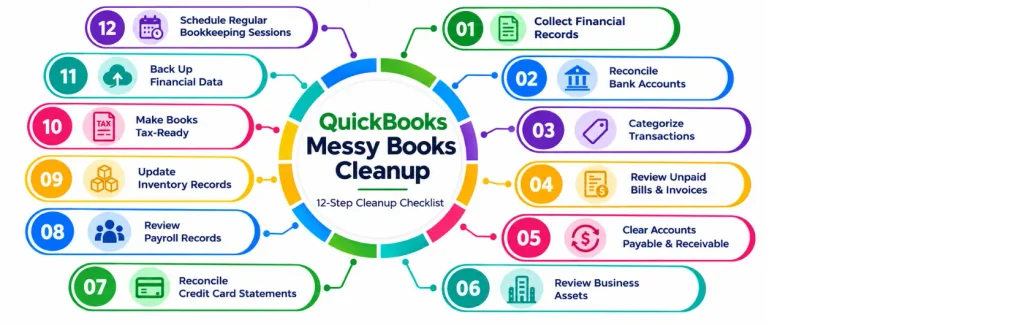
Begin the books cleanup process by assembling all your company’s financial records. This includes customer and vendor invoices, bank and credit card statements, loan documents, payroll records, tax documents, customer and vendor invoices, and records from payment platforms.
Also, it is mandatory to keep your documents organized in one place so that they can be accessed easily. However, for the paper receipts and invoices, you can use a scanning app to create digital copies and store them securely.
Compare your bookkeeping records with your bank statement to verify that every transaction is recorded accurately. You need to check your business bank accounts, credit cards, and payment platforms for any missing or duplicate transactions, or unexpected fees. QuickBooks Bank Reconciliation can also help you review and reconcile account activity.
If you suspect that your company file contains damaged or inconsistent data, you can also Verify and Rebuild Data in QuickBooks Desktop to check the integrity of the file.
You must ensure that every income and expense is assigned to the correct category and that duplicate, missing, or incorrectly recorded transactions are reviewed. For example, the employee payments must be recorded as payroll, advertising costs as marketing, and office purchases as supplies.
Moreover, you should also check for old unpaid invoices and deposits to verify that records accurately show the money you received and the money customers still owe you. Consistent categorization is an important part of QuickBooks Messy Books Cleanup because it makes your financial reports easier to understand and review.
Check for any bills you still need to pay and invoices your customers haven’t paid yet. You need to record unpaid bills so that you can understand what your business owes and keep track of unpaid customer invoices to understand what money is still coming in. Following up on overdue invoices can also help improve your cash flow.
Now, you need to review the money that your business owes to suppliers and the money customers still owe you.
Pay or schedule outstanding bills on time, and follow up on overdue customer invoices. Keeping both accounts up to date helps you manage cash flow and avoid surprises.
Check your records for major business assets like computers, furniture, vehicles, and equipment. Also, verify that the assets you own are recorded properly and any required depreciation is up to date.
However, keeping these records accurate helps ensure your financial statements and tax records show your business’s assets correctly.
Compare your credit card statements with your bookkeeping records to verify every transaction is recorded correctly.
Check each charge against your receipts and verify that personal purchases aren’t recorded as business expenses. Also, you must fix any missing, duplicate, or incorrectly categorized transactions.
For businesses with employees, review your payroll records to verify that the wages, bonuses, salaries, and payroll taxes are recorded accurately.
Accurate payroll records will help ensure employees are paid accurately, and your business meets its payroll and tax obligations. After reviewing payroll records, make sure your QuickBooks Payroll Tax Table Update is current so that payroll calculations and tax amounts are based on the latest available tax tables.
If your business is selling physical products, verify that your inventory records match what you actually have in stock. Review the quantity and cost of products and then search for missing, damaged, or unaccounted inventory. Accurate inventory records will help keep track of product costs, manage stock levels, and prepare accurate financial and tax reports.
Before the arrival of tax season, thoroughly review your books to ensure that all income and expenses are recorded and categorized accurately. You can also follow our QuickBooks Tax Season Cleanup guide for a more detailed pre-tax review.
Also, you must look for unexplained transactions, negative amounts, incorrect balances, and other errors. Therefore, to fix those issues, verify that your financial records are accurate and organized. This will help your tax professionals have sufficient information required to prepare your return easily.
Protect your company’s bookkeeping records by creating secure backups of your sensitive financial information. Using the backup, you can recover your records if your software or financial data is either damaged or lost.
Therefore, to protect your data, you must use secure cloud storage. Also, you must enable the multi-factor authentication feature on your bookkeeping and financial accounts for an extra layer of protection.
You must not wait for the tax season to review your books. It is essential for businesses to take out some extra time to record transactions, categorize expenses, reconcile accounts, and review unpaid invoices.
Reviewing your books regularly will help spot small errors early, keep you organized, and provide you with clear insight regarding business finances.
Here, we have explained some of the scenarios when you require a professional QuickBooks messy books cleanup to ensure that the accounts are managed accurately. Professional QuickBooks Messy Books Cleanup may be helpful when your records contain several years of unreconciled accounts, duplicate transactions, missing records, or other complex bookkeeping issues.
If your records were imported from another accounting system or moved between QuickBooks files, you may also need QuickBooks Data Conversion Services or QuickBooks Data Migration Services to ensure the information is transferred correctly. Therefore, it’s crucial to review your records regularly to verify that every transaction is recorded properly.
If your profit and loss amount suddenly starts looking higher or lower than expected, you must not ignore it. In that case, review your records to find out whether the change is real or caused by a bookkeeping error.
Automation can save time, but sometimes it can also lead to incorrect categorization of records. So, it’s necessary to check your books constantly and ensure your banks and other financial accounts are reconciled.
Don’t wait until the last minute to review your books. It is essential to review your income, expenses, receipts, and other financial records before the arrival of tax season to prevent last-minute stress and surprises.
Before approaching a bank or lender, verify that your books are accurate and up to date. However, clean financial records can help you identify and fix problems before submitting your application.
The time taken for QuickBooks cleanup depends on how messy the accounts are. A business with a few months of minor categorization issues doesn’t require much time for cleanup.
Whereas a business with several years of unreconciled accounts, duplicate transactions, missing records, old invoices, multiple payment platforms, and mixed personal and business expenses can require significantly more work. The important thing is to assess the condition of the books before estimating how much cleanup is needed.
Before considering your QuickBooks cleanup is complete, review the following details;
Messy QuickBooks books can create confusion and make it harder to manage your business finances effectively. Performing a thorough QuickBooks messy books cleanup can help you identify errors, reconcile accounts, organize financial records, and maintain more accurate books.
If your records require ongoing cleanup or bookkeeping assistance, you can also explore our Accounting And Bookkeeping Services. For answers to common QuickBooks questions, visit our Data Service Team FAQ.
For further assistance with your QuickBooks cleanup, connect with our professionals at +1(888)-718-7888 for a free consultation.
If you have unreconciled accounts, duplicate or missing transactions, uncategorized expenses, old invoices, or financial reports that aren’t accurate, your books may need cleanup.
The QuickBooks cleanup includes categorizing income and expenses, reviewing unpaid invoices and bills, reconciling accounts, fixing transaction errors, and checking financial reports.
You must review financial records, reconcile your accounts, fix duplicate or missing transactions, categorize transactions correctly, and review your financial reports for errors.
Compare your QuickBooks transactions with your bank or credit card statement, identify discrepancies, correct errors, and reconcile the account again.
To remove duplicate transactions, compare your duplicate entries to verify they are the same transaction. Then, remove or correct the extra entry while keeping your records accurate.
You must review the transaction and supporting documents and then change it to the correct income or expense category.
Cleanup fixes errors in your existing books, while catch-up bookkeeping brings overdue records up to date. You may need both if your books are behind and contain errors.
Yes, reviewing your books before tax filing can help you find missing transactions, incorrect categories, and other errors before they affect your tax records.




