
QuickBooks Error 12031 occurs when QuickBooks Desktop fails to connect with Intuit’s servers while downloading payroll or software updates. This error is normally caused by internet connection problems, incorrect Windows security settings, firewall restrictions, antivirus interference, or disabled TLS 1.2.
By identifying the cause and following the right troubleshooting steps, you can usually fix QuickBooks Error 12031 without reinstalling the software or making major changes to your system.
In this guide, we will explain why QuickBooks Error 12031 occurs, the common signs of this problem, and step-by-step solutions to help you complete your payroll or QuickBooks updates successfully.
QuickBooks Error 12031 can occur because of different internet, security, or system settings. Finding the exact cause helps you apply the right solution.
| Cause | How It Affects QuickBooks |
| Unstable internet connection | A weak or interrupted connection can stop QuickBooks from downloading update files. |
| Incorrect Windows internet settings | QuickBooks may fail to connect securely with Intuit servers. |
| Disabled TLS 1.2 | Older security settings may prevent QuickBooks from creating a secure connection. |
| Firewall restrictions | Firewall rules may block QuickBooks from accessing the internet. |
| Antivirus interference | Security software may mistakenly block QuickBooks update activity. |
| Outdated QuickBooks Version | Older versions may have compatibility issues with current security requirements. |
| Damaged QuickBooks installation files | Missing or corrupted program files can interrupt the update process. |
| Network restrictions | Office networks or proxy settings may prevent QuickBooks from connecting. |
This is depending on the QuickBooks version and the update process you are performing, you may see different messages related to QuickBooks Payroll Update Error 12031. Some common messages include:
You may be experiencing Error 12031 if you notice any of these issues:
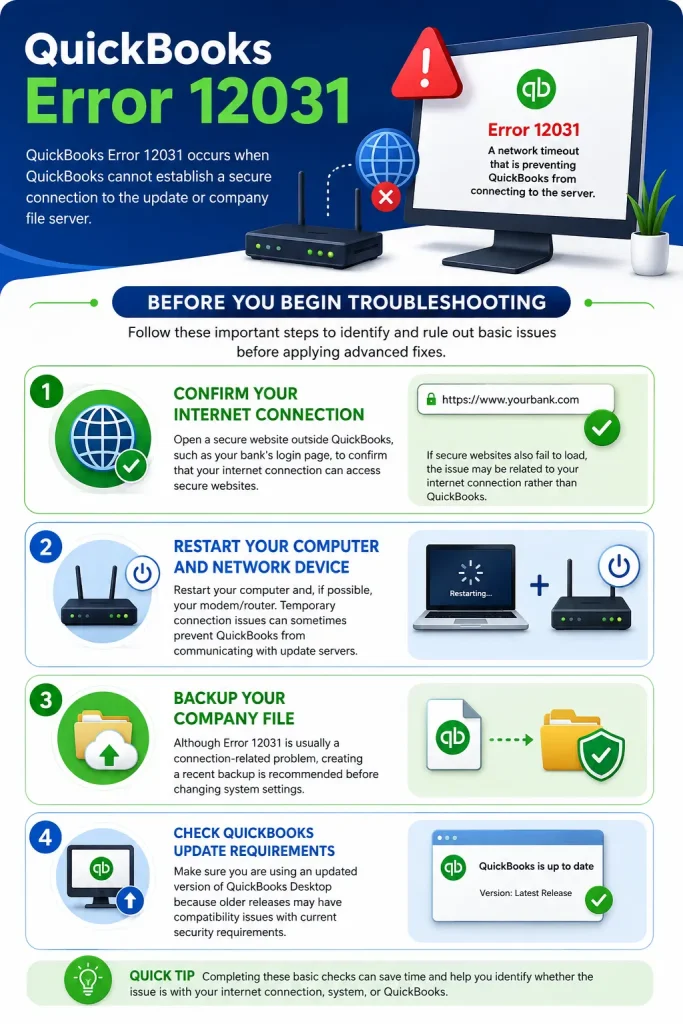
These signs help you identify that the problem is related to QuickBooks connectivity rather than your company file.
Before applying any technical fixes, you should complete these basic checks:
Open a secure website outside QuickBooks, such as your bank’s login page, to confirm that your internet connection can access secure websites.
If secure websites also fail to load, the issue may be related to your internet connection rather than QuickBooks.
Restart your computer and, if possible, your modem/router. Temporary connection issues can sometimes prevent QuickBooks from communicating with update servers.
Although Error 12031 is usually a connection-related problem, creating a recent backup is recommended before changing system settings.
Make sure you are using an updated version of QuickBooks Desktop because older releases may have compatibility issues with current security requirements.
QuickBooks Error 12031 is usually caused by a connection issue between QuickBooks Desktop and Intuit’s update servers. The right solution depends on what is blocking the connection.
Before making major changes, start with the basic fixes first. If the error continues, move to the advanced troubleshooting methods.
A weak or unstable internet connection is one of the most common reasons behind QuickBooks Error 12031. Follow these steps to check:
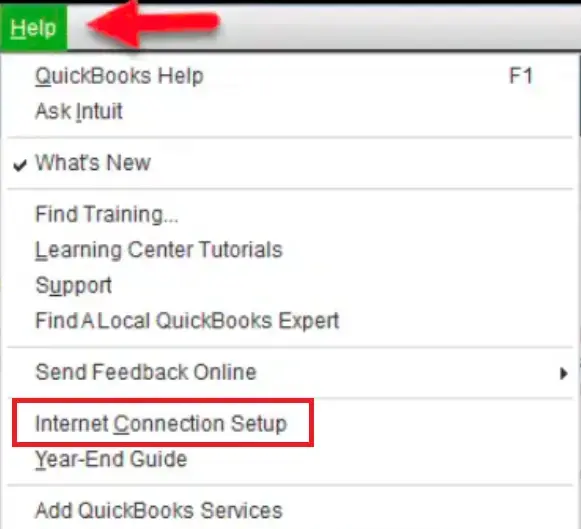
Pro Tip: If you’re using a VPN, proxy server, or public Wi-Fi network, disconnect it temporarily and switch to a stable internet connection before updating QuickBooks. If the error still appears, you may also be experiencing a similar connection issue such as QuickBooks Error 12029. Check our guide for additional troubleshooting steps.
Incorrect internet settings can prevent QuickBooks from connecting to Intuit’s servers. Checking and updating these settings can help resolve QuickBooks Error 12031. Here’s how you can fix this:
Note: If TLS 1.2 is already enabled, leave it checked and continue to the next troubleshooting method.
Windows Firewall helps protect your computer, but it can sometimes block QuickBooks from accessing the internet. If QuickBooks is blocked, payroll and software updates may fail with Error 12031. Here’s how to allow QuickBooks through the firewall:
If you’re using a third-party firewall or security software, you’ll also need to add QuickBooks as an allowed application in that program.
Even if you don’t use Internet Explorer, QuickBooks Desktop still relies on its internet settings to connect with Intuit’s servers. If these settings are incorrect, you may encounter QuickBooks Error 12031 while downloading updates. Look at the steps below:
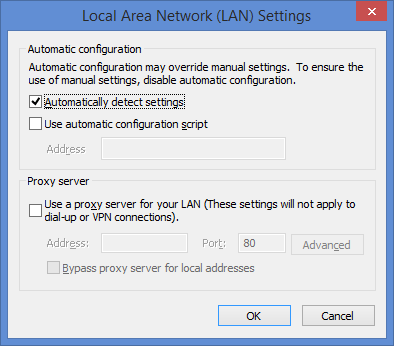
If your organization uses a proxy server, contact your network administrator before making any changes.
Note: Still having trouble with the update? If QuickBooks remains stuck while downloading or installing an update, check our guide on QuickBooks Update Stuck for additional solutions.
Sometimes, temporarily disabling the antivirus can help you determine whether it’s causing the problem. Follow these easy steps:
Important: Only disable your antivirus temporarily for testing purposes. Leaving your system unprotected may expose it to security risks.
If the update works after disabling the antivirus, add QuickBooks as a trusted application so future updates aren’t blocked.
If a background program is interfering with QuickBooks, starting Windows in Safe Mode with Networking can help you fix QuickBooks Payroll Error 12031 smoothly. Here’s how you can fix this:
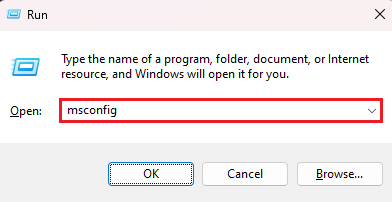
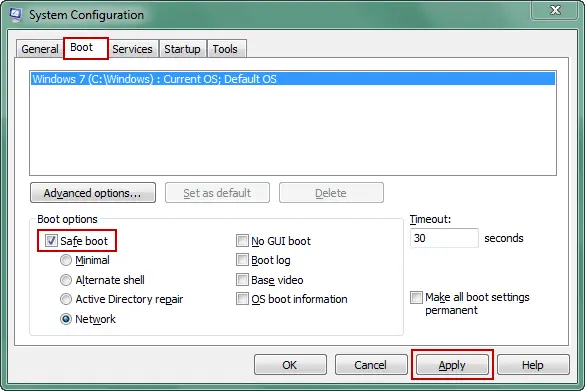
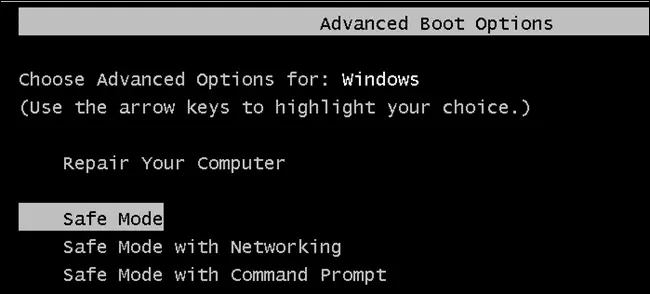
If the update works in Safe Mode, another program running in the background is likely interfering with QuickBooks.
QuickBooks depends on various Windows components to download and install updates. If your operating system is outdated, it may prevent QuickBooks from connecting securely to Intuit’s servers. These are the simple steps to follow:
Installing Windows updates also includes important security improvements that help QuickBooks communicate with online services.
Corrupted Windows system files can sometimes affect QuickBooks and prevent updates from completing successfully. Here are the steps to follow:
If Windows reports that it repaired corrupted files, try downloading the QuickBooks update again before moving to the next solution.
Although this error can occur unexpectedly, following a few best practices can reduce the chances of facing it again.
QuickBooks Error 12031 is mainly a connection-related issue that prevents QuickBooks Desktop from downloading payroll or software updates. If you are specifically having trouble with payroll updates, see our guide on QuickBooks Payroll Update Not Working for additional troubleshooting steps.
Start with the basic troubleshooting methods and go for advanced solutions if needed. Since this error usually affects only the update process, your company file remains safe in most situations. If the error continues after trying all the recommended solutions, contacting Data Service Team experts at +1(888)-718-7888 is the next best step to identify any underlying system or network issues.
QuickBooks Error 12031 is an update-related error that occurs when QuickBooks Desktop cannot connect to Intuit’s servers while downloading payroll or software updates. The issue is usually caused by internet connectivity problems, firewall restrictions, incorrect Windows internet settings, or disabled TLS 1.2.
You may encounter QuickBooks Payroll Update Error 12031 if QuickBooks is unable to establish a secure connection with Intuit’s update servers. Common causes include a slow internet connection, firewall or antivirus restrictions, outdated QuickBooks, incorrect internet settings, or network configuration issues.
Since QuickBooks Error 12031 mainly affects the update process, it usually doesn’t damage your company file. You can fix the error by checking your internet connection, enabling TLS 1.2, reviewing firewall and antivirus settings, updating QuickBooks Desktop, and installing the latest Windows updates. Creating a backup before troubleshooting is always recommended.
To enable TLS 1.2, open Internet Properties by pressing Windows + R, typing inetcpl.cpl, and pressing Enter. Go to the Advanced tab, scroll to the Security section, check Use TLS 1.2, click Apply, and then OK. Restart your computer and try updating QuickBooks again.
Yes, QuickBooks Payroll Error 12031 commonly appears when QuickBooks cannot download the latest payroll tax table updates because it fails to connect to Intuit’s servers. Resolving the connection issue usually allows the payroll update to complete successfully.
If QuickBooks Error 12031 keeps coming back after trying the recommended solutions, check your firewall, antivirus, and Windows internet settings again. You can also repair your QuickBooks installation, run the QuickBooks Tool Hub, or contact QuickBooks Support if the issue persists.
Even if your internet connection is working, QuickBooks may still fail to update because of blocked firewall permissions, antivirus software, disabled TLS 1.2, or an outdated QuickBooks version. Reviewing these settings can help you resolve the problem.

QuickBooks Error 105: Fix Bank Server Connection and Transaction Sync Issues
Read More


