QuickBooks Desktop lets you send invoices, reports, estimates, and purchase orders directly through Outlook or Webmail without exporting PDF files manually. This guide explains how to set up email in QuickBooks Desktop, configure Outlook or Webmail, troubleshoot common email issues, and send invoices successfully.
Our QuickBooks specialists have assisted businesses in resolving email configuration issues caused by Outlook profile corruption, incorrect SMTP settings, Microsoft 365 authentication, and outdated QuickBooks Desktop versions. The steps below are based on common issues encountered during QuickBooks Desktop email setup.
There are several benefits of QuickBooks Email Setup, which are discussed below.
Within QuickBooks, you can send transactions via Outlook or Webmail. Once you QuickBooks email Setup in Desktop, you can send invoices, reports, and more. Here are the step-by-step instructions for the smooth QuickBooks email setup process.
Perform the steps below to setup Outlook with QuickBooks.
You need to consult with your ISP or email provider to get the following details;
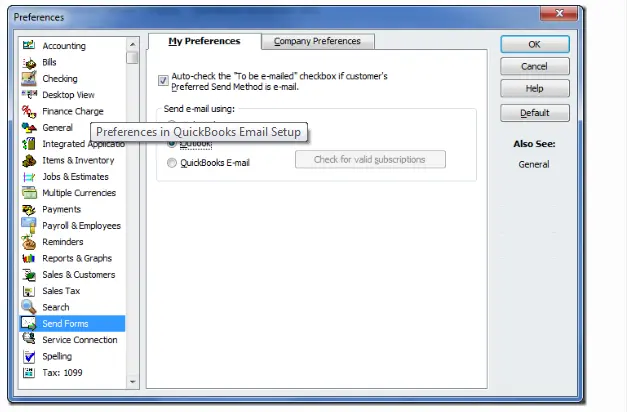
Expert Tip: If QuickBooks cannot detect Outlook after setup, close both applications, restart Windows, and verify that Outlook is set as the default email application in Windows Settings.
Before You Begin
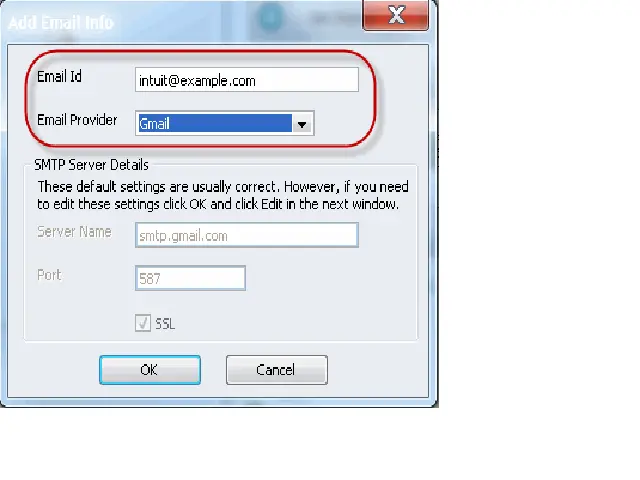
Expert Tip: Gmail and Microsoft 365 accounts may require app passwords or OAuth authentication when two-step verification is enabled.
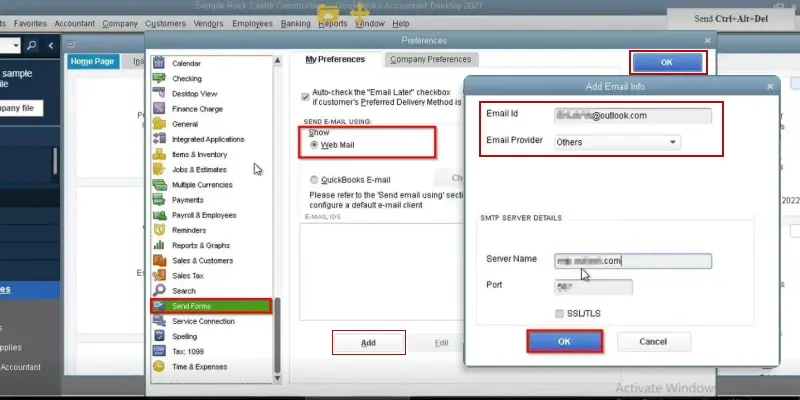
Your webmail provider’s login page will display. Sign in and select Allow to grant Intuit access.
| Important Things to Remember 1. You need to log in to webmail while sending emails while using Hosted environments. 2. If your password isn’t accepted, checkout this page QuickBooks will not accept my webmail password for more information. 3. See this blog Set up enhanced security in Gmail for QuickBooks Desktop for specific Google instructions. |
Intuit doesn’t support providers that use the STARTTLS encryption.
| 1AND1.com | smtp.1and1.com | 587 (SSL enabled, with password) |
| ADELPHIA | mail.adelphia.net | 110 |
| AOL | smtp.aol.com | 465 or 587 (see Note) (SSL enabled for incoming and outgoing mail servers) |
| BELL SOUTH | mail.bellsouth.net | 110 |
| COMCAST | smtp.comcast.net | 587 |
| COMPUSERV | smtp.compuserve.com smtp.aol.com | 110 or 587 |
| COX Business | smarthost.coxmail.com | 465 or 587 (see Note) |
| COX CENTRAL | smtp.central.cox.net | 465 or 587 (see Note) |
| COX EAST | smtp.east.cox.net | 465 or 587 (see Note) |
| COX WEST | smtp.west.cox.net | 465 or 587 (see Note) |
| EARTHLINK | smtpauth.earthlink.net | 25 (with password) |
| LYCOS | smtp.mail.lycos.com | 25 |
| MICROSOFT OUTLOOK 365 | outlook.office365.com | 587 (SSL enabled) |
| NETSCAPE | smtp.isp.netscape.com | 25 (SSL enabled) |
| PRODIGY | smtp.prodigy.net | 25 (SSL enabled) |
| ROADRUNNER | smtp-server.sc.rr.com | 587 |
| SPRINT PCS | smtp.sprintpcs.com | 25 |
| VERIZON | outgoing.verizon.net | 465 |
| VERIZON YAHOO | outgoing.yahoo.verizon.net | 465 |
Note: If 465 doesn’t work, change the port to 587. Make sure SSL is enabled when trying both ports.
In QuickBooks Desktop, users can email sales forms, invoices, and statements to customers. Also, you can send them individually, in batches, or schedule them later. Follow the steps instructed below to set up QuickBooks to email invoices.
Perform these steps to setup email in QBDT for Windows.
Before starting the process, ensure that you have connected your email to QuickBooks Desktop.
| Note: 1. The previously used email address will be set as default the next time you email the same transaction. 2. This email address is specific to each transaction type. |
Here, we have provided the stepwise instructions to set an email address for a specific transaction for a customer.
For sending a message to multiple recipients, use the following steps.
Removing an email from the list only deletes the email address. However, the QuickBooks application will not remove the form itself.
In QuickBooks, you can email any of your forms with their attachments. While emailing, you can save the documents in PDF form, send them as email attachments, and use email tokens.
After saving an invoice and setting up your QuickBooks Payments preferences, you can now attach a link in the email so that your customers can pay the invoice online.
Setting up email in QuickBooks Desktop allows you to send invoices, estimates, reports, and purchase orders directly from the software using Outlook or Webmail. If emails fail to send, verify your Outlook profile, SMTP settings, QuickBooks version, and Windows permissions before troubleshooting advanced configuration issues. If you experience configuration issues, verify your email settings, update QuickBooks, and test your connection before contacting support +1(888)-718-7888.
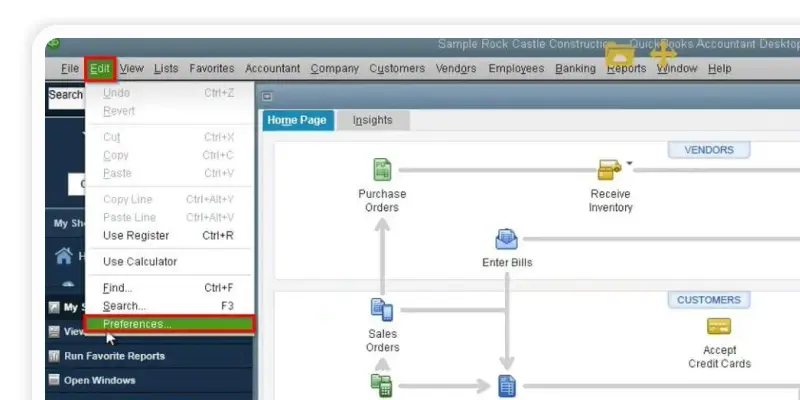
To set up email,
QuickBooks fails to send emails through Outlook due to a lack of admin permissions, outdated Office updates, misconfigured email preferences, or selecting a default email profile.
If Outlook is not responding, verify your QuickBooks compatibility settings, review your Send Forms preferences, update Outlook, or temporarily switch to Webmail.
Yes, both QuickBooks Desktop and Online support Microsoft 365 email accounts.
To change the email account;
To fix the Email Not Configured or email failed issue, update your email settings in QuickBooks, or toggle your preferences in the Send Forms menu.
If QuickBooks email is not working, disable the “Run as an administrator” settings in QuickBooks. Then, update your email preferences and repair missing Windows printing components.

Get Free Consultation for QuickBooks Upgrade
(2021, 2022, 2023)


