Intuit-Enterprise-Suite

As a business grows, managing finances and daily tasks can become more difficult. QuickBooks Desktop helps businesses manage accounting, inventory, and reports. But when a business expands, it may need more tools to manage its growing needs. This is where Intuit Enterprise Suite can help. It offers features like financial management, multi-company reporting, and automation to make business tasks easier.

In this blog, we’ll compare QuickBooks Desktop vs. Intuit Enterprise Suite, explore the key Intuit Enterprise Suite features, and help you decide whether it’s the right QuickBooks Desktop alternative for your business.
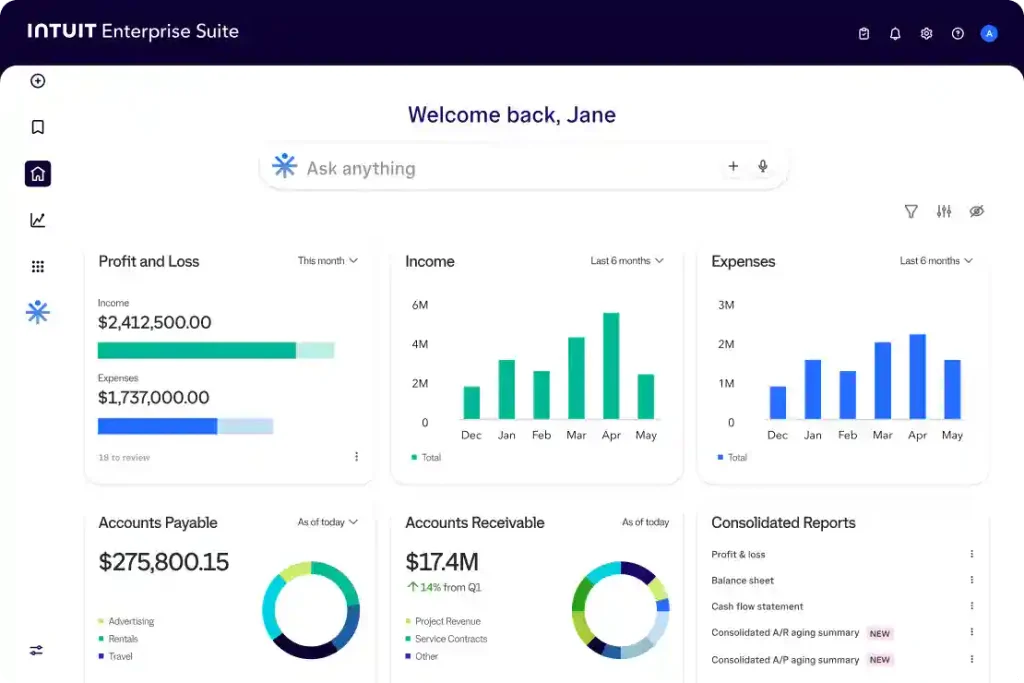
Intuit Enterprise Suite

What is Intuit Enterprise Suite?

Intuit Enterprise Suite is business management software that helps growing businesses manage their finances and daily work in one place. It is useful for businesses that need more than basic accounting tools. Here’s what you can do with it:

  • Manage Finances: It helps you keep track of your business income, expenses, and financial records.
  • Manage Multiple Companies: It helps you manage the financial information of different companies in one place.
  • Create Financial Reports: It helps you check your business performance and understand where your money is going.
  • Automate Tasks: It helps reduce repetitive work and saves time on everyday financial tasks.
  • Track Business Performance: It helps you understand how your business is doing and make better decisions.
  • Manage Expenses: It helps you track and manage business expenses across different companies.
  • Simplify Financial Reporting: It helps you bring financial information together to get a clearer picture of your overall business performance.

What is QuickBooks Desktop?

QuickBooks Desktop is accounting software that helps businesses handle their daily accounting tasks. Businesses comparing desktop editions can also learn more about QuickBooks Premier and the features it offers. It is used by businesses to track income and expenses, manage inventory, create reports, and keep their financial records organized. Have a look at the key features of QuickBooks Desktop below:

  • Track Income and Expenses: It helps you record business income, track expenses, and manage financial transactions.
  • Manage Inventory: It helps you track stock levels, manage products, and monitor inventory across locations.
  • Create Financial Reports: It helps you generate reports to understand your business’s financial performance.
  • Manage Bills and Payments: It helps you keep track of vendor bills and customer payments.
  • Track Project Costs: It helps you monitor project expenses and understand whether your projects are profitable.
  • Manage Multiple Companies: QuickBooks Desktop Enterprise supports managing multiple company files and combining financial reports.
  • Industry-Specific Tools: It offers features designed for businesses in industries such as construction, manufacturing, retail, and wholesale.

QuickBooks Desktop Enterprise is ideal for accounting, inventory, and reporting, while Intuit Enterprise Suite may better suit businesses with more complex financial needs.

QuickBooks Desktop vs. Intuit Enterprise Suite: What’s the Difference?

Both software solutions help businesses manage their finances, but they serve different needs. QuickBooks Desktop Enterprise focuses on accounting, inventory, and reporting, while Intuit Enterprise Suite offers more advanced tools for businesses managing multiple companies and financial operations. Here are the key differences:
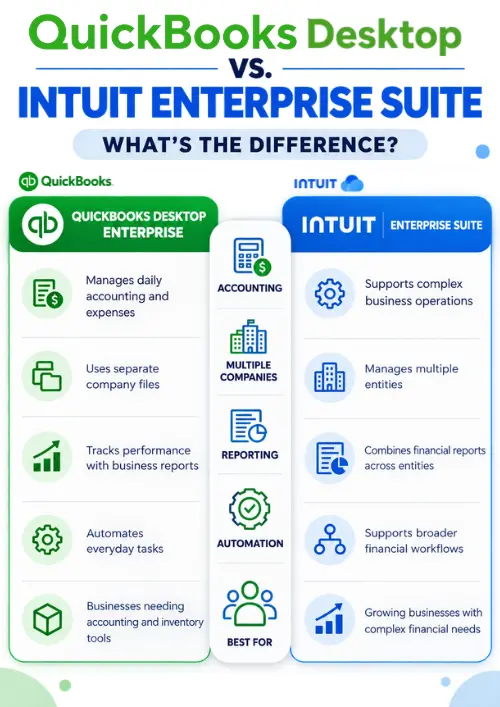
QuickBooks Desktop vs. Intuit Enterprise Suite
FeatureQuickBooks Desktop EnterpriseIntuit Enterprise Suite
AccountingHelps manage daily accounting and expenses.Managing complex business operations
Multiple CompaniesHelps manage separate company files.Manages multiple entities
ReportingCreates reports to track business performance.Combines financial reports across entities
AutomationAutomates everyday business tasks.Supports broader financial workflows
Best ForBusinesses that need accounting and inventory tools.Growing businesses with complex financial needs

What are the Key Intuit Enterprise Suite Features?

Intuit Enterprise Suite offers tools that help businesses manage their finances, handle multiple companies, and keep track of daily operations. Here are the key features and how they can help your business.

  • Multi-Entity Management: It helps you manage multiple companies, subsidiaries, and locations from one place.
  • Financial Reporting: It helps you combine financial reports from different companies and understand your overall business performance.
  • Intercompany Transactions: It helps you manage transactions between your companies and reduce manual accounting work.
  • Custom Reports: It lets you organize financial data by categories such as departments, locations, and projects.
  • Financial Planning and Forecasting: It helps you plan budgets, estimate future expenses, and forecast business performance.
  • AI-Powered Insights: It helps you identify financial trends and understand changes in your business performance.
  • Project Management: It helps you track project costs, compare budgets with actual expenses, and monitor profitability.
  • Workflow Automation: It helps automate certain financial tasks, approvals, and project reminders.
  • User Roles and Permissions: It lets you control what employees can view and do within the system.
  • Industry-Specific Tools: It offers features designed for businesses in industries such as construction and professional services.

These features can help businesses reduce manual work, improve financial reporting, and make better decisions as they grow.

Key Benefits of Using Intuit Enterprise Suite

Intuit Enterprise Suite can help businesses manage their finances more easily as they grow. Here are some of its main benefits:

  • Save Time: Automate repetitive tasks and spend less time on manual work.
  • Manage Multiple Businesses Easily: View financial information for different companies in one place.
  • Improve Financial Reporting: Get a clearer picture of your income, expenses, and overall business performance.
  • Reduce Manual Errors: Use connected workflows to reduce repeated data entry and improve consistency.
  • Track Project Profitability: Compare project costs with estimates to understand which projects are profitable.
  • Make Better Decisions: Use financial reports and business insights to plan your next steps.
  • Support Business Growth: Manage more complex financial processes as your business expands.

Overall, Intuit Enterprise Suite can help you grow your business and organize your finances, simplify daily tasks, and get a better understanding of your business performance.

When Should You Consider Intuit Enterprise Suite?

Intuit Enterprise Suite may be a good option if your business is growing and managing finances is becoming more complicated. You may want to consider it if:

  • Manage Multiple Companies: When you need an easier way to manage financial information across different businesses.
  • Reports Take Too Much Time: Your team spends hours combining reports from different companies.
  • Having Too Much Manual Work: You want to reduce repetitive accounting tasks and simplify financial processes.
  • Need Better Financial Insights: You want to understand business performance and identify areas for improvement.
  • Business is Expanding: You need software that can support more complex financial needs as your business grows.

If QuickBooks Desktop Enterprise already meets your needs, switching may not be necessary. However, if your business needs more advanced financial management and reporting, Intuit Enterprise Suite may be worth exploring.

What are the Key Features of QuickBooks Desktop Enterprise?

QuickBooks Desktop Enterprise offers tools to help businesses manage accounting, inventory, and daily operations with QuickBooks Desktop Enterprise Hosting.

  • Accounting Management: It helps you track income, expenses, bills, and payments.
  • Inventory Management: It helps you track stock levels, manage inventory, and monitor products across locations.
  • Financial Reporting: It helps you create reports to understand your business performance.
  • Job Costing: It helps you track project expenses and check whether your jobs are profitable.
  • Order Management: It helps you manage sales orders, purchase orders, and customer orders.
  • Payroll Management: It offers payroll capabilities through supported services and subscriptions.
  • Multi-Company Management: It helps you manage separate company files and combine financial reports using supported features.
  • Industry-Specific Tools: It provides features for industries such as construction, manufacturing, retail, and wholesale. Businesses that need to connect accounting data with other applications can also explore QuickBooks Enterprise API Integration.

QuickBooks Desktop Enterprise is a useful option for businesses that need accounting and operational tools in one system. The features available depend on your edition, subscription, and configuration.

Pros and Cons of Intuit Enterprise Suite vs. QuickBooks Desktop Enterprise

Both Intuit Enterprise Suite and QuickBooks Desktop offer useful tools for managing business finances. However, they differ in their capabilities and the business needs they address. Understanding their pros and cons can help you choose the best solution for your business growth.

Pros and Cons of Intuit Enterprise Suite

Pros:

  • You can manage your financial information across multiple entities in one place.
  • Get a clear picture of overall business performance through consolidated financial reports.
  • Save time on repetitive tasks with AI-powered tools and workflow automation.
  • Keep track of project budgets, costs, and profitability.
  • Handle more complex financial operations as your business grows.

Cons:

  • The wide range of features may be unnecessary for businesses with simple accounting needs.
  • Initial setup requires planning to match the software to your business processes.
  • Transferring existing financial data can take time and preparation.
  • Pricing varies according to business requirements and selected services.

Pros and Cons of QuickBooks Desktop Enterprise

Pros:

  • Everyday accounting tasks, such as tracking income, expenses, bills, and payments, are managed in one system.
  • Inventory tools help you monitor your stock across warehouses and locations, depending on the subscription.
  • Built-in reporting makes it simple to review the financial and operational performance.
  • Job costing features help you determine the project expenses and profitability.
  • Multiple company files and supported intercompany workflows make it useful for businesses managing more than one company.

Cons:

  • Certain advanced features are available only with specific subscriptions.
  • Optional services and add-ons may increase the overall cost.
  • Detailed reporting requirements can involve additional setup.
  • As operations become more complex, the existing setup may no longer meet every business requirement.

Intuit Enterprise Suite vs. QuickBooks Desktop: Pricing and Cost

Pricing is an important factor when choosing business software. The total cost depends on your business needs. The features you require and the services included in your plan:

QuickBooks Desktop Enterprise Pricing

QuickBooks Desktop Enterprise offers different subscription plans with features that vary by plan. Check the official QuickBooks Enterprise pricing and plan details for current pricing and included features. Each plan includes different features to support business accounting and daily operations.

  • Gold: Starts at $2,210 per year and includes basic business functionality, reporting, and multi-company management.
  • Platinum: Starts at $2,717 per year and adds features such as Advanced Inventory, Advanced Pricing, and intercompany transactions.
  • Diamond: Starts at $5,363 per year and offers additional functionality and automation, along with QuickBooks Time Elite options.

The available user limit varies by plan. Payroll, cloud hosting, and other optional services may involve additional charges.

Intuit Enterprise Suite Pricing

Intuit Enterprise Suite uses customized pricing based on your business requirements. Factors such as the number of entities, required features, and implementation needs can affect the total cost. The main expenses to consider include:

  • Software subscription: The cost depends on your business requirements and selected solution.
  • Implementation and migration: Transferring financial data and setting up your business structure may involve additional costs.
  • User and entity requirements: Your business size and organizational structure may affect the quote.
  • Additional services: Training, integrations, and other services may increase the overall investment.

Multi-Entity Accounting vs. Multi-Company Accounting: What’s the Difference?

Managing multiple companies can make accounting more complicated, especially when each business has its own financial records. Intuit Enterprise Suite and QuickBooks Desktop Enterprise offer tools to manage multiple businesses, but their capabilities differ.

1. Multi-Entity Accounting in Intuit Enterprise Suite

Intuit Enterprise Suite helps businesses manage financial information across multiple entities in one place. It supports consolidated reporting and intercompany accounting workflows, making it easier to review financial performance across a group of businesses.

2. Multi-Company Management in QuickBooks Desktop Enterprise

QuickBooks Desktop Enterprise allows businesses to manage separate company files and combine financial reports using supported features. It also offers intercompany transaction capabilities in eligible plans, helping businesses manage transactions between companies.

How to Move from QuickBooks Desktop to Intuit Enterprise Suite?

Moving from QuickBooks Desktop to Intuit Enterprise Suite requires some planning to make sure your QuickBooks Data Conversion process is properly prepared. Before getting started, review your existing company files, accounting records, and reporting needs. Here are a few steps to help prepare for the move:

  • Review your financial data: Check your company files, account balances, and financial records before starting the migration.
  • Organize your company information: Identify the entities you need to manage and how their financial information should be organized.
  • Prepare your data: Review existing records and resolve any errors or inconsistencies that could affect the transition.
  • Confirm migration requirements: Contact Intuit to understand which data can be transferred and what preparation is required.
  • Check your financial reports: After migration, review important balances and reports to make sure the information is accurate.
  • Train your team: You should help your employees understand the new system and how to complete their regular accounting tasks.

What Should You Check Before Migrating?

Before moving from QuickBooks Desktop to Intuit Enterprise Suite, review a few important things to help make the transition smoother.

  • Back up your Data: Keep a secure backup of your existing company files and financial records.
  • Check data accuracy: Review account balances, transactions, and outstanding invoices to identify errors before migration. If your financial records are disorganized, QuickBooks Messy Books Cleanup may help you prepare your books before migrating to a new system.
  • Review Your Business Structure: Identify all companies and entities that need to be included in the new system.
  • Confirm Feature Availability: Make sure Intuit Enterprise Suite supports the accounting tools, reports, and workflows your business relies on.
  • Plan for Downtime: Prepare your team for any temporary disruption during the migration process.
  • Verify Migrated Data: After the transfer, check account balances and financial reports to confirm that the information is accurate.
  • Prepare Your Team: Make sure employees understand the new system and know how to perform their regular tasks.

Taking these steps before migration can help reduce errors, avoid unnecessary delays, and make the transition easier for your business.

How to Choose the Right Solution for Your Business?

Before choosing a QuickBooks Desktop alternative, compare the features, reporting capabilities, and overall costs to find the right fit for your business. If you’re comparing QuickBooks Desktop editions, our guide to QuickBooks Pro vs Premier vs Enterprise can help you understand their differences and choose the right option for your business. Consider the following points before making your decision.

  • Business Size: Consider how many companies or entities you manage and whether your current software meets your needs.
  • Accounting Requirements: QuickBooks Desktop Enterprise may be suitable for everyday accounting, inventory management, and job costing.
  • Financial Reporting: Intuit Enterprise Suite may be worth considering if you need more extensive multi-entity reporting and financial management.
  • Automation Needs: Review which solution offers the workflows and automation features your team needs.
  • Budget: Compare subscription fees, additional services, implementation costs, and training expenses.
  • Future Growth: Choose software that can support your business as its financial operations become more complex.

The right solution is the one that fits your current requirements while supporting your future plans. Businesses that need help organizing financial records may also explore Accounting And Bookkeeping Services. Before switching, compare the available features and pricing to make sure you’re choosing the best option for your business.

Conclusion!

Choosing between Intuit Enterprise Suite and QuickBooks Desktop depends on your business needs. QuickBooks Desktop Enterprise is a good option for businesses that need accounting, inventory management, and financial reporting tools. However, Intuit Enterprise Suite may be a better fit for growing businesses that need to manage multiple entities and handle more difficult financial operations.

If you’re looking for a QuickBooks Desktop alternative, compare the features, pricing, and reporting capabilities of both solutions before making a decision.

Need help managing your business data or planning a smooth software transition? Contact Data Service Team experts at +1(888)-718-7888 to simplify the migration process.

Frequently Asked Questions (FAQ’s)

Intuit Enterprise Suite is a business management solution created for growing the businesses and manage their finances across multiple entities. QuickBooks Desktop Enterprise focuses on accounting, inventory management, job costing, and reporting. The right option depends on your business structure and financial needs.

Consider switching when managing multiple entities, combining financial reports, or handling challenging tasks becomes difficult with your current setup. If QuickBooks Desktop Enterprise already meets your needs, switching may not be necessary.

Intuit Enterprise Suite can help businesses manage financial information across multiple entities, simplify consolidated reporting, automate selected tasks, and track project costs. These tools can make it easier to understand overall business performance as operations grow.

It helps businesses manage financial information across multiple entities and supports consolidated reporting and intercompany accounting workflows. This gives businesses a clearer view of their combined financial performance.

Yes. Intuit Enterprise Suite includes AI-powered capabilities that can help simplify selected tasks, organize financial information, and provide business insights. It also offers tools to support financial workflows and multi-entity management.

Yes. Intuit provides a migration process for moving supported QuickBooks Desktop company files to Intuit Enterprise Suite. The process includes preparing your data, mapping company files to entities, and submitting the files for migration.

Before you start, check your accounting needs, company structure, reporting requirements, budget, and existing financial data. You should also confirm which features you need for your business and how to adapt.

QuickBooks Desktop Enterprise offers different subscription plans, with pricing depending on the selected plan and services. Intuit Enterprise Suite pricing is customized to business requirements. Contact Intuit for a quote and compare the total costs before deciding.

Yes. Intuit Enterprise Suite is designed for businesses that need to manage multiple entities, consolidate financial reports, and handle more complex financial operations. It may be particularly useful for businesses with several subsidiaries or related companies.

Start by backing up your company files, reviewing account balances, and correcting data issues. Identify the entities you need to move and use Intuit’s data preparation process to check your files before submitting them for migration.

QuickBooks Desktop Enterprise may be a good fit for businesses that need accounting, inventory management, and operational reporting. Intuit Enterprise Suite may be better suited to businesses that require more extensive multi-entity management, consolidated reporting, and automation. Compare your business requirements and budget before choosing.

About The Author

Steven Moody

Steven Moody is a bookkeeping and payroll specialist dedicated to helping businesses maintain accurate financial records and efficient payroll operations. His expertise includes payroll management, tax compliance, bookkeeping solutions, and financial reporting. Steven regularly shares insights on accounting best practices and business finance strategies. Outside of work, he enjoys traveling, exploring new places, and keeping up with the latest developments in business technology.

Steven Moody

QuickBooks Desktop

QuickBooks scheduled backup not working? Here’s How to Fix

Read More
QuickBooks

QuickBooks Web Connector: A Guide to Setup, Features, and Solutions

Read More
QuickBooks

QuickBooks Check Alignment Problems: Here’s How to Fix It

Read More
QuickBooks Error

Unable to Send Invoices in QuickBooks? Here’s How to Fix It

Read More
QuickBooks

QuickBooks Tax Filing Problems? Here’s How to Fix It

Read More
