QuickBooks Error 3371, Status Code -11118 occurs when QuickBooks Desktop cannot load or validate its license data. Damaged or missing license files, installation problems, or Windows component issues can trigger this error. It may prevent QuickBooks from opening normally. The quickest solution is to run the 3371 Error Fix through QuickBooks Tool Hub and restart QuickBooks.
This comprehensive guide will assist you walk through clear, proven, and effective step wise methods to resolve QuickBooks Error 3371, Status Code 11118. It helps you restore your license data, repair corrupted components, and get your software running smoothly again.
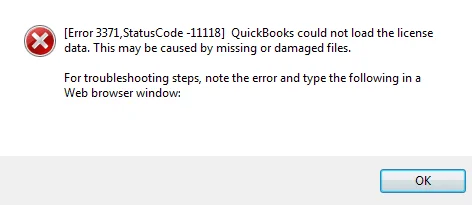
QuickBooks Error 3371 is a license initialization error that occurs when QuickBooks Desktop cannot load or validate the license data required to start the program. It may appear with Status Code -11118 and can occur when license files are missing or damaged, QuickBooks installation components are corrupted, or required Windows components are not working correctly.
This error usually happens because some important files QuickBooks needs are missing or damaged and this makes it unable to verify your license to use the software. The main causes of error 3371 in QuickBooks are:
This error appears when QuickBooks Desktop fails to load license data due to damaged registration files. It blocks software startup and system access. The symptoms of QuickBooks Error 3371, Status Code 11118 are:
To fix this issue, you must meet the given requirements. These are as described below:
This error can disrupt your accounting processes and cause frustration. But it is possible to overcome this issue if you know a couple of workarounds. Let’s break down several fixing solutions you must address the problem and restore the seamless QuickBooks Desktop functioning.
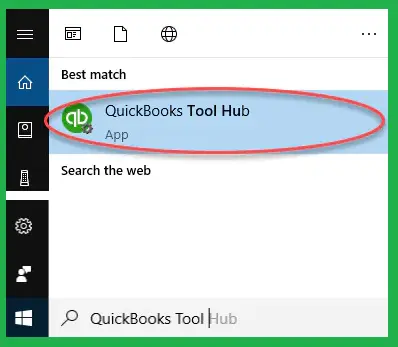
QuickBooks Tool Hub includes troubleshooting tools for common QuickBooks Desktop problems, including installation and license-related errors such as Error 3371.
A fresh reinstall removes damaged files and restores system integrity again. Here are the instructions to fix this license error with an installation of QBDT:
Always Remember: Sign in as an administrator and try again if you are unable to see the uninstall option.
Note: If QuickBooks continues to experience installation or startup problems after reinstalling, see our guide on QuickBooks Error 1712 for additional troubleshooting steps.
Rename the entitlement file, as it enables QuickBooks to create a new one and fix QuickBooks error 3371 status code 11118:
QuickBooks will become de-registered and require you to register again when you run it and delete the QBregistration.dat file. It will help you re-register the application with a registration file that is corruption-free, which will help to fix QuickBooks Error 3371, Status Code 11118.
Save the file and import it to avoid error 3371 in QuickBooks when you are using WebConnect with QuickBooks Enterprise. Now, consider these steps to save the file before opening it.
This error occurs when files are corrupted, and it can be resolved using the QuickBooks Install Diagnostic Tool. Follow these instructions to fix QuickBooks error 3371, If you experience other installation-related problems, such as QuickBooks Error 1904, the QuickBooks Install Diagnostic Tool may also help identify and repair damaged installation components.
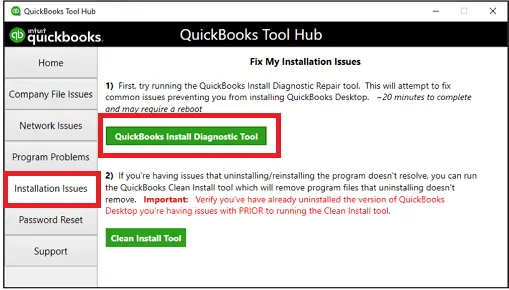
Data Service Team Tip: This process will take up to 20 to 25 minutes and users are advised not to close any tabs. Remember that hard drive cloning or copying QuickBooks to another computer without proper installation may damage licensing information.
The QuickBooks Clean Install Tool can help remove damaged QuickBooks installation files and settings, allowing you to reinstall the software with a fresh setup.
QuickBooks relies on the Microsoft .NET Framework to run properly. Problems with these components can cause QuickBooks Error 3371 and other installation issues, including QuickBooks Error 1935. Repairing the .NET Framework may help resolve these problems.
An outdated antivirus may block QuickBooks files. Updating it prevents conflicts. Here are the steps to update antivirus and allow QuickBooks access.
Data Service Team Tips: Facing the 3371 error in QuickBooks and willing to get a professional’s guide? Learn ways to fix QuickBooks license error with detailed steps for each solution. Contact us for more now!
Outdated systems fail to receive critical updates and QuickBooks relies on. Follow these instructions to update Windows and fix the license initialization error 3371.
You should also update QuickBooks Desktop to the latest available release to ensure the software has the required fixes and components.
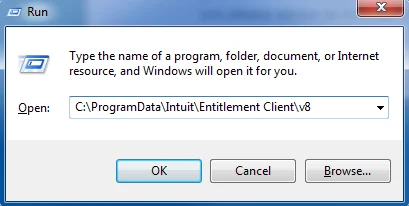
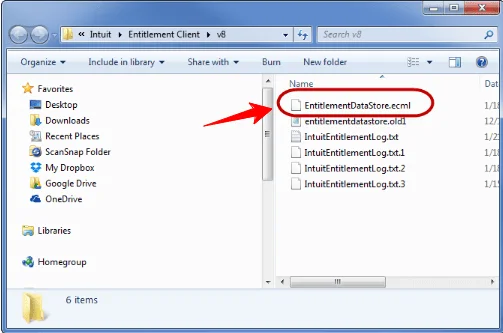
This file stores the license and registration information for QuickBooks. EntitlementDataStore. ecml Fileecml File can get corrupted and cause QuickBooks error 3371 status code 11118. Implement the provided steps to re-create this file:
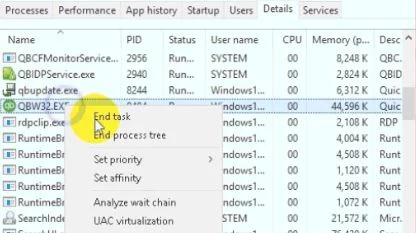
Prevent QuickBooks error 3371 by terminating tasks that use excessive system resources. Follow these steps to close unnecessary tasks in Task Manager and avoid license errors.
QuickBooks Migration Failed error arises when a user tries to transfer all files from one place to another. Contact us at +1(888)-718-7888 now to know more!
This error typically appears when the software cannot initialize the license properties required to start the application. Here are the prevention tips to stop the chance of QuickBooks error 3371 status code 11118 from returning:
QuickBooks Error 3371, Status Code -11118 occurs when QuickBooks Desktop cannot load or validate its license data. Start by running the 3371 Error Fix in QuickBooks Tool Hub. If the error continues, recreate the EntitlementDataStore.ecml file, repair installation components, update Windows, or reinstall QuickBooks Desktop. Back up your company data before making major installation changes.
If the error remains after completing the troubleshooting steps, consider contacting a qualified QuickBooks professional or Data Service Team for additional assistance +1(888)-718-7888.
QuickBooks displays the “could not initialize license properties” message of error 3371 when it is unable to load its critical license validation data. It happens because the local registration file, which is known as EntitlementDataStore.ecml, is missing due to a recent Windows update or system crash.
It takes about 15 to 30 minutes if the issue is straightforward license file corruption to fix QuickBooks error 3371. It can extend up to an hour if a technician needs to repair deep Windows components like MSXML.
Close the program and open the hidden C:\ProgramData\Intuit\Entitlement Client\v8 folder through the Windows Run command. Delete the corrupted EntitlementDataStore.ecml and reopen QuickBooks to re-enter the license details. Run the automatic 3371 fix in the QuickBooks Tool Hub.
Download, open the QuickBooks Tool Hub, select Installation Issues, and run the 3371 error Fix Tool to resolve QuickBooks error 3371. Manually delete the damaged EntitlementDataStore.ecml file from the hidden C:\ProgramData\Intuit\Entitlement Client\v8 folder and re-register your product.
This error is a licensing problem and not a company file issue. QuickBooks error 3371 status code 11118 occurs when the software cannot load the license data because critical registration fields or essential Microsoft components are damaged. It prevents QuickBooks from verifying the product license.
This issue shows a pop-up stating Could not initialize license properties with status codes like -1. Common signs include the software crashing, inability to access company files, and sudden program freezes upon launch due to damaged license data files.
No! This error does not harm the underlying accounting data. It is a licensing and installation issue that is caused by a damaged EntitlementDataStore.ecml file. QuickBooks error 3371 does not allow the software to open the product license. The financial and payroll data remains safe. However, you cannot view it until the license file is fixed.
Yes! This error occurs after cloning a hard drive. This happens because QuickBooks binds its license data to certain hardware signatures and system files when the drive is cloned to new hardware. Another reason can be that the encrypted configuration becomes mismatched and unreadable during the transfer. It prevents the software from initializing its license properties.




