Running payroll is critical for small businesses, so it becomes a major problem when you encounter a QuickBooks Online Payroll Not Working Error. When a payroll processing failure happens, it prevents you from paying your employees on time and completely disrupts your financial schedule.
If you are experiencing the QuickBooks Online Payroll Not Working Error, the issue can result from browser conflicts, corrupted network DNS files, or sudden account verification holds by Intuit. If you are currently wondering why your payroll is not processing, you are not alone, and the underlying cause is highly fixable.
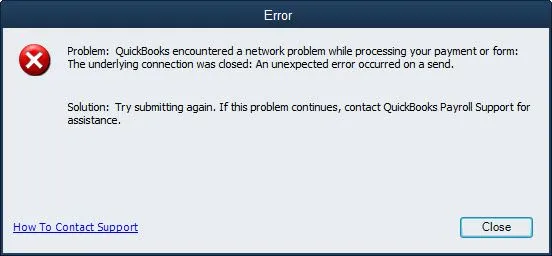
This guide outlines the primary reasons behind these system blocks and provides straightforward, step-by-step troubleshooting methods to help you clear the error and process your payroll data safely. If you are unable to access your account before reaching the payroll screen, see our guide on QuickBooks Online Login problem for help with sign-in issues.
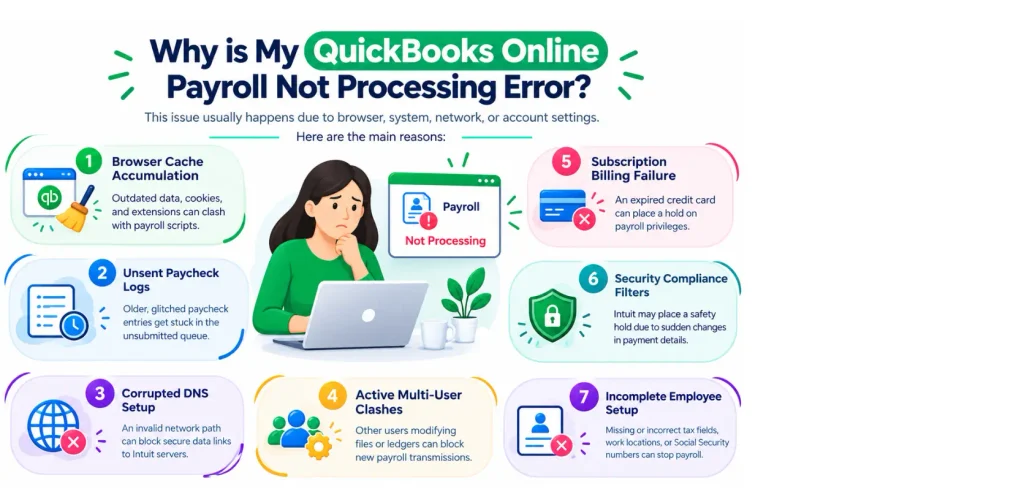
This QuickBooks Online Payroll not working error usually happens because of specific browser, system network, or backend account settings on your computer. The main reasons include:
Before you dive into the technical solutions to resolve the QuickBooks Online Payroll not working error, run through these essential checks to ensure a simple system setting isn’t causing the issue. Taking a moment to verify these basics can save you time:
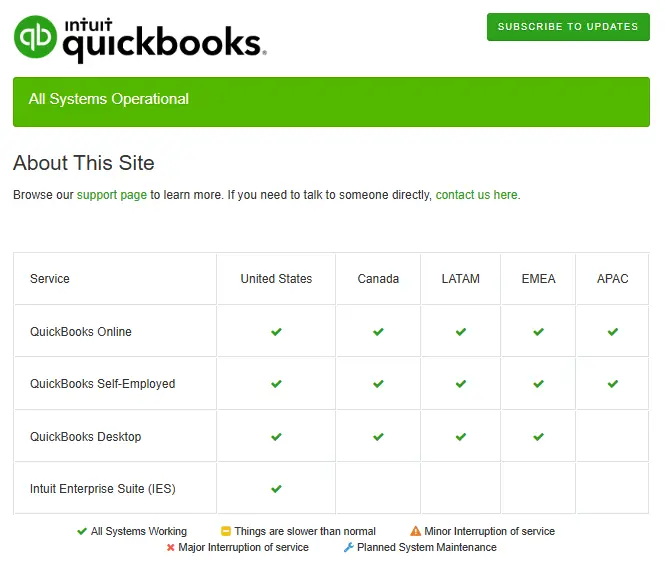
Check QuickBooks Service Status: Before troubleshooting your browser, network, or account settings, check the official QuickBooks Status page to see whether QuickBooks Online Payroll is experiencing an outage or scheduled maintenance.
Resolving QuickBooks Online payroll not working error involves isolating browser glitches, resetting network configurations, and confirming account permissions. Follow the structured troubleshooting steps to fix the QuickBooks payroll processing failed error:
Web browsers save temporary files that can conflict with QuickBooks Online. When this happens, the payroll submit button often stops working.
Corrupted internet connection records on your computer can stop QuickBooks from talking to the Intuit servers. Flushing your DNS wipes out these old connection records so your system can find the correct, secure payroll pathway again. Perform the steps below to fix the QuickBooks Online payroll not working error:
Once the DNS cache has been cleared, try running payroll again. If payroll updates are also failing, follow our guide on QuickBooks Payroll Update Not Working.
If a previous payroll run was interrupted by a lost internet connection, the pending data can get stuck on the processing screen. This creates a data block that can trigger the QuickBooks Online Payroll Not Working Error and stop you from starting or completing new payroll runs. Follow these steps to clear a stuck draft:
Once done, if you are still facing the same QuickBooks Online payroll Not Working or processing failed issue, move to the next troubleshooting step.
An expired payment card or an unpaid balance on your account will cause an immediate pause on your payroll privileges. You must make sure your account is active to send data to Intuit. Follow these steps to check your subscription:
If your payment failed or your billing information needs to be updated, see Intuit’s guide on fixing QuickBooks Online subscription payment issues.
QuickBooks will block the entire payroll transmission if even one employee profile has an empty tax field or a formatting error. Follow these steps to audit your list:
Avoiding the QuickBooks Online Payroll Not Working Error is much easier. Follow these simple, proactive steps to keep your accounting system running smoothly:
QuickBooks Online Payroll not working error is generally caused by browser cache conflicts, blocked network data, or stuck paycheck files. By clearing the browser data, running an ipconfig/flushdns command, and ensuring you are operating in single-user mode, you will resolve the issue for most users.
Always check your subscription status and run through the pre-troubleshooting checklist before modifying deep network settings. If the payroll processing failure continues after completing these steps, contact Data Service Team experts at +1(888)-718-7888 for further help.
QuickBooks Online Payroll may not process because of incorrect payroll settings, an issue with the employee or bank information, an account hold, or a temporary QuickBooks service problem. Check for any error message first, then review your payroll and direct deposit settings.
QuickBooks Online Payroll may stop working because of an outdated browser, internet or connection problems, incorrect account information, or a problem with your payroll subscription. Try signing out and back in, clearing your browser cache, and checking your QuickBooks account for alerts or errors.
Start by checking the error message and confirming that your employee, tax, and bank details are correct. Also make sure your payroll subscription is active, and there are no account alerts or holds. If everything looks correct, try processing payroll again.
QuickBooks may prevent payroll from being processed if required employee information is missing, a payroll setup issue needs attention, your account has a restriction, or there is a problem with your payroll subscription. Review any message QuickBooks displays and complete the required steps before trying again.
Payroll can remain stuck because QuickBooks is still processing the request, there is a connection issue, or the payroll submission needs additional attention. Avoid submitting the same payroll repeatedly. Check the payroll status first to see whether it has already been submitted.
Direct deposit may not work because of incorrect bank information, an inactive or restricted payroll account, an issue with employee direct deposit details, or a processing delay. Check the direct deposit status and verify the bank details before attempting to submit payroll again.
This can happen due to incorrect bank details, incomplete direct deposit setup, or a processing delay. To fix this, check the employees payment information and payroll status in QuickBooks Online.
Yes. Incorrect, inactive, or restricted bank account details can prevent payroll from processing. Check that the bank information is correct and up to date.
Sign in to QuickBooks Online and check for payroll alerts, notifications, or account messages. If your payroll account is on hold, QuickBooks may show the reason and provide steps to resolve it.
Check for error messages, payroll alerts, and incorrect employee or bank details. If everything looks correct and payroll still won’t process, contact the Data Service Team for further help.

Get Free Consultation for QuickBooks Upgrade
(2021, 2022, 2023)


