
Handling the QuickBooks on a local computer or office server can become challenging when teams need to work remotely or access company files from different locations. A QuickBooks Hosted Server provides an alternative by hosting QuickBooks Desktop and its company files on a remote server, allowing authorized users to access them over the internet.
But how does QuickBooks hosting actually work, and is it right for your business? In this guide, we’ll cover the key benefits, requirements, setup process, security considerations, common problems, and costs. We’ll also compare QuickBooks hosting with local servers and QuickBooks Online to help you make an informed choice.
A QuickBooks Hosted Server is a remote server where QuickBooks Desktop and its company files are installed and stored. Instead of keeping everything on a single office computer, authorized users can access the hosted environment through an internet connection. Here are the key features of a hosted QuickBooks setup:
QuickBooks hosting is different from QuickBooks Online. Hosted QuickBooks typically means running QuickBooks Desktop on a remote server, while QuickBooks Online is a separate cloud-based accounting product.
A QuickBooks Hosted Server works by moving your QuickBooks Desktop application and company files to a remote server. Instead of storing and running QuickBooks only on your office computer, users connect to the hosted environment over the internet. The process generally works like this:
This setup allows businesses to use QuickBooks Desktop without maintaining the entire server infrastructure themselves.
For businesses that rely on the QuickBooks program but need more flexibility in how and where their teams work, hosting can offer multiple practical advantages:
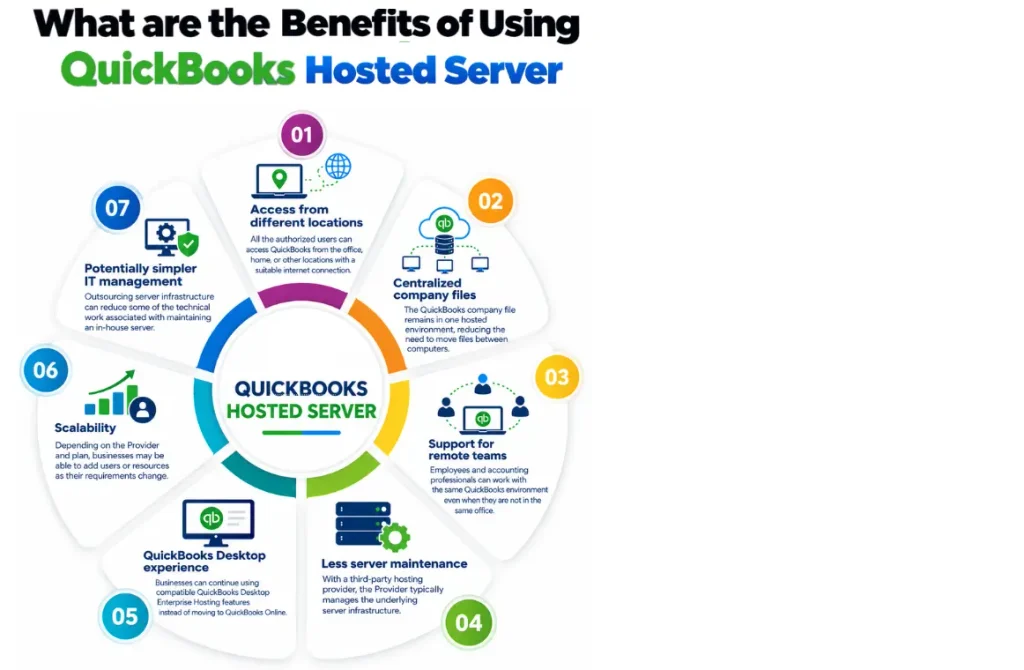
QuickBooks hosting can be a practical option for businesses that want to keep using QuickBooks Desktop while making it accessible to users in different locations. It may be particularly useful for:
However, hosting may not be necessary for a small business where everyone works from one computer or a simple local network. The right choice depends on your users, QuickBooks version, workflow, budget, and IT requirements.
The better option depends on how your business uses QuickBooks. A local server keeps QuickBooks and company files within your own office network, while a hosted server places the QuickBooks Desktop environment on a remote server that authorized users can access over the internet. Here’s how the two compare:
| Factor | QuickBooks Hosted Server | Local Server |
| Access | It can be accessed remotely with an internet connection. | This is primarily designed for access within the local network. |
| Maintenance | Server management is generally handled by the hosting provider | Your business is responsible for server maintenance |
| Remote work | More convenient for distributed teams | May require additional remote-access setup |
| Upfront cost | Usually involves a recurring hosting fee | May require investment in server hardware and setup |
| Scalability | Resources or users may be adjusted depending on the provider | Expansion may require additional hardware or configuration |
| IT responsibility | Some infrastructure responsibilities shift to the provider | Most server responsibilities remain with your business |
A QuickBooks Hosted Server may make more sense for businesses with remote employees, multiple locations, or limited IT resources. A local server can still be a practical choice for businesses that primarily work from one location and already have the infrastructure to manage it.
Rather than choosing based only on price, consider how your team works, who will manage the server, how often users need remote access, and what level of IT support your business requires.
QuickBooks Hosted Server and QuickBooks Online both give businesses the flexibility to work with their accounting data remotely, but they take different approaches. With hosted QuickBooks, the QuickBooks Desktop application and company files are placed on a remote server, allowing authorized users to access the familiar Desktop environment from different locations. QuickBooks Online, on the other hand, is a separate cloud-based accounting product.
| Factor | QuickBooks Hosted Server | QuickBooks Online |
| Product type | QuickBooks program hosted remotely | Cloud-based QuickBooks product |
| Access | Remote access to the hosted Desktop environment | Access through supported web and app interfaces |
| Desktop experience | Keeps the QuickBooks Desktop workflow | Uses the QuickBooks Online interface and features |
| Updates | Depends on the Desktop version and hosting arrangement | Managed as part of the online service |
| Best suited for | Businesses that want QuickBooks Desktop with remote access | Businesses looking for a cloud-based accounting solution |
For businesses that already rely on QuickBooks Desktop and don’t want to change their existing workflow, QuickBooks hosting can offer a convenient middle ground. You get remote access while continuing to work with the Desktop environment your team already knows.
QuickBooks Online may be a better fit if you’re ready to Migrate from QuickBooks Desktop to Online. Before making the switch, consider your required features, number of users, existing workflows, and overall budget.
If QuickBooks Desktop remains important to your business, choosing a reliable QuickBooks hosting provider can make the transition to remote access much easier while reducing the need to manage your own server infrastructure.
Before moving QuickBooks Desktop to a hosted server, it’s important to check whether your software, users, and devices are compatible with the hosting environment. Some of the main things to consider include:
| Requirements | Details |
| Operating System | A supported 64-bit Windows environment. QuickBooks Desktop 2024 supports Windows Server 2016, 2019, and 2022. |
| Processor | Minimum 2.4 GHz x86 processor. |
| RAM | 8 GB for 1–5 users, 12 GB for 10 users, 16 GB for 15 users, and 20+ GB for 20 or more users. |
| Storage | At least 2.5 GB for QuickBooks Desktop, plus additional space for company files. |
| Storage Type | An SSD is recommended for better performance. |
| Internet Connection | A reliable internet connection is needed to access the hosted QuickBooks environment. |
| QuickBooks Version | Confirm that the hosting provider supports your specific QuickBooks Desktop version. |
| Third-Party Applications | Check compatibility with payroll, banking, Microsoft Office, and other applications you use with QuickBooks. |
| Hosting Provider | Review the provider’s supported versions, user limits, support, backup policies, and other services before choosing a plan. |
Make sure these requirements are not the same for every QuickBooks version or hosting setup.
Setting up QuickBooks hosted server usually requires moving the QuickBooks program and company files to a remote server and then giving authorized users Access. The exact process varies by Provider, but the general steps are similar.
Start by comparing providers based on QuickBooks compatibility, user capacity, support, security practices, backup policies, and pricing.
Choose a QuickBooks Hosted server configuration based on the number of users, QuickBooks version, company file size, and applications your business uses.
The Provider can install the supported QuickBooks Desktop version on the hosted server. Existing company files can then be transferred to the hosted environment using QuickBooks Data Migration Services.
Create accounts for authorized employees and configure permissions according to their roles.
Before moving completely to the hosted setup, check that QuickBooks, company files, printers, integrations, and other required applications work as expected.
Once everything is configured, users can connect to the QuickBooks hosted server and work with QB from their supported devices.
Security is one of the first things businesses should consider before moving QuickBooks and company files to a hosted environment. A hosted setup can provide security controls at the server and network level, but the actual protection depends heavily on the hosting provider, configuration, and how users access the system. When comparing providers, look for:
The cost of QuickBooks depends on the product and plan you choose. QuickBooks offers several subscription options designed for businesses with different accounting needs and team sizes. The main QuickBooks Online plans include Simple Start, Essentials, Plus, and Advanced.
| Plan | Regular Price | Users | Suitable For |
| Simple Start | $38/month | 1 user | Small businesses with basic accounting needs |
| Essentials | $85/month | Up to 3 users | Businesses that need additional accounting and reporting features |
| Plus | $140/month | Up to 5 users | Growing businesses that need inventory, budgeting, and project tracking |
| Advanced | $340/month | Up to 25 users | Larger or growing businesses that need advanced features and customization |
When comparing options, look at the overall value of the plan rather than choosing only the lowest price. A suitable plan should provide the features, user access, and support your business needs.
If you’re unsure which option fits your business, comparing the available plans and checking the latest pricing directly with the Provider can help you make a more informed decision.
QuickBooks hosting can make remote accounting easier, but users may still face occasional issues. Most problems are relatively straightforward to identify once you know where to look.
If QuickBooks is running slower than usual, the issue could be related to the internet connection, server resources, or the number of users accessing the hosted environment at the same time. Start by checking the internet connection. If the problem continues, ask the hosting provider to review the server resources and overall performance.
A weak or interrupted internet connection can affect Access to the QuickBooks hosted server. Check your network and make sure your connection is stable.
Incorrect credentials or user permissions can prevent Access. Verify the login details and ask the Provider to check account permissions if needed.
Problems can occur when multiple users access the same company file. If QuickBooks Multi-User Mode Not Working occurs, make sure user permissions and QuickBooks multi-user settings are configured correctly.
Third-party applications and local printers may require additional configuration in a hosted environment. If you experience QuickBooks printing problems, use the QuickBooks Print And PDF Repair Tool. Check compatibility and contact your Provider for assistance.
Choosing a hosting provider with reliable technical support can make these issues easier to resolve when they occur.
Choosing the right QuickBooks hosting provider is just as important as choosing the hosting plan. Look for a provider that supports your QuickBooks version, offers the resources your business needs, and provides clear pricing and customer support. Before making a decision, consider:
A good hosting provider should be transparent about its services, pricing, support, and responsibilities. Taking time to compare these factors can help you choose a hosting solution that fits your business instead of simply choosing the cheapest option.
A QuickBooks Hosted Server can be a practical choice for businesses that want the flexibility of QuickBooks Desktop without managing their own physical server. Before choosing a plan, compare the cost, features, security, support, and user requirements.
Need help getting started? Contact Data Service Team live experts at +1(888)-718-7888 to choose the right hosting setup and make the transition easier.
A QuickBooks Hosted Server allows businesses to run QuickBooks Desktop on a remote server and access it over the internet. It can be useful for teams that need to work with QuickBooks from different locations.




