QuickBooks Error 350 can interrupt your work when you try to connect your bank account or manage financial transactions. This error may occur due to an expired bank connection in QuickBooks Online or problems with transaction links in a QuickBooks Desktop company file. As a result, you may have trouble downloading bank transactions or working with certain invoices and payments. The solution depends on which version of QuickBooks you are using and what caused the error.
In this detailed guide, we’ll explain the common causes of QuickBooks Error 350 and walk you through the simple troubleshooting steps to help resolve it.
QuickBooks error 350 can occur for multiple reasons, whether you use QuickBooks Online or QuickBooks Desktop. By understanding the root cause of the error, you can choose the best solution and avoid unnecessary changes to your company file. Here are the common reasons you may get this error:
After identifying the possible causes of QuickBooks error 350, you can select the appropriate method for your QuickBooks version.
QuickBooks Banking Error 350 can affect your ability to connect bank accounts or work with certain financial transactions. The symptoms may vary depending on whether you use QuickBooks Online or QuickBooks Desktop. Here are some common signs that you may be experiencing this error:
These early symptoms can help you identify the type of QuickBooks error and choose the best solution to fix it.
The steps to fix QuickBooks Error 350 depend on whether the issue is related to your bank connection or your QuickBooks Desktop company file. Before trying any troubleshooting method, make sure you have a stable internet connection. If you use QuickBooks Desktop, create a backup of your company file before making any changes to your transactions.
Let’s look at the solutions for both versions of QuickBooks and see how you can resolve the error.
If QuickBooks Online cannot connect to your bank, your bank connection may have expired or require reauthorization. Reconnecting the account can help restore the connection and allow QuickBooks to download transactions again. Follow these steps:
After reconnecting, check whether QuickBooks can download your latest bank transactions. If the error persists, try the next solution. If QuickBooks still cannot download transactions after reconnecting your bank account, check our guide on QuickBooks Bank Feeds Not Working for additional troubleshooting steps.
If you use QuickBooks Desktop and error 350 involves incorrectly linked transactions, checking your company file can help you identify data problems. If you use QuickBooks Desktop and Error 350 involves incorrectly linked transactions, checking your company file can help identify data problems. You can use the built-in Verify and Rebuild utilities to check for data integrity issues. Follow our guide on Verify and Rebuild Data in QuickBooks Desktop for additional instructions before proceeding with the steps below. QuickBooks includes verify and rebuild utilities for this purpose.
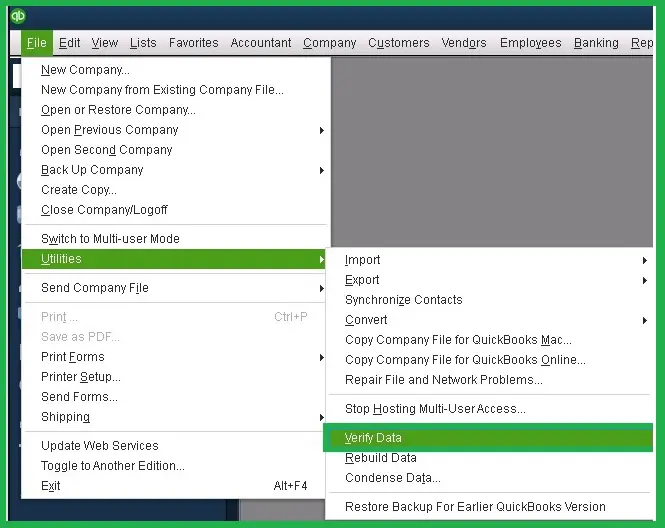
If QuickBooks reports that no problems were found, your company file may not have a data-integrity issue. If it reports that the data has lost integrity, proceed to the rebuild process.
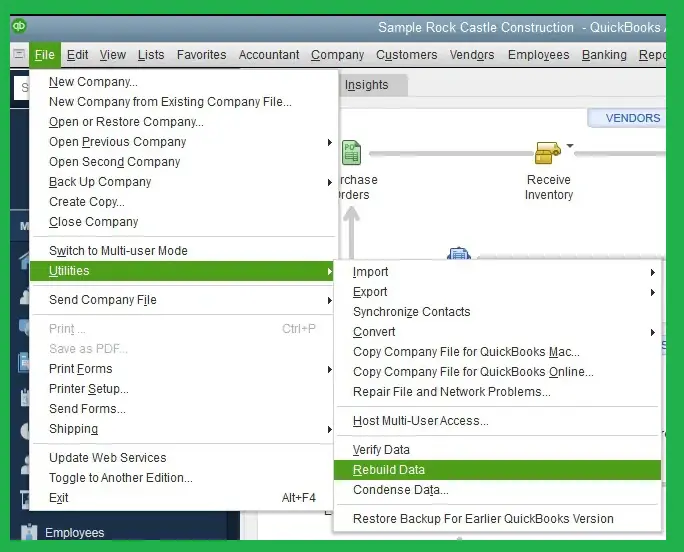
If the error continues after verifying and rebuilding your company file, consider using QuickBooks Tool Hub to investigate further. If data-integrity problems persist, explore QuickBooks Data Repair Services before making additional changes to your invoices or payments. Always back up your company file before attempting further repairs.
If your QuickBooks Bank Connection Error 350 continues after verifying and rebuilding your company file, try QuickBooks Tool Hub. It contains tools that can help you identify and troubleshoot certain company File problems. Here’s how to do it:
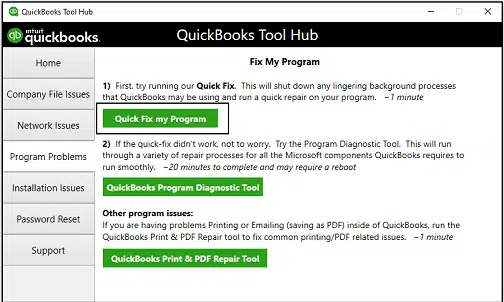
If the problem continues, return to Company File Issues and select QuickBooks File Doctor. Choose your company file, select the option to check the File, and follow the instructions to complete the scan.
Make sure you have a recent backup before running file-repair tools. If QuickBooks still reports Error 350, move on to the next solution.
Outdated browser cache files can interfere with QuickBooks Online and prevent banking features from working correctly. Clearing the cache may help you fix the issue. Here is how you can do it in Google Chrome:
You can also open QuickBooks Online in an incognito window to check whether the issue is related to your regular browser session.
Remember that clearing the cache may sign you out of some websites or remove temporary browsing data. If Error 350 still appears, continue with the next solution.
QuickBooks Error 350 may appear when your bank requires you to verify your identity or update your sign-in details. Bank connection problems can sometimes appear with other QuickBooks banking errors. Depending on the message you receive, see our guides on QuickBooks Error 324, QuickBooks Error 102, QuickBooks Error 105, and QuickBooks Error 108 for related troubleshooting steps. Some banks also require users to renew their authorization periodically for security reasons. Follow these steps to check your bank connection:
If you use QuickBooks Online, you may need to select Fix now under the affected account.
Once you’ve completed these steps, try updating your bank transactions again. If the error remains, contact your bank to check whether it is experiencing connection issues or has changed its online banking requirements.
If you use QuickBooks Desktop, installing the latest available updates can help address software issues and improve compatibility. However, an update may not resolve QuickBooks Error 350 if the underlying problem involves damaged company file data or incorrectly linked transactions. Follow these steps to check for updates:
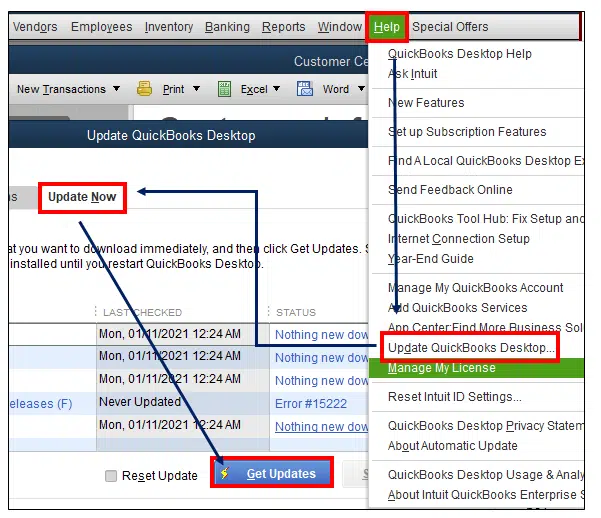
Before installing updates, make sure you save your work and back up your company file when appropriate.
If the error continues after updating QuickBooks, move on to the next troubleshooting method.
If QuickBooks Error 350 continues to appear, reviewing the error log may help you identify the transaction or company file issue causing the problem. This can be useful when the error involves invoices, payments, or transfers of Credits. Follow these steps:
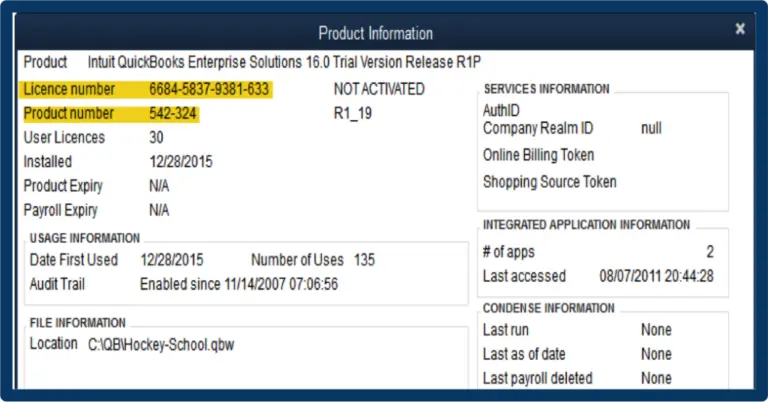
The log may help you identify which transactions need further investigation. Avoid deleting or changing transactions based only on a log entry, as invoices, payments, and journal entries may be linked.
If QuickBooks Desktop is having trouble downloading bank transactions, refreshing the connection can help you restore the communication with your financial institution. This step is useful when the banking connection needs to be reauthorized or updated. Follow the steps below:
If the connection still fails, check your bank’s website for service announcements or contact the bank to confirm whether any changes to its security requirements are affecting QuickBooks.
If QuickBooks Error 350 is related to an incorrectly linked invoice, payment, or journal entry, you may need to correct the affected transaction. Before making any changes, create a backup of your company file and identify the exact transaction mentioned in the error message or log. Follow these steps:
Before troubleshooting QuickBooks Error 350, identify the cause of the problem and take a few precautions to avoid unnecessary changes to your accounting data.
Completing these checks will help you select the appropriate troubleshooting method and reduce the risk of disrupting your financial records.
Although QuickBooks Error 350 can occur when a blank connection expires or when transactions are incorrectly linked in QuickBooks Desktop, by following a few preventive measures, you can reduce the chances of recurring problems.
By following these preventive tips, you can reduce the chances of recurring problems and keep your financial records organized.
Make QuickBooks Work Smarter for Your Business
Spend less time managing data and more time growing your business. Whether you need help setting up QuickBooks, cleaning up your books, reconciling accounts, or resolving errors, our team is here to make accounting easier. Get quick solutions that save time, improve accuracy, and keep your business finances on track.
QuickBooks Error 350 can easily interrupt your work by preventing your bank connections or causing problems with linked transactions. To fix this error code, you need to identify whether you are using QuickBooks Online or QuickBooks Desktop and follow the appropriate troubleshooting steps. Reconnecting your bank account, verifying your company file, or correcting affected transactions may help you resolve the issue.
Always back up your company file before making changes. If the error continues after applying the above mentioned methods, contact the Data Service Team experts at +1(888)-718-7888 for further assistance.
QuickBooks Error 350 usually occurs when QuickBooks has trouble connecting to your bank account or syncing bank transactions. It may happen because of a bank connection issue, outdated login details, or a problem with the bank’s online services.
To fix QuickBooks Error 350, check your internet connection, update your bank login details, and try refreshing your bank account connection. If the error continues, disconnect and reconnect your bank account after checking for any pending transactions.
Open QuickBooks and go to the Banking or Transactions section. Select your bank account, disconnect it if necessary, and then connect it again using your updated bank login details. Make sure you review any pending transactions before reconnecting.
No, QuickBooks Error 350 does not normally delete your existing transactions or accounting data. However, some recent bank transactions may not appear until the bank connection is restored. It is a good idea to back up your company file before performing troubleshooting steps.
The error may return because of outdated bank login details, temporary bank server issues, expired account permissions, or an ongoing connection problem. Check your bank account access and update QuickBooks if needed.
If the Verify Data tool fails, create a backup of your company file first. Then, use the Rebuild Data tool in QuickBooks Desktop to repair certain data issues. If the problem continues, contact a Data Service Team professional for further assistance.
You can usually try basic troubleshooting steps yourself, such as checking your internet connection, updating bank login details, and reconnecting your account. If the error continues or QuickBooks reports company file damage, professional Help may be needed.
Basic troubleshooting, such as refreshing your bank connection or updating login details, usually does not cost extra. However, professional technical support or paid repair services may charge a fee, depending on the service you choose.

Get Free Consultation for QuickBooks Upgrade
(2021, 2022, 2023)


