Have you encountered the QuickBooks Abort Error when work on the company file? It can cause QuickBooks Desktop to shut down/ interrupt financial tasks/ and unable you to access important financial data. The error may occur due to damaged company files/ corrupted installation components/ network connectivity issues/ or incorrect hosting configurations. QuickBooks may also crash due to issues discussed in our guide to QuickBooks Has Stopped Working. You need to examine the common causes to resolve the problem.
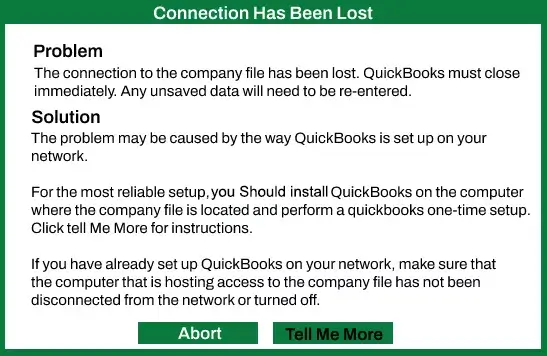
Here, we will explain the common causes of the QB Abort Error and provide step-by-step solutions to help you resolve it. Follow these practical methods to restore QuickBooks performance and reduce interruptions to financial activities.
These errors happen after Windows updates/ file corruption and a common fix is changing the compatibility execution mode to “Very strict execution” or uninstalling the recent Windows update. It may display a message indicating that QuickBooks has encountered a problem and needs to close. The Abort error can halt the workflow and prevent access to important financial records.
The causes behind this problem can be outdated QuickBooks software or Windows components. You can update QuickBooks or run a diagnostic tool to resolve it. It is recommended to create a backup of your company file before fixing it to secure your financial data.
This error occurs when QuickBooks Desktop shuts down while opening/working on a company file. Several factors can trigger this issue and affect financial tasks. The common causes include:
The error can cause unexpected interruptions while using QuickBooks Desktop. Recognizing its symptoms can help you examine the issue and take appropriate troubleshooting steps. Common symptoms include:
Follow these six essential steps before troubleshooting the QuickBooks Abort Error:
Are you looking for fast and simple fixes to resolve the Abort error in QuickBooks? Here are multiple solutions to fix this error effectively:
A QuickBooks Abort Error occurs when the QuickBooks application unexpectedly shuts down or crashes. The below steps will help to resolve QuickBooks Abort error message when opening if security software is blocking QuickBooks processes.
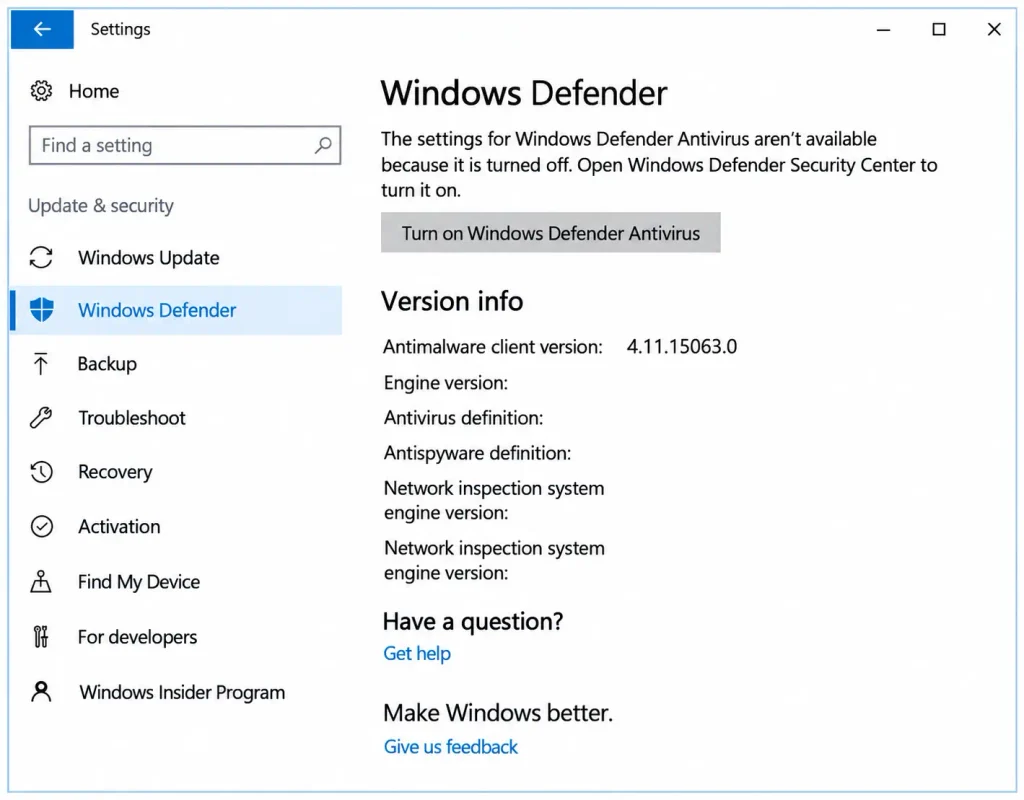
Once you restart the computer, Windows Defender will be enabled again.
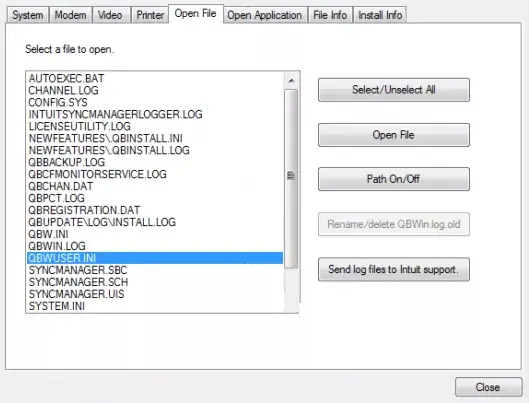
You need to rename the QBWUSER.INI file can resolve a QuickBooks Abort error when try to open Desktop and the root cause is a corrupted configuration file. Here are the steps to rename the file:
You can Update QuickBooks Desktop to resolve the Abort error if it is caused by outdated software/ a bug addressed in a newer release. Intuit releases updates and critical fixes to patch known software glitches. It causes unexpected crashes/ connection drops. Ensure QuickBooks and Windows OS are on the latest versions to prevents conflicts with system components.
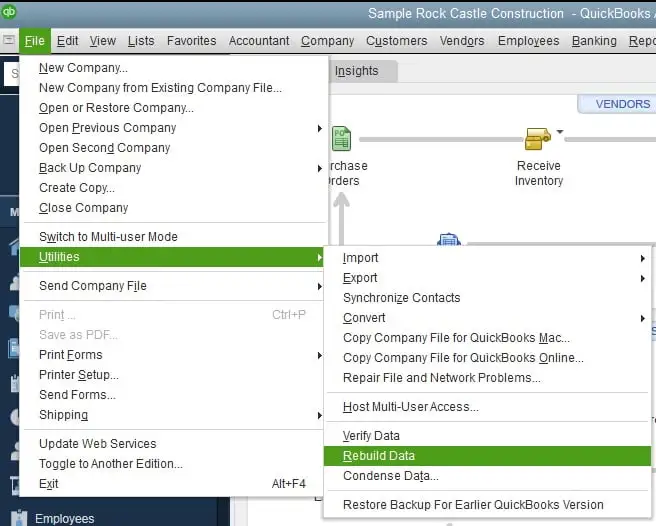
The Verify Data tool checks for company file issues, while Rebuild Data attempts to repair detected damage. Follow our guide to Verify and Rebuild Data in QuickBooks Desktop for detailed steps. Use these utilities to fix data damage in QuickBooks Desktop.
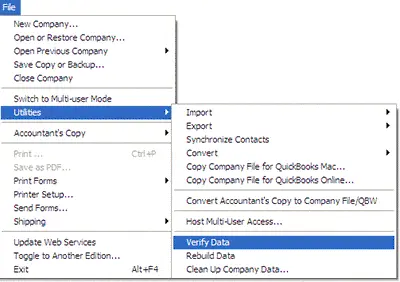
If the verify tool finds data damage, use rebuild tool to repair the company file. A backup is required before you can rebuild.
Run QuickBooks Tool Hub and File Doctor can help resolve QuickBooks abort errors/ unexpected crashes. This issue may be caused due to minor company file data damage/ network drop-offs/ or damaged background components.
Now, Run QuickBooks File Doctor
Note: If the QuickBooks File Doctor does not open, move to QuickBooks Desktop File Doc and open it manually.
Remember: The scan time is based on the file size and can take around 10-15 minutes. The scan may say it was unsuccessful even if it fixes your issue. Once it finishes, try to open QuickBooks and the company file.
This method helps resolve a QuickBooks abort error if the issue is caused by network communication blockage between a workstation and the host server.
If your firewall blocks QuickBooks connections, see our guide on Windows Firewall is Blocking QuickBooks for additional troubleshooting steps.
If you use multiple versions of QuickBooks Desktop on the same computer, perform these steps for each version:
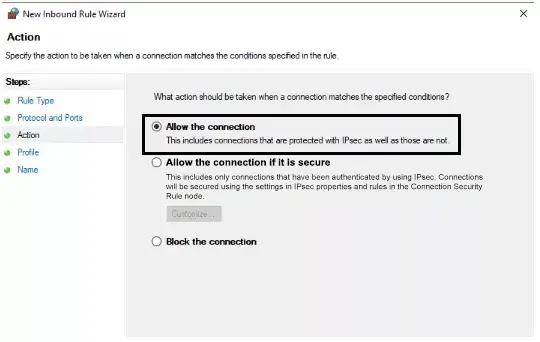
Repeat the steps, but choose Outbound Rules in step 4.
| Executable files | Location |
| AutoBackupExe.exe | C:\Program Files\Intuit\QUICKBOOKS YEAR |
| Dbmlsync.exe | C:\Program Files\Intuit\QUICKBOOKS YEAR |
| DBManagerExe.exe | C:\Program Files\Intuit\QUICKBOOKS YEAR |
| FileManagement.exe | C:\Program Files\Intuit\QUICKBOOKS YEAR |
| FileMovementExe.exe | C:\Program Files\Intuit\QUICKBOOKS YEAR |
| QuickBooksMessaging.exe | C:\Program Files\Intuit\QUICKBOOKS YEAR |
| QBW32.exe | C:\Program Files\Intuit\QUICKBOOKS YEAR |
| QBDBMgrN.exe | C:\Program Files\Intuit\QUICKBOOKS YEAR |
| QBServerUtilityMgr.exe | C:\Program Files\Common Files\Intuit\QuickBooks |
| QBCFMonitorService.exe | C:\Program Files\Common Files\Intuit\QuickBooks |
| QBLaunch.exe | C:\Program Files\Common Files\Intuit\QuickBooks |
| QBUpdate.exe | C:\Program Files\Common Files\Intuit\QuickBooks\QBUpdate |
| IntuitSyncManager.exe | C:\Program Files\Common Files\Intuit\Sync |
| OnlineBackup.exe | C:\Program Files\QuickBooks Online Backup |
The Host multi-user access option should be turned off on the workstations when the QuickBooks Abort error keeps appearing. For more help, read our guides on QuickBooks Multi-User Mode Not Working and QuickBooks Hosting Mode is Off. These are the computers on the network that do not host company files. The server computer should be the single host.
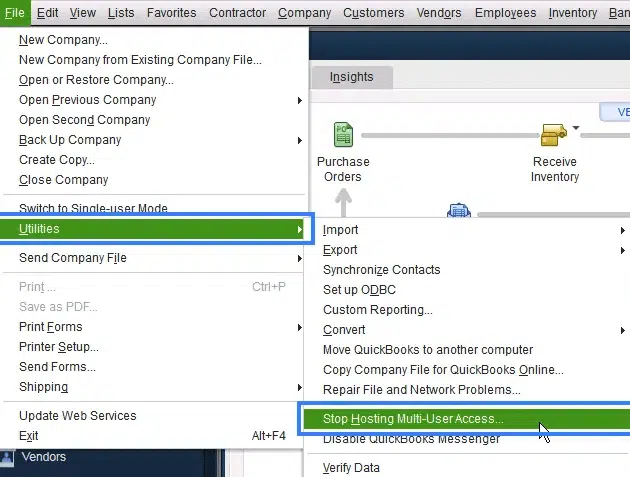
Once you have checked your workstations, move on to the server computer. This is the computer that hosts the company files.
This effective solution can resolve the Abort error in QuickBooks if the issue stems from damaged program files/ stuck background processes.
Maintain smooth accounting operations and reduce application crashes to prevent the QuickBooks Abort error. Follow these six best practices to minimize the chance of this issue:
Note: Causes behind Abort Errors in QuickBooks are damaged QBWUSER.INI files,/strong security by anti-virus software/ improper installation/ or software permissions.
Make QuickBooks Work Smarter for Your Business
Spend less time managing data and more time growing your business. Whether you need help setting up QuickBooks, cleaning up your books, reconciling accounts, or resolving errors, our team is here to make accounting easier. Get quick solutions that save time, improve accuracy, and keep your business finances on track.
The QuickBooks Abort Error can disrupt the financial workflow and prevent you from accessing important company files. You must examine the causes and apply the appropriate solutions to resolve the issue. Updating QuickBooks Desktop/using QuickBooks Tool Hub/checking network settings/ and repairing damaged company files may restore normal functionality. Create a backup of the company file to perform the major troubleshooting steps and protect the financial data.
Need expert help to resolve the QuickBooks Abort Error? Contact our Data Service Team professionals at +1(888)-718-7888 today for reliable guidance and support.
You need to close the program and download the QuickBooks Tool Hub to run Quick Fix My Program from the Company File Issues tab to fix the abort error. If the error still continues, rename your QBWUSER.INI file to QBWUSER.OLD in your local user AppData folder to reset corrupted settings. Disable the antivirus/ firewall to check for network interference.
This error occurs when it suddenly loses connection to the company file/ crashes due to damaged files. It includes a corrupted QBWUSER.INI file/ network or multi-user hosting conflicts/ third-party antivirus/damage to the company data file. Use utilities like QuickBooks Tool Hub/ check data through QuickBooks Community to resolve this issue.
Yes! A damaged/ corrupted QB installation can cause unexpected program errors/ failure to launch. QuickBooks cannot execute routine tasks and open windows like the Abort screen when core program files/ registry components cannot execute routine tasks. Run QuickBooks Tool Hub to run Quick Fix my Program to resolve this issue.
You must first download and install the Tool Hub to repair QuickBooks when a persistent QuickBooks Abort error keeps appearing. It is the official diagnostic software designed by Intuit to resolve common application issues. Close accounting software and open the Tool Hub. Navigate to Program Problems to run the QuickBooks Diagnostic Tool if the error is related to core system files.
Yes! This can fix the Abort error if the issue stems from software bugs/ outdated OS compatibility. However, an update alone will not solve the error if it is caused by hardware problems/ a corrupted company file/ damaged .INI settings files/ etc. It requires separate solutions like running the QuickBooks Tool Hub or using the Verify & Rebuild data utilities.
QB closes after showing the abort error because a sudden breakdown in communication/ data integrity forces the software to protect itself by terminating the sessions. This happens due to network disruptions/ Wi-Fi drops in a multi-user setup/ a corrupted QBWUSER.INI configuration file/ corruption within the company data file. It can also be triggered when the host computer/ server enters sleep/ hibernation mode.
Yes! Address program and company file issues with QuickBooks Tool Hub to fix the QuickBooks abort error. You can open the Tool Hub and run Quick Fix My Program under the Program Problems tab to repair background glitches. You need to adjust Windows power settings/ update software/ or reconfigure the network permissions if the abort error stems from external causes like sleep mode/ network drops.
You must maintain a stable network environment and keep software optimized to prevent the QuickBooks Abort error from appearing again. Ensure that both QuickBooks Desktop and the Windows operating system are updated to patch known stability bugs. The error is triggered by a disrupted connection between the workstation and the company file. Use a stable, wired network connector than Wi-Fi for multi-user setups. Configure firewall and antivirus software to grant full permissions to QuickBooks.
You need to install QuickBooks again to fix the abort error as a last resort after you have tried simple fixes like updating software and running the QuickBooks Tool Hub File Doctor. Reinstallation becomes essential when core program files are damaged. The QBWUSER.INI configuration file is deeply corrupted, and lighter solutions fail to stop the software from closing.

Get Free Consultation for QuickBooks Upgrade
(2021, 2022, 2023)


