Calculating employee wages, payroll taxes, and take-home pay accurately is essential for effective payroll management. The QuickBooks Payroll Calculator helps employers and employees estimate gross earnings, applicable tax withholdings, and net pay using details such as salary, hourly rates, overtime, and pay frequency.
Whether you manage payroll for a small business or want to understand your expected paycheck, a QuickBooks payroll calculator can simplify these estimates. However, it is important to understand the difference between a free paycheck calculator and QuickBooks Payroll software, which offers additional payroll processing and tax management features.
In this guide, you’ll learn how the QuickBooks Payroll Calculator works, what information you need, how to estimate employee pay, its benefits and limitations, and when using dedicated payroll software makes more sense.
The QuickBooks Payroll Calculator is an online tool designed to help users estimate employee earnings, payroll deductions, and take-home pay. Depending on the calculator, users can enter details such as hourly wages, annual salary, overtime, pay frequency, and applicable tax information to calculate an estimated paycheck.
It is useful for business owners who want to plan payroll expenses and employees who want to understand how much they may receive after deductions. However, a paycheck calculator is different from QuickBooks Payroll software. The calculator provides estimates, whereas an eligible QuickBooks Payroll subscription can help businesses calculate employee wages, process payments, manage payroll records, and handle payroll tax obligations.
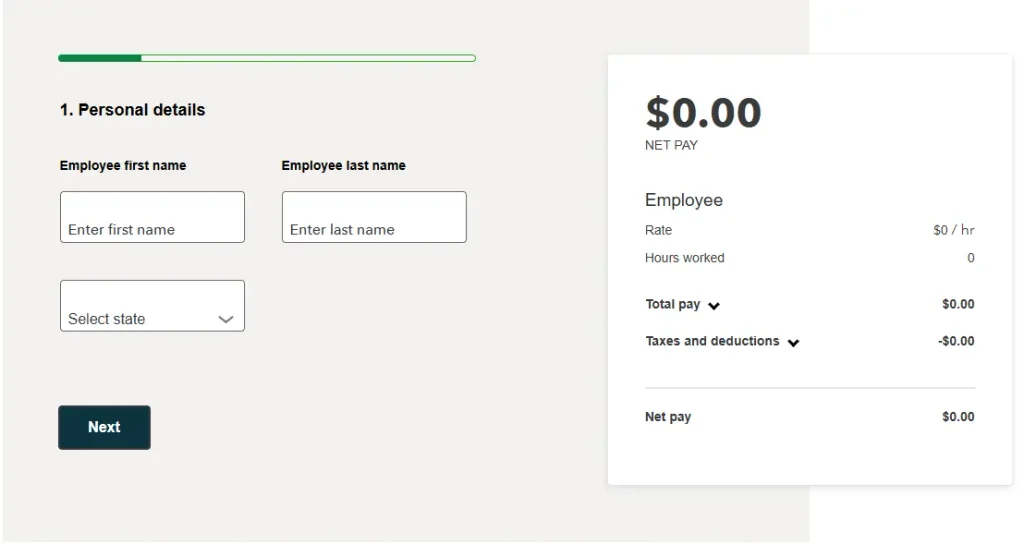
The QuickBooks Payroll Calculator estimates an employee’s gross earnings, applicable tax withholdings, and net pay using the payroll details entered. The calculation depends on factors such as employee location, pay type, pay frequency, earnings, and federal and state withholding information. Follow these steps to estimate an employee’s paycheck:
Important: The calculator provides an estimated paycheck breakdown. Actual take-home pay may differ because of benefit contributions, retirement deductions, garnishments, local taxes, and other payroll-specific rules.
The QuickBooks Payroll Calculator allows employers and employees to estimate paycheck amounts by entering employee earnings and tax information. You can use the following steps to calculate an estimated paycheck:
Note: These steps explain how to estimate a paycheck using the online calculator. To process employee payments, manage payroll records, or handle payroll tax filings, you need an eligible payroll service.
Before calculating payroll, employers should ensure that all employee details are entered correctly. If you are setting up a new employee, follow our guide on Add Employee to QuickBooks Payroll to maintain accurate payroll records. You need to gather employee information/earnings details/ tax information/ and any deductions to ensure accurate payroll calculations in QuickBooks.
| Required Information | Details |
| Employee Details | Legal name/ address/ hire date/ and required tax forms. |
| Pay Rate | Hourly wage/ salary. |
| Pay Schedule | Weekly/ biweekly/ semimonthly/ or monthly. |
| Working Hours | Regular hours/ overtime/ and paid leave/ if applicable. |
| Additional Earnings | Bonuses/ commissions/ and tips/ if applicable. |
| Tax Information | Federal EIN/ employee withholding forms/ and applicable state tax details. |
| Deductions and Benefits | Insurance/ retirement contributions/ and other applicable deductions. |
| Previous Payroll Records | Year-to-date wages and tax payments/ if payroll was processed during the year. |
| Bank Details | Employee & company bank information for direct deposit and electronic tax payments, if applicable. |
For U.S. employees, the employee’s Form W-4 helps determine federal income tax withholding. Employers may also need applicable state withholding forms and accurate records of employee earnings. After payroll processing, learn how to Print W-2 Forms in QuickBooks to prepare employee wage and tax statements.
Refer to the IRS Publication 15 (Employer’s Tax Guide) for federal employment tax requirements. Employers must also understand applicable federal payroll reporting requirements. Learn how to prepare and manage Form 941 in QuickBooks to report federal income tax withholding and Social Security and Medicare taxes.
Yes! QuickBooks paycheck calculator is free to use, but QuickBooks Payroll software requires a paid subscription. Go through the pointers below for better insight:
This tool helps calculate paychecks based on pay type/ pay rate/ bonus/ commission/ overtime/ and federal/state taxes.
| Benefit | Explanation |
| Free to Use | Estimate paycheck amounts without purchasing payroll software. |
| Quick Pay Estimates | Calculate estimated gross pay and take-home pay. |
| Overtime Calculation | Include eligible overtime earnings in paycheck estimates. |
| Tax Estimation | Estimate applicable federal and state tax withholdings. |
| Bonus and Commission Support | Include additional earnings in calculations. |
| Better Financial Planning | Understand how taxes and deductions affect take-home pay. |
| Downloadable Results | Download paycheck calculation details as a PDF. |
Accountants managing payroll for multiple clients can also explore QuickBooks Enhanced Payroll for Accountants to learn about additional payroll management features and reporting capabilities.
This calculator is beneficial when it comes to estimating employee pay/ taxes/ and deductions. But you also must be aware of the limitations of the QuickBooks net pay calculator, which are as follows:
Note: Consider an eligible QuickBooks Payroll subscription for detailed payroll processing and tax calculations. Also, review the results before submitting payroll.
QuickBooks payroll calculator for employees estimates wages/ payroll taxes/ and net pay. On the other hand, QB Payroll Software automates salary calculations/ tax deductions/ direct deposits/ and payroll processing. Each serves different payroll needs for businesses.
| Comparison | QuickBooks Payroll Calculator | QuickBooks Payroll Software |
| Primary Purpose | Estimates payroll costs and employee take-home pay. | Manages and automates the entire payroll process. |
| Functionality | Performs basic payroll calculations. | Handles complete payroll operations. |
| Salary Calculation | Calculates gross and net pay. | Calculates salaries, deductions, and net pay automatically. |
| Tax Calculation | Estimates payroll tax deductions. | Calculates and helps manage payroll tax payments and filings, depending on the plan. |
| Automation | Usually requires manual input. | Automates recurring payroll tasks. |
| Direct Deposit | Not typically available. | Supports employee direct deposits. Follow our guide to Set Up Direct Deposit in QuickBooks to learn how to configure electronic employee payments. |
| Employee Management | Limited or no employee management. | Supports employee payroll records and management. |
| Best For | Individuals, freelancers, and employers estimating payroll. | Small and growing businesses managing regular payroll. |
Businesses that need additional payroll assistance can also explore QuickBooks Assisted Payroll to understand how assisted payroll services can help manage payroll tax responsibilities.
QuickBooks payroll can yield errors due to incorrect employee details/ outdated tax rates/ or missing information. Advance identification of these issues helps ensure accurate payroll and avoid tax problems.
| Common Payroll Errors | Solutions |
| Incorrect Employee Information | Verify employee details/ filing status/ and tax information. |
| Wrong Tax Calculations | Check applicable federal/ state/ and local tax rates. |
| Incorrect Salary or Hourly Rate | Review employee pay rates and update incorrect amounts. |
| Overtime Calculation Errors | Verify overtime hours and applicable overtime pay rules. |
| Incorrect Tax Withholdings | Review employee W-4 details and withholding settings. |
| Missing Payroll Deductions | Check benefit contributions/ insurance/ and other deductions. |
| Incorrect Pay Period Settings | Confirm the correct payroll schedule and pay frequency. |
| Outdated Payroll Tax Tables | Update QuickBooks Payroll and review the QuickBooks Payroll Tax Table Update process to ensure you are using the latest supported tax rates. |
| Incorrect Net Pay | Recheck gross wages/ taxes/ and deductions. |
| Duplicate Payroll Entries | Review payroll records and remove duplicate transactions. |
QuickBooks paycheck calculator has various cost plans based on business size and payroll needs. It features a monthly subscription fee plus charges per employee.
Yes! QuickBooks provides separate payroll calculators for the USA and Canada. Each calculator follows its respective country’s payroll tax rules/ deductions/ and regulations. You should use the calculator designed for the employee’s country of employment.
QuickBooks can miscalculate employee paychecks for several reasons, including:
If you use QuickBooks Online and experience payroll processing or calculation issues, see our guide on QuickBooks Online Payroll Not Working for troubleshooting steps.
Make QuickBooks Work Smarter for Your Business
Spend less time managing data and more time growing your business. Whether you need help setting up QuickBooks, cleaning up your books, reconciling accounts, or resolving errors, our team is here to make accounting easier. Get quick solutions that save time, improve accuracy, and keep your business finances on track.
The QuickBooks Payroll Calculator makes it easier to estimate employee earnings, payroll tax withholdings, and take-home pay. By entering accurate information about wages, working hours, bonuses, and tax details, users can better understand how different factors affect their paycheck.
However, the calculator provides estimates rather than complete payroll processing. Businesses that regularly manage employee payments, payroll records, and tax obligations may benefit from an eligible QuickBooks Payroll subscription.
If you need help managing QuickBooks payroll operations or resolving payroll-related issues, Data Service Team can help you understand the available options and maintain organized financial records. Contact our team at +1(888)-718-7888 for more information.
You need to enter employee details/set up pay rates/ calculate wages/ taxes/ and deductions for each pay period. Add employee information/ including salary/ hourly rates/ tax withholding details/ and benefits. Record regular hours/ overtime/ bonuses/ and other earnings/ where applicable. QuickBooks Payroll can then calculate gross pay/ applicable payroll taxes/ and deductions to determine each employee’s net pay.
Whether the QuickBooks payroll tax calculator is free to use depends on the specific calculator/ payroll tool you choose. Basic online payroll calculators may be available for free to estimate gross pay/ payroll taxes/ deductions/ and take-home pay. QuickBooks Payroll is a paid service/ and includes automated payroll calculations/ direct deposit/ and tax payments. Payroll filing features require a suitable subscription.
It provides accurate payroll estimates when you enter the correct employee wages/ pay frequency/ tax withholding details/ and applicable deductions. Its accuracy depends on the information provided and whether the calculator accounts for the relevant federal/ state/ and local tax rules. The estimated total pay may differ from the final paycheck. This is due to benefits/ retirement contributions/ and additional earnings.
Yes! Calculate hourly wages/ overtime/ salaries using QuickBooks based on the product and payroll subscription. Enter the hours worked and hourly pay rate to calculate gross earnings for hourly employees. QuickBooks Payroll can calculate eligible overtime pay based on recorded hours/ configured pay rates/ and applicable labor laws for overtime. Enter the annual salary and pay schedule to determine earnings for each pay period for salaried employees.
Yes! The calculator can estimate federal/ state payroll taxes based on the specific calculator and the information you provide. Federal taxes may include federal income tax withholding/ Social Security/ and Medicare for U.S. payroll. State taxes may include state income tax withholding and other applicable state payroll taxes. The accuracy of these estimates depends on employee tax details/ work location/ earnings/ and current tax rules.
A paycheck calculator and QuickBooks Payroll software differ in purpose as well as performance. A calculator is a free online tool that estimates gross wages/ overtime pay/ payroll taxes/ and deduction. In contrast, QuickBooks Payroll is a paid payroll management solution that helps businesses calculate employee wages and manage payroll records. A payroll is better suited for businesses that need to process employee payments on time.
You need to use separate payroll calculators based on a specific country for the USA and Canada. The U.S. paycheck calculators estimate U.S. federal and applicable state tax withholdings. Canadian payroll calculations involve Canadian federal and provincial deductions. It includes Canada Pension Plan contributions and Employment Insurance premiums. Choose the calculators designed for the employee’s work jurisdiction.
QB may calculate incorrect paycheck of an employee due to inaccurate employee information/ incorrect pay rates/ or outdated payroll tax details. Incorrect federal/ state tax withholding forms/ benefit deductions/ retirement contributions/ and result from incorrect tax tables. Review the employee’s profile/ verify regular and overtime hours to resolve this issue. Compare the paycheck details with the employee’s timesheet to ensure accurate payment calculations.
QuickBooks payroll cost depends on the plan/ number of employees/ and features your business needs. The official cost page lists plans starting at $50 per month and $7 per employee per month at the regular list cost. However, promotional discounts may be available. QuickBooks Payroll can be worth the investment for businesses that want to automate wage calculations and manage direct deposits.

Get Free Consultation for QuickBooks Upgrade
(2021, 2022, 2023)