
Does the “QuickBooks hosting mode is off’ error prevent you from accessing the company file in Multi-user mode, causing delays in business operations?
If yes, this usually happens when your system isn’t configured correctly to host the company file in multi-user mode. As a result, it restricts workstations’ access, disrupts collaboration, and may trigger errors when switching to multi-user mode.
In this comprehensive guide, we have explained the causes of the “QuickBooks Hosting mode is off” error and provided useful solutions to fix it effectively.
Want to experience QuickBooks hosting before you commit? Contact Data Service Team for a free demo and discover secure, high-performance QuickBooks Enterprise Hosting at a budget-friendly price.
The hosting mode in QuickBooks allows a server computer to host the company file, enabling multiple users to access it from different locations at the same time.
If the hosting mode is turned off, it indicates that your computer is not configured properly to host the company file with other workstations. As a result,
The following are the major factors that may trigger the QuickBooks hosting mode off issue.
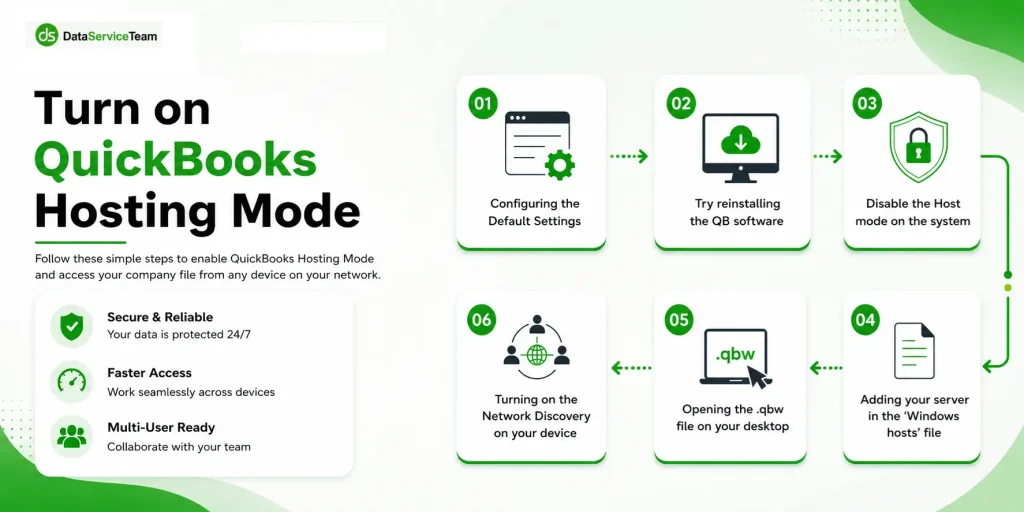
If the QuickBooks Hosting Mode is Off in your system, then perform the following troubleshooting methods to fix the issue.
Corrupted or damaged QuickBooks Network Data (.ND) and Transaction log (.TLG) files can prevent multi-user mode and may cause a hosting mode error QuickBooks.
When you rename both these files, QuickBooks automatically recreates them when you reopen the company file or scan the company files using the QuickBooks database server manager. Follow these steps to rename the files;
If the QuickBooks Database Server Manager isn’t configured correctly, it prevents you from sharing your company file with other workstations over the network. Thus, it might cause the QuickBooks Database Manager hosting mode is off error. So, to fix the issue, follow these steps to run the QBDBMgrN properly.
The QuickBooks File Doctor tool from the tool hub is used to fix the damaged or corrupt company file. Use the following steps to run this tool and repair the damaged file to fix the QuickBooks file doctor hosting mode is off error.
Incorrect folder permissions can prevent QuickBooks from accessing the company file and may trigger hosting-related issues. Follow these step-by-step instructions to set up a folder and Windows access permissions to rectify the QuickBooks hosting mode is off issue.
Start the process by checking that the permissions are set accurately.
If your permissions aren’t configured properly, apply the following steps.
Use these steps to change your folder permissions accurately.
| C:\Program Data\Intuit\Entitlement Client\v8 |
| C:\Program Data\Intuit\Entitlement Client\v6.0 |
| C:\Program Data\Intuit\Entitlement Client\v5 |
| C:\Program Data\Intuit\Entitlement Client\v3 |
| C:\Program Data\Intuit\Entitlement Client |
| C:\Program Data\Intuit\QuickBooks Enterprise Solutions X.0 (X = version) or C:\Program Data\Intuit\QuickBooks 20XX (XX = year) |
| C:\Program Data\COMMON FILES\INTUIT |
| C:\Program Data\COMMON FILES\INTUIT\QUICKBOOKS |
| C:\Users\Public\Public Documents\Intuit\QuickBooks\FAMXX (XX = year) |
| C:\Users\Public\Public Documents\Intuit\QuickBooks\Company Files |
| C:\Users\Public\Public Documents\Intuit\QuickBooks\Sample Company Files\QuickBooks Enterprise Solutions X.0 (X = version) or C:\Users\Public\Public Documents\Intuit\QuickBooks\Sample Company Files\QuickBooks 20XX (XX = year) |
Next, repeat the following steps for each relevant QuickBooks folder on your system. Keep in mind that the available folders may vary depending on the version of QuickBooks Desktop you’re using, so you may not see every folder listed below.
You must verify that Windows has enough access permissions so that you can avoid issues you may get while working with your company file over the network. Perform the following steps on the Windows 10 operating system.
Issues with the network connection may also trigger hosting mode errors in QuickBooks Desktop. So, to fix the issue, ping the server from a workstation to test the internet connection. Ping your server from each workstation that is encountering the issue.
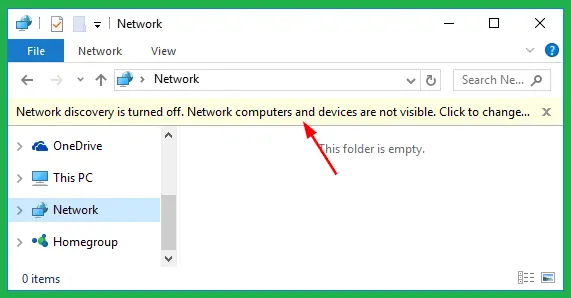
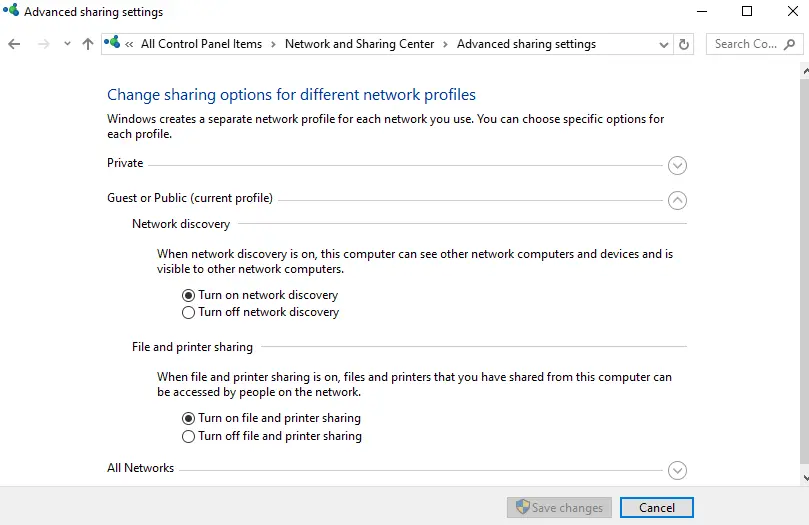
To identify your server name, follow these steps on the server computer:
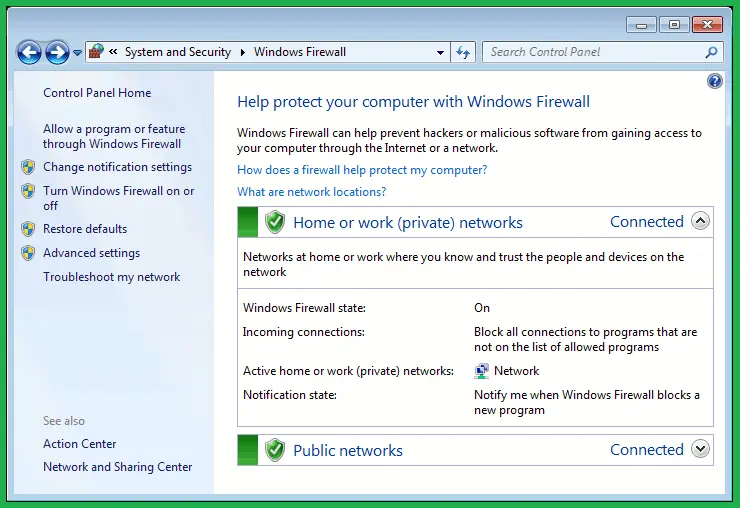
The next solution is to check the firewall settings and look if QuickBooks is added as an exception to the port to prevent the QuickBooks file not opening in multi-user mode error. Apply the following stepwise instructions to correct the firewall settings.
| QuickBooks Desktop 2020 and later | 8019, XXXXX |
| QuickBooks Desktop 2019 | 8019, XXXXX |
| QuickBooks Desktop 2018 | 8019, 56728, 55378- 55382 |
| QuickBooks Desktop 2017 | 8019, 56727, 55373-55377 |
Create Firewall exceptions for QuickBooks programs
| AutoBackupExe.exe | C:\Program Files\Intuit\QUICKBOOKS YEAR |
| Dbmlsync.exe | C:\Program Files\Intuit\QUICKBOOKS YEAR |
| DBManagerExe.exe | C:\Program Files\Intuit\QUICKBOOKS YEAR |
| FileManagement.exe | C:\Program Files\Intuit\QUICKBOOKS YEAR |
| FileMovementExe.exe | C:\Program Files\Intuit\QUICKBOOKS YEAR |
| QuickBooksMessaging.exe | C:\Program Files\Intuit\QUICKBOOKS YEAR |
| QBW32.exe | C:\Program Files\Intuit\QUICKBOOKS YEAR |
| QBDBMgrN.exe | C:\Program Files\Intuit\QUICKBOOKS YEAR |
| QBServerUtilityMgr.exe | C:\Program Files\Common Files\Intuit\QuickBooks |
| QBCFMonitorService.exe | C:\Program Files\Common Files\Intuit\QuickBooks |
| QBLaunch.exe | C:\Program Files\Common Files\Intuit\QuickBooks |
| QBUpdate.exe | C:\Program Files\Common Files\Intuit\QuickBooks\QBUpdate |
| IntuitSyncManager.exe | C:\Program Files\Common Files\Intuit\Sync |
| OnlineBackup.exe | C:\Program Files\QuickBooks Online Backup |
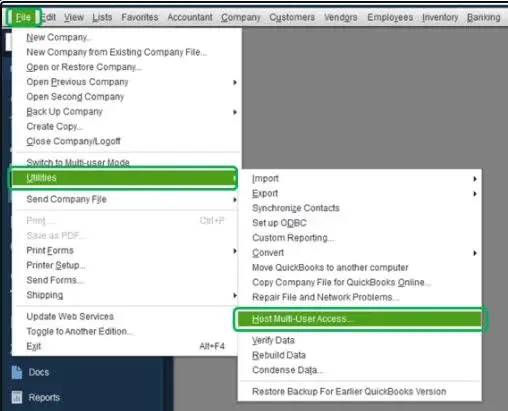
Verify that the QuickBooks multi-user hosting is enabled on the server computer, not the client workstations. Follow these steps to disable multi-user hosting on other workstations.
The ” QuickBooks hosting mode is off error occurs when the server computer hosting the company file is not set properly, preventing the opening of the file in multi-user mode. But you can fix this issue by checking the internet connection, disabling the multi-user hosting settings, correcting firewall settings, and running QBDBMgrN properly. If the error still continues, then we suggest that you directly contact our QB Data service team experts for help +1(888)-718-7888.
QuickBooks hosting mode is off when the server cannot host the QuickBooks company file across the network. As a result, workstations fail to connect with the company file in a multi-user environment and may trigger network or access errors.
To fix this error, enable hosting on the server, disable hosting on all workstations, restart QBDBMgrN, run QuickBooks File Doctor, and restart QuickBooks services.
Host multi-user access is greyed out in QuickBooks if hosting is already enabled or when you’re trying to open QuickBooks on a workstation rather than the server.
To enable hosting on a QuickBooks server;
Yes, the QuickBooks Database Server Manager can scan company files and can manage network descriptors even though the hosting mode is disabled. But to access the company file in multi-user mode, hosting must be enabled on the server.
To configure the hosting settings correctly, enable hosting on the server, disable hosting on all workstations, share the company file folder with proper permissions, and verify QBDBMgrN is running properly.
QuickBooks can’t connect to the host computer if hosting is disabled on the server, the firewall blocks QuickBooks, Database Server Manager isn’t running, network permissions are incorrect, or ND files are corrupted.
To restore multi-user access, turn on hosting mode on the server, disable hosting on all workstations, rescan the company file folder, and repair damaged network files.