QuickBooks Error 1321 is a common installation/ update issue that occurs when the software cannot access/ modify a required file. This error appears when Windows does not provide enough permission to update/ replace/ or install QuickBooks files. It may also occur due to antivirus interference/ restricted folder access/ or incorrect file permissions.
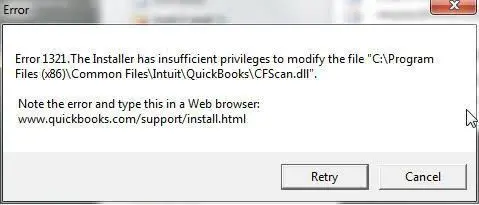
Users may face problems installing QuickBooks updates/ completing the installation process. It is best to understand the causes and symptoms of QuickBooks Error 1321 when installing. This will help you find the right solution. In this guide, we will explain simple and effective methods to fix this issue and get QuickBooks working properly again.
It is an installation/ update error that occurs when the Windows installer does not have sufficient permission to modify/ replace/ or access a required QuickBooks program file. It appears when installing QuickBooks Desktop/ downloading and installing its updates. The error message may mention specific DLL files/ such as sdkeventl.DLL/ CfScan.DLL/ or QBONLI32.DLL. This issue can occur because antivirus software blocks file access/ Windows folder permissions are restricted. As a result, QuickBooks installation/ updating may fail until the file access issue is resolved.
This error occurs due to permission issues/ interference during installation/ updates. Common causes include:
You may notice the following symptoms when QuickBooks installation error 1321 occurs:
Make sure you complete these preparations before troubleshooting QuickBooks installation error 1321:
You need to examine file access issues/ adjust necessary permissions/ and consider repair methods to complete the installation/ update successfully to troubleshoot QuickBooks installation error 1321:
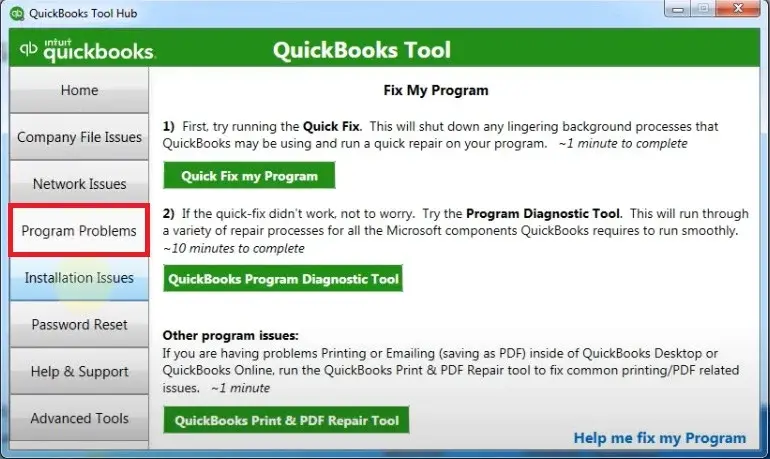
If there was an issue during the installation of QuickBooks, it might lead to problems when you attempt to use the software. Use the QuickBooks Install Diagnostic Tool to resolve QuickBooks Error 1321 when installing.
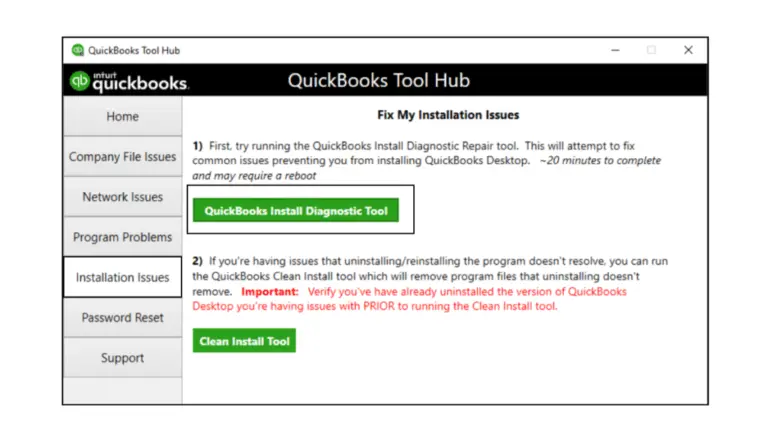
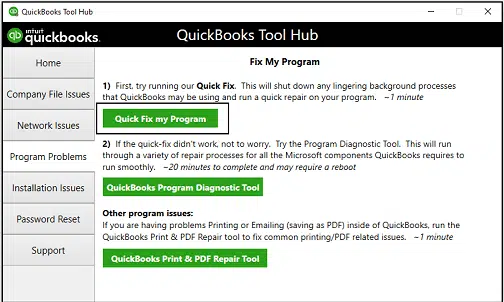
QuickBooks Desktop Error 1321 occurs when the installer lacks the required permissions to change certain files during installation/ updates. The Quick Fix will close any background processes associated with QuickBooks. It will perform a rapid repair on your application.
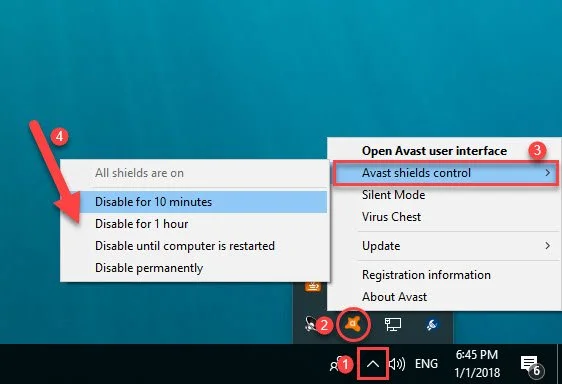
Antivirus/ security software may interfere with QuickBooks installation/ updates. Follow these steps to temporarily disable it:
Note: Do not leave antivirus protection disabled. If you cannot find the disable option, contact your antivirus provider for instructions.
Verifying and updating Windows folder permissions can resolve QuickBooks Error 1321 when installing. It prevents the installer from modifying files/ though it may not fix the error if the root cause is an active file lock/ fast update timing/ or antivirus interference. “If Windows prevents you from accessing or modifying program files, read our guide on QuickBooks Administrator Permission Needed Error to learn more about resolving administrator permission issues.”
Follow these steps to scan and repair corrupted Windows system files:
Note: These are Microsoft-recommended repair steps, not a specific fix prescribed by Intuit for Error 1321.
Uninstall QuickBooks Desktop from Windows Control Panel, then download QuickBooks Desktop using the latest compatible installation file. Reinstall QuickBooks/ apply the available updates/ and check whether QuickBooks installation error 1321 is resolved.
If you continue experiencing installation problems, use the QuickBooks Clean Install Tool to perform a clean installation of the software.
Follow these practices to minimize the chances of encountering QuickBooks installation error 1321 again:
QuickBooks Error 1321 can interrupt installation and update processes, but understanding its causes/ symptoms/ and preventive measures can help you resolve the issue conveniently. Follow the recommended troubleshooting steps and keep your QuickBooks software updated to avoid future interruptions.
Need expert assistance? Contact the Data Service Team today at +1(888)-718-7888 and let our QuickBooks experts help you resolve QuickBooks installation error 1321.
This error occurs during installation/ updates when the installer cannot access/ modify/ or replace certain program files. The reason behind this is insufficient Windows permissions/ restricted folder access/ antivirus interference/ or files being locked by another process. These access restrictions prevent QuickBooks from completing the installation/ update successfully.
Close QuickBooks and restart your computer to fix QuickBooks Error 1321 in Windows 10/11. Run the QuickBooks installer as an administrator. Check the permissions of the folder containing QuickBooks files/ temporarily disable antivirus software if it is blocking installation. Ensure no other process is using the required files.
Right-click the QuickBooks installation folder to change Windows folder permissions and fix QuickBooks Error 1321. Select Properties \> Security \> Edit/ and choose your Windows user account. Grant the necessary Modify and Write permissions. Click Apply/ then OK/ restart your computer. Finally, run the QuickBooks installer as an administrator and install/update the software again.
Yes! Antivirus software can cause QuickBooks installation error 1321 as it blocks access to installation files/ prevent QuickBooks from modifying required folders. Security settings/ real-time protection may restrict file permissions during installation/ updates. Temporarily pause antivirus protection/ retry the installation/ and add QuickBooks as an exception to resolve this.
Close QuickBooks and restart your computer to fix QuickBooks installation error 1321 when updating Payroll/ QB. Run QuickBooks Desktop as an administrator/ check & correct Windows folder permissions/ and ensure your antivirus software is not blocking update files. Also, verify that the required installation folders have Modify and Write permissions before downloading and installing the latest payroll again.
Yes! This error can occur due to insufficient administrator privileges/ restricted Windows folder permissions. If your Windows user account does not have the required access to modify/ replace QuickBooks installation files, the installation or update may fail. Running QuickBooks as an administrator and granting the necessary folder permissions can help resolve this issue.
Error 1321 in QuickBooks occurs when the installer cannot modify/ replace required files due to insufficient permissions/ restricted file access. In contrast, error 1303 in QuickBooks indicates that the installer lacks sufficient privileges to access a particular directory. Both errors are related to Windows permission issues/ but Error 1321 focuses on file access/ while Error 1303 primarily involves folder access permissions.
If QB error 1321 persists after changing folder permissions, restart your computer and run QuickBooks Tool Hub to repair installation issues. Check whether antivirus software/Windows security settings are blocking access to QuickBooks files. Use the QuickBooks Install Diagnostic Tool/ repair QuickBooks Desktop/ and retry the installation or update.

Get Free Consultation for QuickBooks Upgrade
(2021, 2022, 2023)