Have you encountered the error message “[PS032] QuickBooks is having trouble installing your payroll update” while updating QuickBooks Payroll?
QuickBooks Error PS032 mainly triggers when QuickBooks Desktop fails to download the latest payroll tax table update. This issue may appears due to various reasons, such as inactive payroll subscription. If you’re seeing a QuickBooks Subscription Has Lapsed message, renew your subscription before downloading payroll updates.
If this issue remains unresolved, it can prevent you from downloading payroll updates accurately, which may results in incomplete payroll updates, inaccurate payroll calculations, delays in payroll processing, or issues when filing payroll taxes. Therefore, it is essential to resolve the issue and ensure accurate payroll calculations and stay updated with the latest tax laws.
In this guide, you’ll learn what QuickBooks Error PS032 is, its causes, symptoms, and easy troubleshooting methods to fix it.
QuickBooks Error PS032 is a payroll update error that appears when QuickBooks fails to install the latest payroll tax table update. You may also see one of the following error messages:
| Unable to complete payroll update. Payroll update failed. |
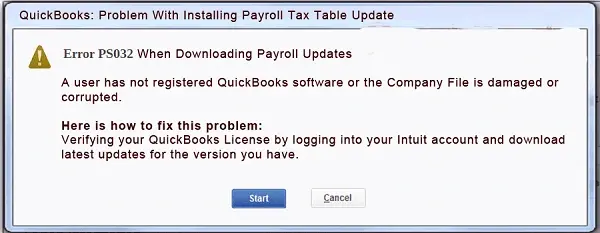
This issue mainly indicates that QuickBooks can’t verify payroll information or access the files required to complete the update.
Note: If you’re facing a QuickBooks update stuck issue, follow our step-by-step troubleshooting guide to resolve frozen updates, installation errors, and complete the update successfully.
Here we have mentioned all the possible causes behind QuickBooks Error PS032 that may prevent you from downloading the latest tax table update.
Before going forward to the troubleshooting section to fix payroll update error, it’s essential to consider a few points. This will help in ensuring that your payroll updates are installed accurately without any issues.
Note: If you’re encountering QuickBooks Error PS038 while processing payroll, it usually means payroll data is stuck in the “Online to Send” status. Follow our detailed guide to resolve the issue and complete payroll updates successfully.
After understanding the causes, let’s explore the effective troubleshooting methods to fix QuickBooks Error PS032 . This will help you continue downloading the payroll updates without any hindrance.
Confirm that you are using an active and valid QuickBooks payroll subscription to get the payroll updates smoothly. Follow these steps.
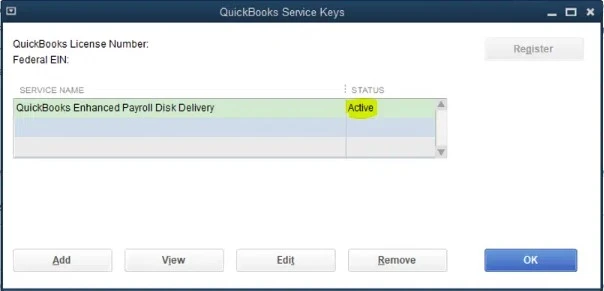
It is essential to register the QuickBooks Desktop to get access to the latest security and software improvements. Follow these steps to verify whether QuickBooks Desktop is registered,
Verify that Microsoft Defender isn’t blocking QuickBooks Desktop from getting the latest payroll updates and fix it using Quick Fix My Program. This may help you resolve QuickBooks Error PS032.
QuickBooks Tool Hub is an in-built feature provided by Intuit that automatically adds QuickBooks files to the Microsoft Defender exclusion list. This will help you prevent the antivirus software from scanning these specific files during the installation.
Note: Before starting the steps, make sure
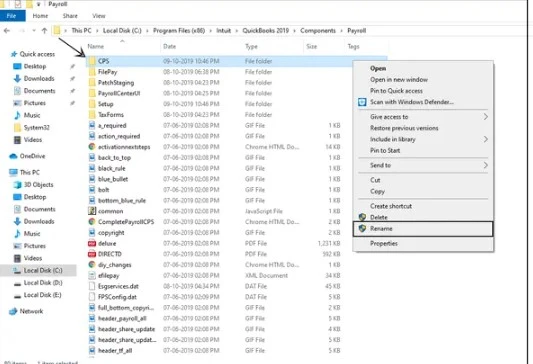
You can repair the damage or corruption in the CPS folder by renaming it. Here’s how to rename the CPS folder.
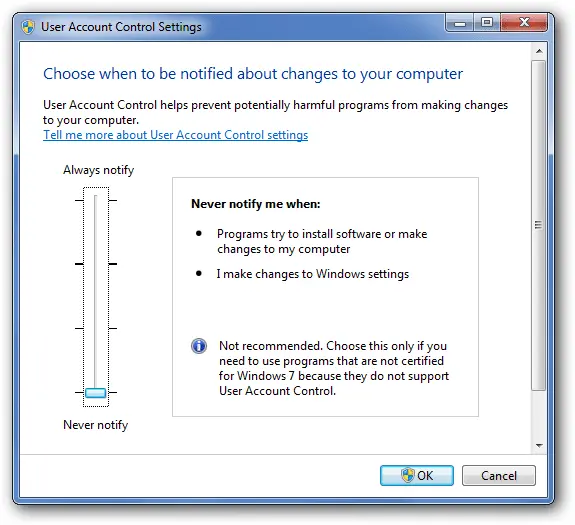
You must turn off User Account Control settings while downloading the payroll updates to make the necessary changes to your computer and fix QuickBooks Payroll Update Error PS032.
Issues with the QuickBooks Desktop installation may create problems while updating payroll services. Therefore, to fix the issues, use the QuickBooks Install Diagnostic Tool.
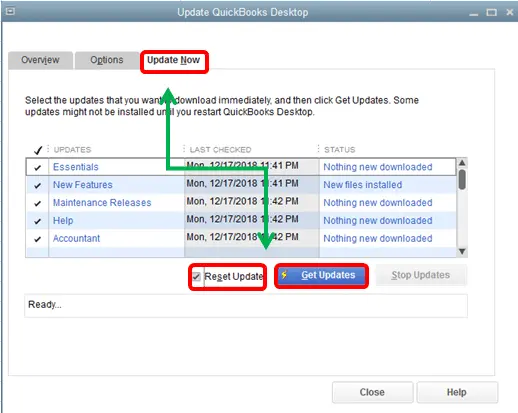
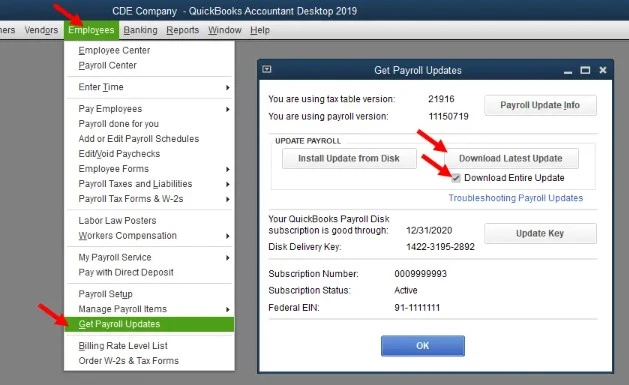
Users may encounter QuickBooks Error PS032 or PS077 when downloading payroll updates due to outdated tax table updates. Use the following steps to update the latest payroll tax table.
If you are still facing issues downloading the latest QuickBooks payroll updates, run the Verify and Rebuild Data Utility. This utility is used to scan the data issues within the company file and then run a repair to fix PS032 QuickBooks Payroll error.
Windows Firewall is a built-in security feature that acts as a security wall between your system and the internet. It monitors and filters the network traffic and automatically blocks unauthorized incoming connections while controlling outgoing data to prevent malicious software from accessing your system. To fix this issue, correct the Windows firewall settings by adding firewall exceptions for certain files, folders, and ports.
Make QuickBooks Work Smarter for Your Business
Spend less time managing data and more time growing your business. Whether you need help setting up QuickBooks, cleaning up your books, reconciling accounts, or resolving errors, our team is here to make accounting easier. Get quick solutions that save time, improve accuracy, and keep your business finances on track.
QuickBooks Error PS032 is a payroll update issue that prevent users from downloading the latest tax table updates. This issue is mainly caused by outdated software, damaged payroll components, incorrect internet settings, subscription verification failures, or verification failures. But you can fix this issue by performing the troubleshooting solutions outlined above. If the issue is still recurring, connect with our certified QuickBooks Data Service team for better guidance at +1(888)-718-7888.
QuickBooks Error PS032 mainly occurs when you try to download or install the latest payroll tax table update. This issue may evoke due to outdated software, invalid payroll subscription, incorrect billing details, damaged payroll files, or incorrect internet settings.
To verify your QuickBooks Payroll subscription;
To check whether your QuickBooks payroll subscription is active, click Employees menu > My Payroll Service > Account/Billing Information. After that, login to your Intuit account when asked. Now, check whether your payroll subscription status shows Active and your billing address is correct.
If your payroll subscription is inactive, you have to renew it before downloading the payroll updates. For that, check that the payment method and billing information are up-to-date. If your subscription has expired, renew it.
To confirm that the payroll tax table is installed;
After fixing the QuickBooks Error PS032, check if the payroll updates are downloaded successfully and test whether you are able to install the latest tax table update.
To manually check and ensure the latest payroll tax table version;
Yes, unresolved PS032 errors can prevent payroll tax table updates, potentially causing incorrect tax calculations. Verify the latest tax table before processing payroll.
Open QuickBooks Desktop, select Employees, then Get Payroll Updates. Check the displayed tax table information and compare it with Intuit’s latest release details.
Create a company file backup, record the exact error message, and contact QuickBooks support for further diagnosis before attempting advanced repairs or reinstalling software.

Get Free Consultation for QuickBooks Upgrade
(2021, 2022, 2023)


