Need to handle a QuickBooks account but don’t have primary admin or contact access? If you’re new to the software, you can also learn What is QuickBooks before managing your account. This can happen when the current admin leaves the business, becomes unavailable, or the business changes ownership. In such cases, you may need to submit a Request to be the Primary Admin or Contact instead of having the role transferred directly.
QuickBooks may ask you to verify your identity and provide documents that confirm your connection to the business. The requirements can vary depending on your business structure and situation.
In this guide, we’ll explain when you need to submit a request, what documents you may need, how to complete the request, and what happens after you submit it.
The primary admin or contact is the main person responsible for managing the important parts of a QuickBooks account. This role can be especially important when you need to manage users, billing, account details, or certain support-related matters.
When a business changes ownership or the person who originally managed the account is no longer available, another person may need to request to be the Primary Admin or Contact for QuickBooks.
The Primary Admin may be able to:
The process may vary between the QuickBooks Online or Desktop. If the current Primary Admin is available, they can transfer the role directly. If not, you may need to verify your identity and provide supporting business documents to request Primary Admin or Contact access.
You may need to submit a Request to be the Primary Admin or Contact when the current Primary Admin or Contact cannot transfer the role to you. This may happen if:
Note: If the account also has an inactive or expired subscription, review the information about QuickBooks Subscription Has Lapsed to understand how subscription status can affect account access.
If the current admin is available, transferring the role directly is easier. If they are unavailable, you can move forward with the request process and provide the documents needed to verify your identity and connection to the business.
Before you submit a Request to be the Primary Admin or Contact in QuickBooks desktop, gather the documents needed to verify your identity and business relationship. The requirements can vary based on your business structure and situation.
| Business Type | Documents You May Need |
| Sole proprietorship | Government-issued photo ID and business license |
| Corporation / S Corporation | Government-issued photo ID and articles of organization, bylaws, or shareholder agreement |
| LLC | Government-issued photo ID and operating agreement or articles of organization |
| Nonprofit | Government-issued photo ID, bylaws or articles of incorporation, and relevant board meeting minutes |
| Other business types | Government-issued photo ID and documents showing ownership or authority |
If you are not the business owner, you may also need a permission letter and documents from the owner or another authorized person. Additional documentation may be required if the previous owner is deceased.
If you use QuickBooks Online and the current Primary Admin cannot assign the role to you, you can submit a request through the appropriate Intuit process. The request generally involves signing in, providing your business details, reviewing your information, and submitting the required documents.
First, sign in to your Intuit account. If you don’t have an account, you will need to create one before continuing with the request. If you’re having trouble accessing your account because you forgot your password, see Reset QuickBooks Password for additional help.
Open the official Intuit business change request process and follow the instructions shown for your account. The available options and verification requirements may vary depending on your QuickBooks product and account situation.
Review the details you entered and make sure everything is accurate. Then, upload any requested documents, then submit the request for review.
Intuit may contact other business owners or authorized parties if their verification is required. You’ll receive updates at the email address provided with your request.
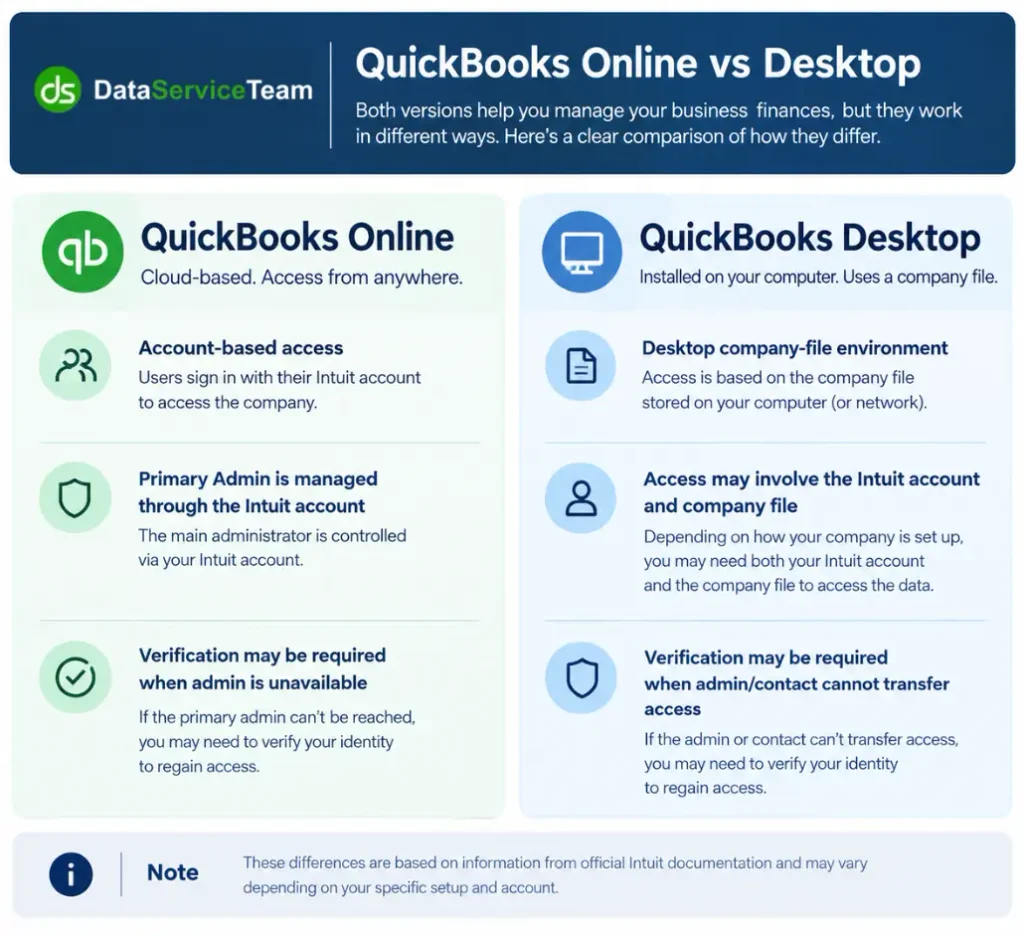
If you’re using QuickBooks Desktop and the current primary admin or contact is no longer available, the process may require account verification and supporting business documents. If you’re using QuickBooks Desktop 2024, make sure you’re signed in with the Intuit account associated with the company before starting the verification process. Before starting, make sure you have access to your Intuit account and the documents needed to confirm your connection to the business.
If the current admin is still available, ask them to transfer the role directly whenever possible. When that isn’t an option, you can submit a request to become the Primary Admin or Contact in QuickBooks Desktop and follow the verification process provided by Intuit.
Sign in to your Intuit Account by using the email address you want associated with the primary role. If you don’t have an account, you need to create one before continuing the process.
To complete the form, enter your personal and business information in the Business Change Request form. Select the company you’re requesting access for and carefully review each detail before continuing.
Upload the documents requested for your business type. These may include a government-issued photo ID, business license, ownership documents, or authorization from another owner.
Review your information and documents one more time, then submit the request. Intuit may contact other owners or authorized parties for additional verification if necessary.
Once you submit the Request to be the Primary Admin or Contact, Intuit reviews the information and documents you provided to verify that you’re authorized to manage the QuickBooks account. The review process may also require confirmation from other owners or authorized parties.
You’ll receive updates at the email address you provided with the request. Keep an eye out for messages from Intuit so you don’t miss any verification steps.
You’ll receive a confirmation that the Primary Admin or Contact role has been assigned to you. You can then sign in to QuickBooks using the email address you provided in the request.
Intuit will explain why the request wasn’t approved. For example, a document may be missing, unclear, or not meet the verification requirements. You may need to correct the issue and submit a new request.
The owner or authorized person may receive a separate email asking them to verify their identity and provide documents. Make sure they complete the request within the given time so it doesn’t expire.
A few simple checks can help make the verification process smoother. Before submitting your request to be the Primary Admin or Contact, make sure:
Taking a few minutes to check everything before submission can help prevent the request from being delayed or rejected.
If your request is not approved, don’t submit the same information again without checking the reason for rejection. Intuit may reject a request because a document is missing, unclear, outdated, or doesn’t meet the verification requirements.
Check the email from Intuit to understand what needs to be corrected. Then:
Requesting account access can feel complicated, but the process becomes easier when you have the right information and documents ready. If the current admin cannot transfer the role, you can request to be the Primary Admin or Contact and complete the required verification.
Make sure your details are accurate, submit clear supporting documents, and check your email for updates from Intuit. If your request is declined, review the reason, correct the issue, and submit the request again if needed. If you are still looking for better assistance, you can reach out to the Data Service Team live specialists at +1(888)-718-7888.
It means asking Intuit to give you the Primary Admin or Contact role when the current admin cannot transfer it directly. You may need to verify your identity and provide documents showing your connection to the business.
Sign in to your Intuit Account and complete the Business Change Request form. Enter your personal and business details, upload the required documents, and submit the request. Intuit will review the information and email you with an update.
A business owner or someone authorized to manage the QuickBooks account can request the role. Depending on the situation, you may need to provide proof of ownership, authorization, or your position within the business.
You may need a valid government-issued photo ID, business documents, and a permission letter if another owner needs to authorize your request. The exact documents depend on your business structure and your relationship with the business.
You can still request to become the Primary Admin or Contact. Intuit may ask for additional documentation, such as a notarized document identifying the executor of the estate, along with the required business and identity documents.
The Primary Admin has the highest level of access to the QuickBooks account and can manage important areas such as billing and users. A Company Admin can manage many company-level tasks but doesn’t necessarily have the same account-level control as the Primary Admin.
If the current Primary Admin is available, they can add the new user as a Company Admin and then transfer the Primary Admin role to them. If the current admin is unavailable, the new user can submit a request to Intuit and complete the required verification process.
Intuit reviews the information and documents you provide. If verification from other owners or authorized parties is required, they may receive a separate email. Once the review is complete, Intuit will email you with the approval or explain what needs to be corrected.
This can happen if the current Primary Admin is still assigned to the account, you’re signed in with the wrong Intuit Account, or the required information and documents are incomplete. Check your account details and follow the appropriate request process if the current admin cannot transfer the role.

Get Free Consultation for QuickBooks Upgrade
(2021, 2022, 2023)


