
How-to-Fix-QuickBooks-Error-PS038

QuickBooks Error PS038 is a common payroll-related issue that may arise when QuickBooks Desktop has pending payroll data and has not been successfully sent. Users may have trouble processing payroll, sending payroll data, or downloading the latest payroll updates when this error appears. Error PS038 occurs when paychecks are stuck with an “Online to Send” status and block payroll updates. The issue can affect financial tasks, especially when payroll data needs to be completed on time.
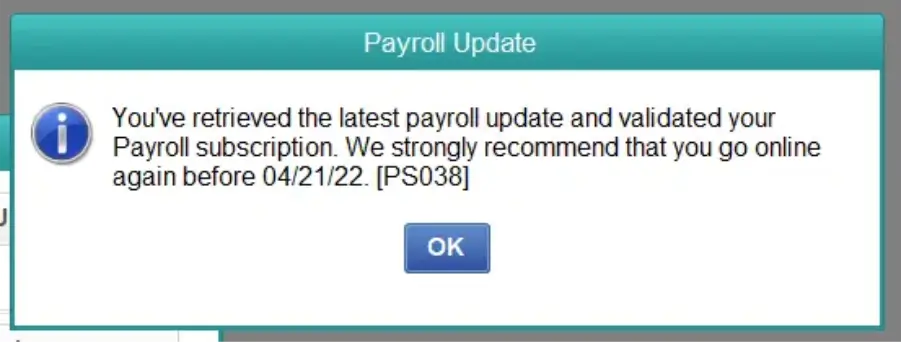
QuickBooks Error PS038

With the guidance below, you will walk through QuickBooks Error PS038 meaning, common causes, symptoms, proven solutions, and preventive measures to help you manage your payroll activities smoothly.

Common Reasons for QuickBooks Error PS038

QuickBooks Payroll Update Error PS038 is a payroll-related error that occurs when QuickBooks detects unsent payroll data or encounters issues while downloading the latest payroll updates. The common reasons for error PS038 are:

  • Running an older and unmaintained version of QuickBooks Desktop prevents proper server communication.
  • The active payroll service subscription has failed validation.
  • Corruption issues exist within the company file (.qbw).
  • Routine usage and analytics data have not synced with Intuit servers.
  • Third-party security tools do not allow QuickBooks to communicate online.

Symptoms of QuickBooks Desktop Payroll Error PS038

QuickBooks Error PS038 stops your payroll from processing. This error usually appears when paychecks get stuck in the system. You must be aware of the symptoms of this error to resolve it quickly. These are:

  • PS038 error message appears when you try to update QuickBooks Payroll.
  • Payroll updates may fail to download properly.
  • Paychecks may remain stuck with the “Online to Send” status.
  • QuickBooks may repeatedly prompt you to download the latest payroll update.
  • You may be unable to send payroll information to Intuit successfully.

Note: If payroll updates keep failing, see our guide to QuickBooks Error PS032 or Error 15276 explains the causes, symptoms, and effective fixes to get QuickBooks working again.

Troubleshooting QuickBooks Desktop Payroll Error PS038

Error PS038 usually stems from issues with payroll data or the subscription step. Restart QB to check if the issue is fixed. Here, we will learn the methods to fix this error:
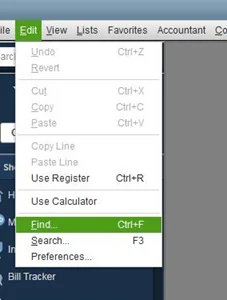
Method 1: Identify Stuck Paychecks and Rebuild Your Data

  • Access the Edit menu and choose Find.

how-to-find-a-paycheck-stuck
  • Navigate to the Advanced tab.
  • Pick Detail Level from the Filter options in the Choose Filter section.
  • Select Summary.
  • Return to the Filter list and scroll down to choose Online Status. Then, select Online to Send.
  • Click Find to display paychecks that have yet to be sent to Intuit.
  • Make a note of the oldest paycheck that remains unsent.
  • Record the Number of matches shown in the Find window.
  • Exit the Find window.
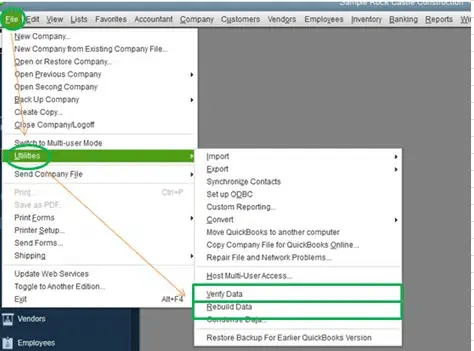
  • Utilize a verify data utility to spot any errors in the file, and then use the rebuild your data file utility to fix it.

Verifying-the-Data-or-rebuild-your-data-file
  • Attempt to download payroll updates once more.
  • If you continue to encounter error PS038, you will need to toggle the paychecks that are stuck.

Method 2: Toggle Stuck Paychecks

Follow these steps to ensure the system updates the status for each paycheck that has not been sent, then manually edit and reset stuck paychecks.
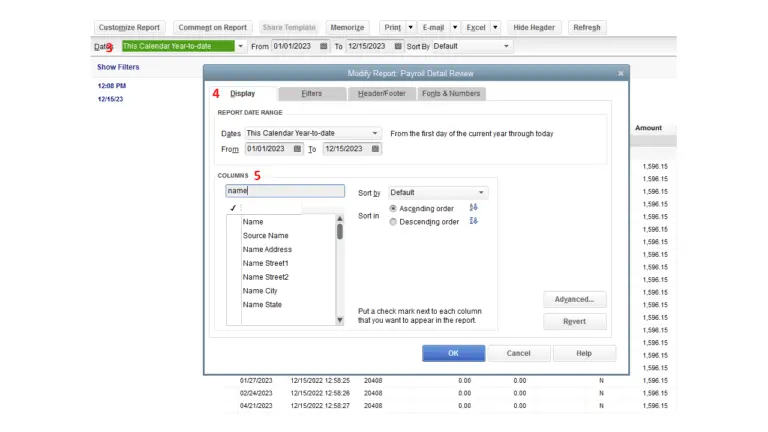
  • Access the paycheck.
  • Click on Paycheck Detail.
paycheck-detail
  • Insert the same earnings item that appears last in the list and under the Earnings section.
  • Choose No when the Net Pay Locked notification shows up.
  • Verify that the tax amounts and net pay have not changed, then click OK.
  • If you see a Past Transaction message, select Yes.
  • Click Save & Close.
  • If a Recording Transaction warning appears, confirm with Yes.
  • Reopen the same paycheck and click on Paycheck Details.
  • Remove the duplicate earnings item you just added.
  • Confirm that the tax amounts and net pay are still correct.
  • Lastly, click OK.

Method 3: Update QuickBooks Application

QuickBooks Error PS038 appears when payroll updates cannot be completed. You have the option to configure QuickBooks to automatically download updates to fix this payroll issue:
Schedule Automatic Updates

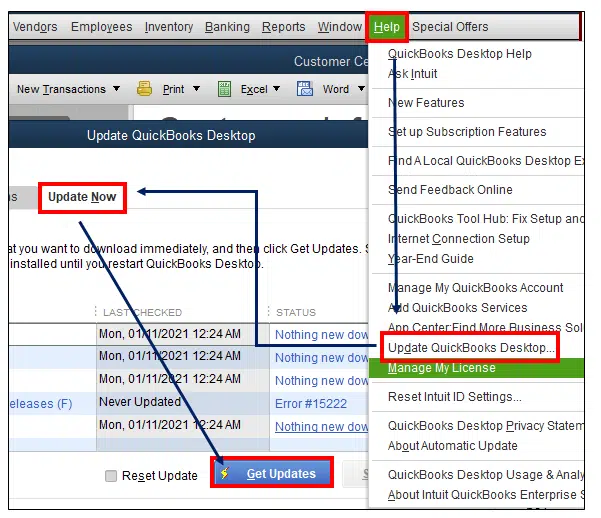
  • Select the Help menu and then Update QuickBooks Desktop option.
  • Click on the Options tab.
  • Choose Yes to turn on automatic updates.
  • Click Close.

Run an Immediate Update

  • Access the Help menu and choose Update QuickBooks Desktop.
  • Click on the Update Now tab.
  • Hit Get Updates.
Get Updates
  • After the update is complete, reboot QuickBooks.
  • Click Install Now when asked to install the update.

Method 4: Verify Payroll Subscription

  • Ensure all your company files are closed and restart your computer.
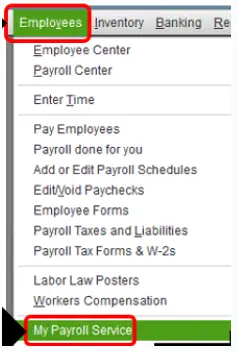
  • Launch QuickBooks and navigate to Employees.
  • Click on My Payroll Service and select Manage Service Key.
My Payroll Service
  • Your Service Name & Status should display correctly and indicate as Active.
  • Click on Edit, and confirm the service key number.
  • If it is incorrect, input the correct service key.
  • Click Next, uncheck the Open Payroll Setup option, and then click Finish.
  • This will initiate the download of the complete payroll update. If the error persists, move on to Step 2.

Note: If you are also experiencing issues while downloading or installing payroll updates, check our guide on QuickBooks Error PS033 for additional troubleshooting solutions.

Method 5: Repair QuickBooks Desktop Program

Repairing QuickBooks Desktop can fix damaged program files that affect payroll updates. This may help QuickBooks process payroll and resolve Error PS038.

Note: Make sure you have downloaded the latest version of QuickBooks Tool Hub.

Run Quick Fix my Program

The Quick Fix feature will close any background processes that QuickBooks is utilizing. It will perform a brief repair on your software and fix QuickBooks Payroll Error PS038 quickly.
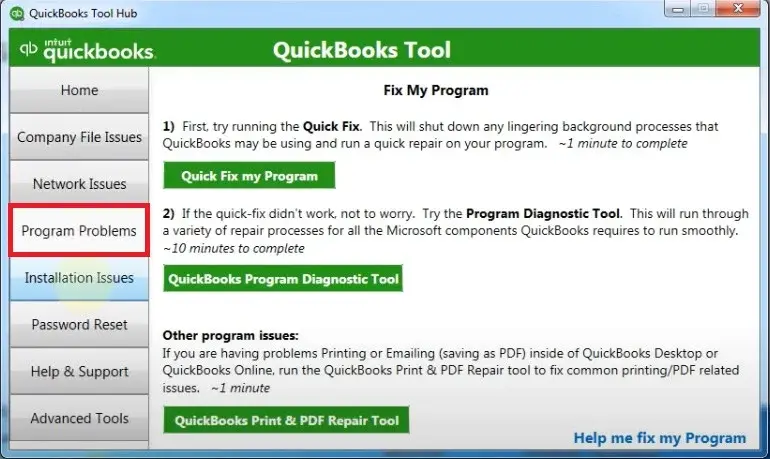
  • Open QuickBooks Tool Hub and choose Program Problems.
quickbooks-program-problems
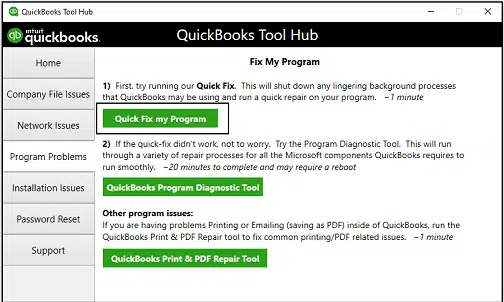
  • Click on Quick Fix My Program.
Run-Quick-Fix-My-Program
  • Launch QuickBooks Desktop and open the data file.

Run the QuickBooks Install Diagnostic Tool

If an issue occurs during the installation of QuickBooks, it may lead to difficulties like error PS038 in QuickBooks Desktop. Utilize the QuickBooks Install Diagnostic Tool to resolve common installation problems.

  • Launch the QuickBooks Tool Hub, then click on Installation Issues.
  • Choose QuickBooks Install Diagnostic Tool.
  • Allow the tool to operate, and it might take up to 20 minutes.
  • Once the tool has completed, restart your computer and open QuickBooks Desktop.
  • Access your data file.
  • Make sure to update your QuickBooks to the latest version.
  • This will ensure you have the newest fixes and security updates.

Method 6: Use Payroll Data and Company File Backup

Creating a backup of your payroll data and company file protects your information before troubleshooting and gives you a safe recovery point. If PS038 is caused by damaged company file data, a clean backup may help resolve the issue.

  • Navigate to File > Backup Company > Create Local Backup.
  • Choose Local Backup and then click on Options.
  • Click Browse to choose a location for saving in the Backup Options window.
  • Click OK to proceed with the selection.
  • On the Create Backup screen, click Next and then select Save it now.
  • Ensure you are saving to a local drive (instead of a network or external drive).
  • Use the restored backup to attempt payroll updates again.

Prerequisites Before Troubleshooting Error PS038

Error PS038 in QuickBooks may occur when payroll updates are stuck or payroll checks remain unsent. Before troubleshooting, prepare the given prerequisites to make the process smoother and safer:

  • Create a current backup before making changes.
  • You must have a stable and reliable connection.
  • Install the latest available QuickBooks Desktop updates.
  • Ensure that the payroll tax table is current.
  • Confirm that the payroll service is active.

Preventive Measures to Avoid QuickBooks PS038 Payroll Update Error

Following a few preventive practices can help reduce the chances of encountering this error.

  • Update QuickBooks Regularly – Install the latest QuickBooks and payroll updates.
  • Verify Payroll Data – Check for pending payroll transactions before processing new payroll.
  • Maintain a Stable Internet – Use a reliable connection when sending payroll data.
  • Use the Latest Tax Table – Keep payroll tax tables updated for accurate procedure.
  • Back Up Company Files – Create regular backups to protect important payroll information.

Conclusion!

QuickBooks Error PS038 can interrupt the payroll process and prevent pending payroll data from being sent successfully. It is crucial to identify the causes and signs to troubleshoot this error. This will help restore normal payroll operations. QuickBooks Error PS038 appears due to stuck paychecks issues with the server and other reasons. Users must use an updated QuickBooks version, check payroll status, and maintain a reliable system. It helps to reduce the chances of encountering QuickBooks Desktop Payroll Error PS038 in future.

Need live assistance with QuickBooks Error PS038? Do not worry! Contact Data Service Team experts now at +1(888)-718-7888 for trusted guidance and perform all payroll task again without issues.

Frequently Asked Questions (FAQ’s)

This error occurs when updating payroll because employee paychecks are stuck in the payroll center. It does not allow the software to download new tax tables and keeps appearing because the underlying transaction queue remains unsynchronized. It means QuickBooks attempts to check for updates all the time or communicate with Intuit servers.

Back up your file, identify the unsent checks using the Fund utility, or run data verification tools to fix QuickBooks Desktop Payroll Error PS038. Alternatively, add and remove a duplicate earnings item in its detail to manually toggle each stuck paycheck.

Go to the Edit menu, select Find, open the Advanced tab, and choose Detail Level set to Summary. Then, add a filter for Online Status equal to Online to Send, and click Find to display the unsubmitted transactions to identify an unsent paycheck in QuickBooks Desktop.

Yes! Outdated payroll tax tables can contribute to error PS038 in QuickBooks Desktop, though the core direct trigger is a paycheck stuck. QuickBooks fails to process pending payroll data to the server when tax table versions are outdated. This communication failure leaves transactions lingering in an unsent state. It blocks new updates and generates the QuickBooks error PS038.

You must back up the company file, sync the pending payroll data, run the Verify & Rebuild data utilities, and toggle any stuck paychecks. These methods work if QuickBooks PS038 Payroll Update Error continues after updating payroll. This error happens when unsent paychecks do not allow software to communicate with tax tables.

You need to regularly audit and clear pending paychecks so none remain stuck in an Online to Send status. This helps prevent error code PS038.

Update the software and clear stuck paychecks to fix QuickBooks Payroll Error PS038. Also, you can back up your company file, send pending usage data via the Employee menu, run the Verify and Rebuild Data utilities, and toggle paychecks that are still stuck.

You must check the internet connection, restart the software, and verify the payroll subscription if the Resend Payroll Data option fails. Clear the browser, update the payroll tax tables, and ensure the computer’s date and time settings are accurate if the error code PS038 in QuickBooks continues.

About The Author

Steven Moody

Steven Moody is a bookkeeping and payroll specialist dedicated to helping businesses maintain accurate financial records and efficient payroll operations. His expertise includes payroll management, tax compliance, bookkeeping solutions, and financial reporting. Steven regularly shares insights on accounting best practices and business finance strategies. Outside of work, he enjoys traveling, exploring new places, and keeping up with the latest developments in business technology.

Steven Moody

QuickBooks Error

QuickBooks Requires That You Reboot: How to Fix the Error

Read More
QuickBooks Error

QuickBooks Error 7149: How to Fix Crashing or Not Opening

Read More
QuickBooks Error

QuickBooks Error 15240: Why It Happens and How to Fix It

Read More
QuickBooks Error

QuickBooks Fatal Error: Why It Happens and How to Fix It

Read More
QuickBooks

Download QuickBooks Desktop: Everything You Need to Know

Read More
