
Are you encountering QuickBooks Error 40003 when try to update your payroll account information? This error can interrupt payroll activities and unable QuickBooks Desktop to complete certain payroll tasks. In some cases, the issue may be associated with stuck payroll transactions or problems sending payroll data to Intuit’s servers.
This error can affect the performance of crucial tasks in the application. QuickBooks Error 40003 in Desktop leads to frustration and lost productivity. Delve into what QuickBooks Payroll Update Error 40003 entails, its common causes, and quick solutions to resolve it in the given blog.
QuickBooks Error 40003 is a common technical issue and it arises during payroll operations like payroll tax tables updates, sending direct deposits, or managing employee data. It is triggered by restricted internet connectivity, aggressive Windows firewall or antivirus settings. These factors can block QuickBooks, outdated software versions, or corrupted company data files. It does not allow QuickBooks to communicate with Intuit’s servers.
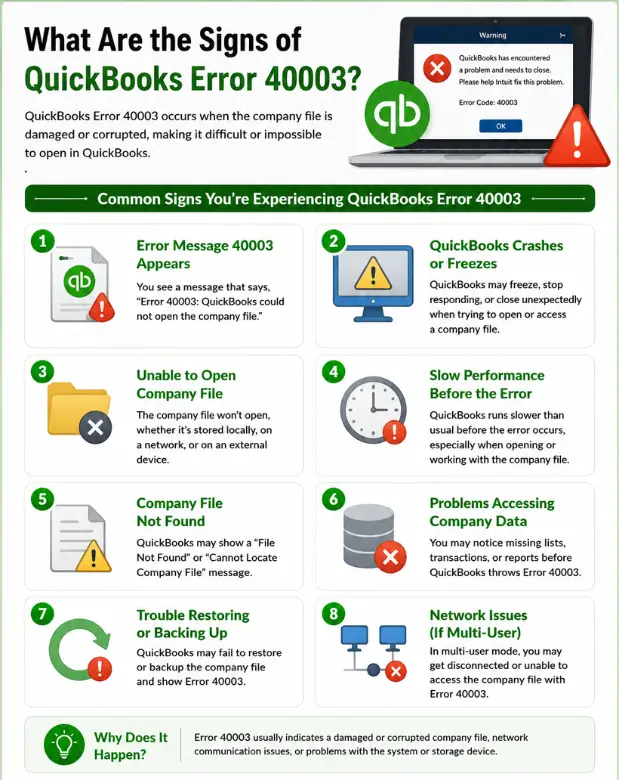
QuickBooks Error 40003 can occur when payroll data cannot be processed or transmitted correctly. If you are experiencing broader QuickBooks payroll update issues, check the related troubleshooting guide for additional solutions. Common contributing factors include:
Note: Similar payroll update problems can also cause QuickBooks Error PS033, which may prevent QuickBooks from downloading or installing payroll updates.
The error may become noticeable when QuickBooks cannot complete payroll updates or process payroll data. You may experience:
Before trying the solutions, complete these basic checks to avoid unnecessary troubleshooting:
Now, it is time to understand the solutions to fix QuickBooks Payroll Update Error 40003 within a short time. Here are the different solutions described to remove this error:
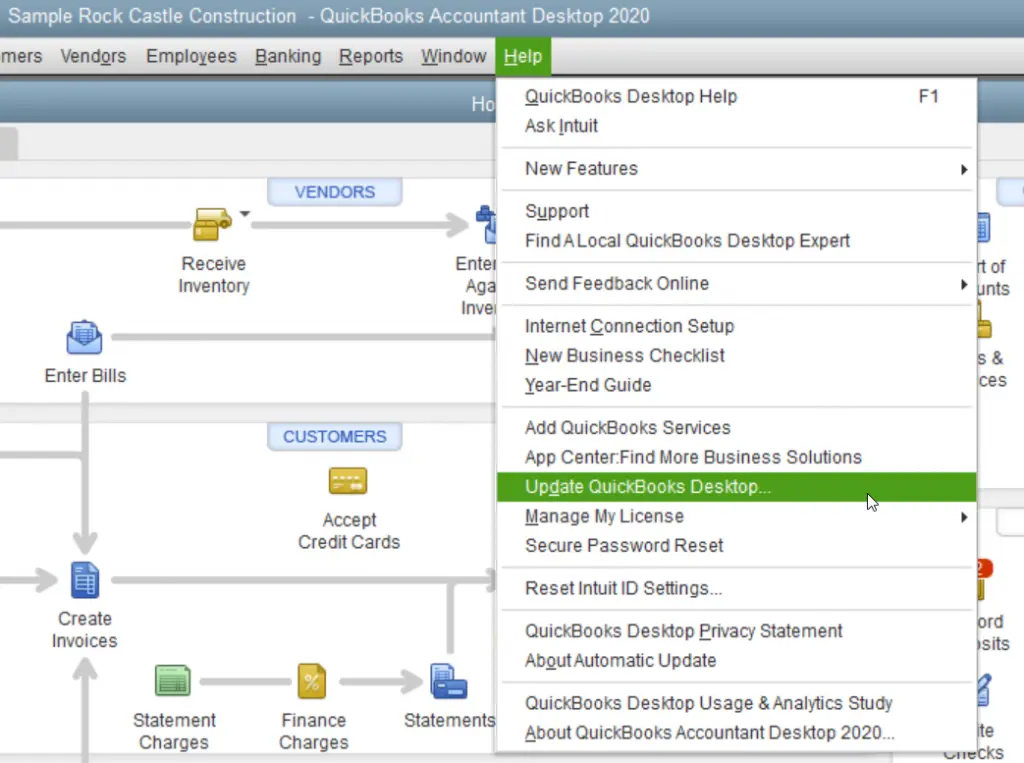
Note: You can also update QuickBooks Desktop to the latest release manually. If the update process becomes stuck, see our guide on QuickBooks Update Stuck for additional troubleshooting steps.
Data Service Team Tip: Refer to Install, Update, and Set up the QuickBooks Desktop Server Manager to update the Server Manager.
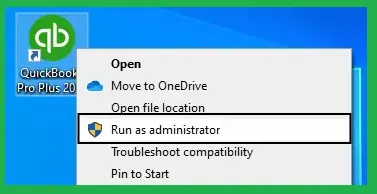
If you are unable to download the QuickBooks Tax Table updates, you will need to launch the application with Administrator privileges:
If the payroll service is inactive or the service key is incorrect, verify the service key and update it as needed.
Follow these instructions to locate any stuck paychecks and reconstruct your data:
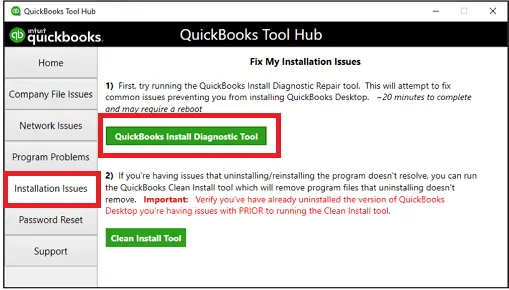
If there was an error during the installation of QuickBooks, it might lead to Error Code 40003 in QuickBooks Desktop when you attempt to use it. Use the QuickBooks Install Diagnostic Tool to resolve this issue.
Data Service Team Tip: QuickBooks error 40003 can be caused by using outdated Desktop programs and by having an unfriendly Windows firewall configuration. Contact our QB professionals to resolve this issue quickly.
Following a few maintenance practices can reduce payroll-update interruptions and help QuickBooks communicate properly with payroll services.
Hopefully, the above guidance on QuickBooks error 40003 clarifies all your doubts regarding the cause and symptoms and enables you to resolve it with various simple solutions. As we have discussed above, QuickBooks Payroll Error Code 40003 usually occurs when there is a problem updating payroll due to incomplete installation, damaged company files, etc.
Keep your software updated, use regular backups, and contact Data Service Team professionals at +1(888)-718-7888 for help. They are available round the clock to help you with all your QuickBooks-related queries.
Keep the software and payroll tax tables updated to prevent 40003 from occurring again in the future. Ensure the active payroll subscription is logged in and verify the date & time settings are accurate on the computer. Configure the antivirus to whitelist the program’s internet access.
Yes! Network and connection problems can trigger QuickBooks error 40003. This error occurs during payroll updates due to poor internet connectivity, timeouts, or a strict Windows Firewall. Security settings do not allow QuickBooks to communicate with remote servers securely.
Yes! It resolves the 40003 error if the problem stems from insufficient Windows user permissions that do not allow communicate with servers. Administrative rights may not resolve it if those underlying triggers persist, as QuickBooks errors can be tied to network connectivity.
This error is caused by interrupted communication with Intuit servers during payroll updates. It is triggered by strict firewall settings, outdated software, or stuck unsent paychecks lingering in the company file.
Yes! A damaged file can cause this error. QuickBooks Error 40003 in Desktop triggers during payroll updates when this software fails to read a corrupted data structure in the company file. It can stem from network connectivity blocks.
Yes! Network and connection problems can trigger QuickBooks error 40003. This error occurs during payroll updates due to an unstable internet connection. Factors like a network timeout or restrictive firewall settings can prevent QuickBooks from communicating with Intuit’s remote server.

Get Free Consultation for QuickBooks Upgrade
(2021, 2022, 2023)


