QuickBooks Error 17337 is a common error that users may encounter when they need to download/ install payroll updates. It occurs when the software cannot establish a secure connection with servers due to incorrect internet security settings/ firewall restrictions. This error can prevent users from downloading the latest payroll tax table updates and affect payroll calculations. If you are experiencing similar problems, check our guide on QuickBooks Payroll Update Not Working for additional troubleshooting solutions.
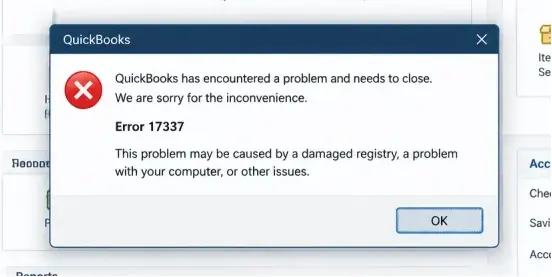
In this detailed blog, we will cover the common causes of QuickBooks Payroll Error 17337. Learn simple solutions to resolve the issue and successfully update your payroll.
It is an error associated with payroll update problems in QuickBooks Desktop. QuickBooks Error 17337 may occur when the software encounters difficulty in establishing a secure internet connection while downloading payroll updates. Users may experience failed payroll tax table downloads/ interruptions during the update process.
Possible troubleshooting areas include internet connection/ Windows security settings/ firewall restrictions/ and QuickBooks configuration. It is important to resolve the main issue to ensure access to the latest payroll tax table updates and maintain accurate payroll calculations.
QuickBooks Payroll Error 17337 may occur when QuickBooks Desktop encounters problems downloading payroll updates. Possible causes include:
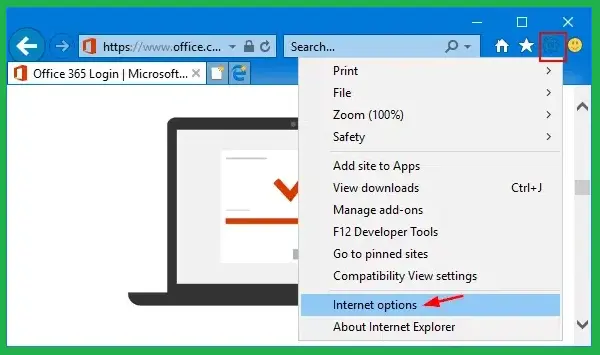
You may notice the following signs when encountering QuickBooks Error 17337:
Before troubleshooting QuickBooks Error 17337, ensure you have the following requirements ready:
If you encounter QuickBooks Error Code 17337 while downloading payroll updates, try the following troubleshooting methods to resolve this error:
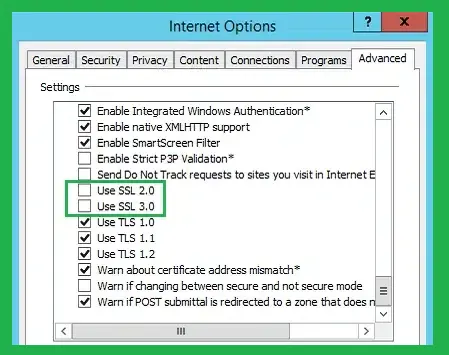
Incorrect SSL settings or a misconfigured Internet Explorer causes QuickBooks Error 17337. This method helps you resolve this error quickly:
QuickBooks Desktop uses Windows Internet properties for secure server communication:
If firewall restrictions prevent QuickBooks from accessing the internet, configure the necessary permissions manually. For additional troubleshooting, read our guide on Windows Firewall is Blocking QuickBooks.
If you are utilizing different versions of QuickBooks Desktop on a single computer, follow these instructions for each version:
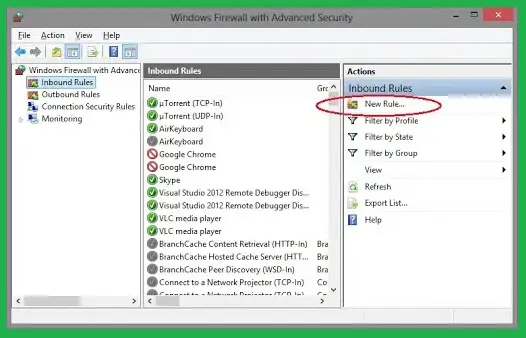
You can change the port number by selecting Renew. After that, go to the Scan Folders tab and click Scan Now to update firewall permissions. Port renewal is available only for Desktop 2019 and newer versions, as older ones do not support this feature.
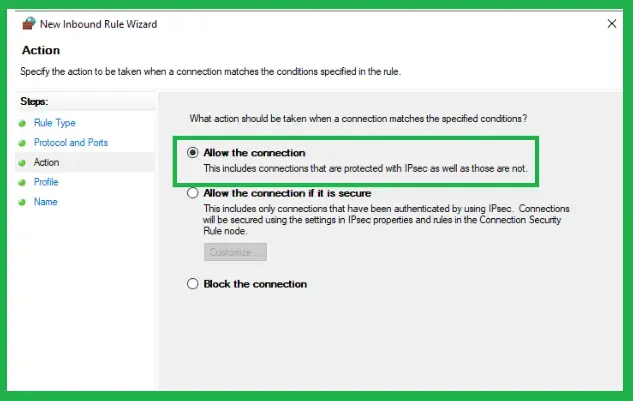
Repeat the steps above and create outbound rules. Follow all the same steps, except select Outbound Rules on step 4.
Error 17337 in QuickBooks Desktop typically arises during pay roll updates or when downloading pay roll data. Update QuickBooks Desktop to the latest available release to fix Error 17337 and improve software compatibility. It will help you ensure smooth payroll and update operations.
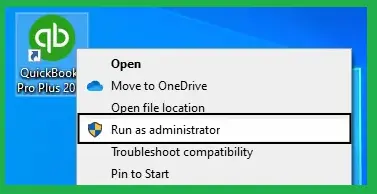
Follow these steps to run QuickBooks Desktop with administrator privileges, as recommended to resolve QuickBooks Error 17337 when updating payroll:
Note: This error occurs when the third-party firewall or application is limiting QuickBooks access, or when SSL settings are wrong.
QuickBooks Tool Hub includes built-in troubleshooting utilities that can help resolve common program errors, damaged installation components, and issues affecting payroll updates. If QuickBooks encounters an unexpected problem while processing payroll or updating the application, running these repair tools may help restore normal functionality.
Follow the steps below to troubleshoot QuickBooks program-related issues.
Download the latest version of QuickBooks Tool Hub and install it on your computer. Follow the on-screen instructions to complete the installation, then launch the tool.
Quick Fix My Program closes background QuickBooks processes and performs a quick repair of common program-related issues.
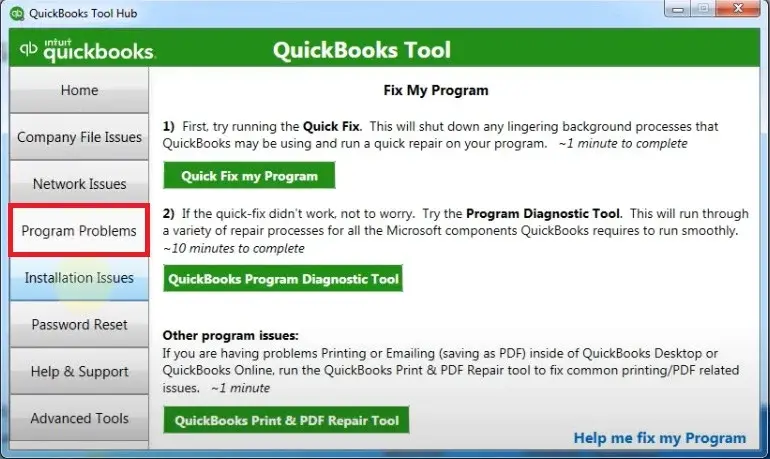
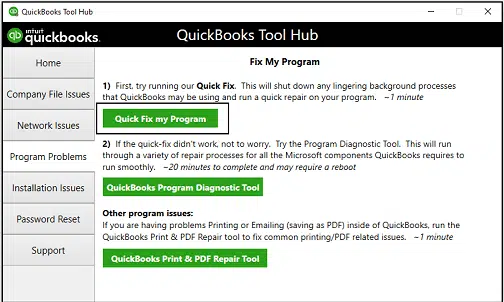
If the error persists, proceed to Solution 2.
If there was an issue during the installation of QuickBooks, it may lead to problems when you attempt to use the software. Run the QuickBooks Install Diagnostic Tool to resolve common installation issues.
QuickBooks Error 17337 occurs when QuickBooks Desktop cannot connect to payroll servers. Use the steps below to resolve it.
Note: Ensure your firewall allows QuickBooks to access the internet.
Error 17337 is a common error that occurs when you try to download updates for QuickBooks software. You should also verify that your payroll subscription is active. If your subscription has expired, follow our guide on QuickBooks Subscription Has Lapsed to troubleshoot the issue.
Yes, this error may affect payroll processing if it prevents users from downloading the latest tax tables. Follow our guide on QuickBooks Payroll Tax Table Update to learn how to download and install the latest updates. Payroll calculations may use outdated tax rates without updated tax tables/ affect employee tax deductions and paycheck accuracy.
However, this error does not stop all payroll functions/ change previously issued paychecks. Users should resolve the update issue and verify that the latest payroll tax tables are installed to avoid payroll discrepancies.
Consider these simple tips to reduce the chances of encountering QuickBooks Error 17337 again:
Note: Always verify that the latest payroll tax table update is installed before processing employee paychecks.
Make QuickBooks Work Smarter for Your Business
Spend less time managing data and more time growing your business. Whether you need help setting up QuickBooks, cleaning up your books, reconciling accounts, or resolving errors, our team is here to make accounting easier. Get quick solutions that save time, improve accuracy, and keep your business finances on track.
QuickBooks Error 17337 can interrupt payroll updates as it prevents QuickBooks Desktop from connecting to servers. Incorrect SSL/TLS settings, firewall restrictions, antivirus interference, and internet connectivity issues are possible causes of this error. You can also explore our guides on QuickBooks Error PS038 and QuickBooks Error PS032 for additional payroll troubleshooting solutions. You just need to check your security settings and update QuickBooks Desktop. Ensure the software has proper internet access/ you may be able to resolve the issue and download the latest payroll updates successfully. If the error continues despite trying these solutions, professional assistance can help you avoid further payroll delays.
Still need expert help to fix QuickBooks Error 17337? Don’t let a payroll update error slow down your business. Contact the Data Service Team today at +1(888)-718-7888 and let our experts help you get your QuickBooks payroll back on track.
It is a payroll update error that occurs in QuickBooks Desktop when the software fails to download payroll updates/ establish a secure connection. It is associated with incorrect Internet Explorer security settings/ misconfigured SSL/TLS protocols/ or firewall and security software restrictions. All these interfere with secure internet communication. These issues can prevent QuickBooks from downloading the latest payroll tax table updates successfully.
You may encounter QB error 17337 while updating payroll because QuickBooks Desktop cannot establish a secure internet connection with payroll servers. This issue can occur due to incorrect SSL/ TLS settings/ restrictive firewall configurations/ or improper Internet Explorer security settings. These issues prevent the software from downloading the latest payroll tax table updates.
The Payroll Error 17337 in QuickBooks can occur due to incorrect SSL/ TLS security settings/ misconfigured Internet Explorer settings/ firewall restrictions/ or antivirus interference. Other causes may be unstable internet connections or damaged QuickBooks components. These issues may prevent QuickBooks Desktop from establishing a secure connection with servers and downloading the latest payroll updates.
Check the internet connection/ verify that the SSL 2.0 and SSL 3.0 settings are enabled in Internet Explorer’s Internet Options. Ensure your firewall/ antivirus is not blocking QuickBooks to fix error 17337 in QB Desktop. Update QuickBooks Desktop to the latest release/ run it as an administrator/ and download payroll updates again. If the error persists, contact Intuit Support for further assistance.
Open Internet Options from the Windows Control Panel to check SSL and TLS settings for error 17337. Navigate to the Advanced tab and scroll down to the Security section. Ensure the supported TLS options/ particularly TLS 1.2, are enabled/ then click Apply and OK. Restart QuickBooks Desktop and download the payroll updates again.
Yes! Windows Firewall/ antivirus software can cause error 17337 as it blocks the software’s secure connection to payroll update servers. These security programs may restrict internet access/ interfere with payroll update downloads. Check your firewall and antivirus settings to resolve this issue. Ensure QuickBooks is allowed through them without disabling essential security protection.
If your payroll update still fails, run QuickBooks Desktop as an administrator/ update it to the latest release/ and check your internet & TLS security settings. You need to configure your firewall to allow QuickBooks connections. Use the QuickBooks Tool Hub to repair common program issues.
No! Error 17337 in QuickBooks is not the same as Error 15223 or 15271, although all three can interfere with QuickBooks Desktop updates/ payroll downloads. Error 17337 is associated with payroll update connectivity issues and Error 15223 is related to update failures involving Windows files/ Internet Explorer configuration. Error 15271 is associated with unsuccessful update installation/ payroll update processes.
Yes! Error 17337 can affect payroll processing, as it prevents QuickBooks Desktop from downloading the latest payroll tax table updates. As a result, outdated tax information may affect payroll calculations/ tax deductions/ and paycheck accuracy. However, QuickBooks Error Code 17337 does not stop existing payroll functions/ affect previously issued employee paychecks. It is important to resolve the issue and update payroll tax tables to process the next payroll.

Get Free Consultation for QuickBooks Upgrade
(2021, 2022, 2023)