QuickBooks Error -6150, -1006 usually appears when QuickBooks Desktop has trouble creating, opening, or using a company file. The issue may be related to company-file damage, malware, or other problems that prevent QuickBooks from accessing the file. If you cannot open your company file, you may also experience issues similar to QuickBooks Company File Not Found. In some cases, an incorrect or misspelled company-file name can also prevent QuickBooks from accessing the file.
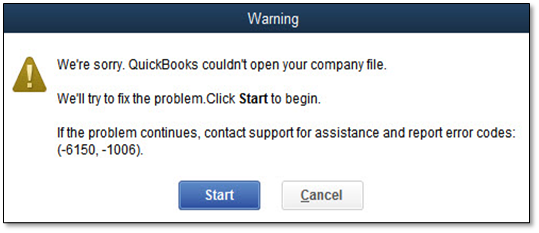
Below, we will highlight the causes and solutions to resolve this error. Understanding this error will help you navigate your accounting tasks more smoothly.
To troubleshoot Error -6150, -1006, first check whether malware is affecting the computer. If the system is safe, try restoring a recent backup. If you don’t have a usable backup, try Auto Data Recovery, QuickBooks File Doctor, or Verify and Rebuild Data.
QuickBooks Error -6150, -1006 can occur when QuickBooks encounters a problem with a company file. In some cases, malware such as CryptoWall can also cause the error. If the error appears while opening a company file, first determine whether the problem is specific to that file or affects QuickBooks more broadly. The backup file (.QBB) is corrupted and cannot be decompressed or restored. It prevents QuickBooks from connecting with its database manager.
Understanding the major cause is the first step to fix a QuickBooks error. Some common reasons for QuickBooks error code 6150 1006 include:
Here are the additional things that you must know if you have encountered this issue and wish to fix it.
| Category | Description |
| Error Classification | It is a critical company file access error in QuickBooks Desktop. |
| Occurrence | pops up when attempting to open, create, or restore a company file. |
| Primary Triggers | caused by corrupted .nd (Network Data) and .tlg (Transaction Log) files, or internal damage to the company file itself. |
| Environment Scope | Can occur in both single-user and multi-user setups due to database manager communication failures. |
| Security Interference | Third-party antivirus programs, firewalls, or Windows Defender frequently block necessary QuickBooks processes, triggering the error. |
| Standard Fixes | Rename extension files, run the QuickBooks File Doctor tool, or restore a recent data backup. |
Check for CryptoWall viruses, repair your company file, and recover your company file data to resolve QuickBooks Error -6150, -1006. It is recommended to implement these solutions in the sequence provided below. Now, let’s examine these solutions more thoroughly:
If your system is compromised by CryptoWall, it might block QuickBooks from accessing the company file. Consider the steps outlined below to check for such viruses and reach out to your antivirus provider if needed.
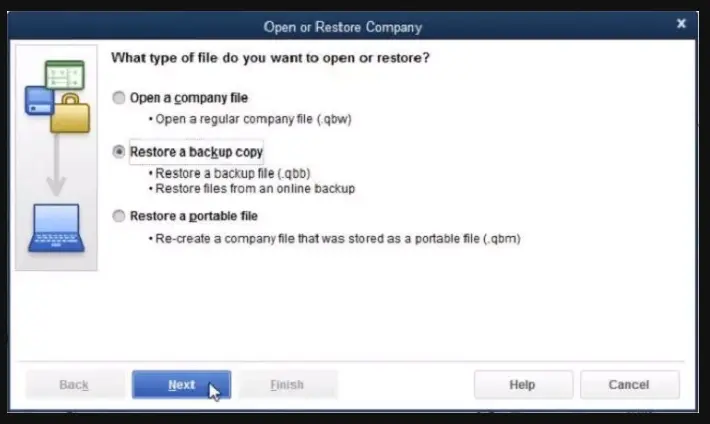
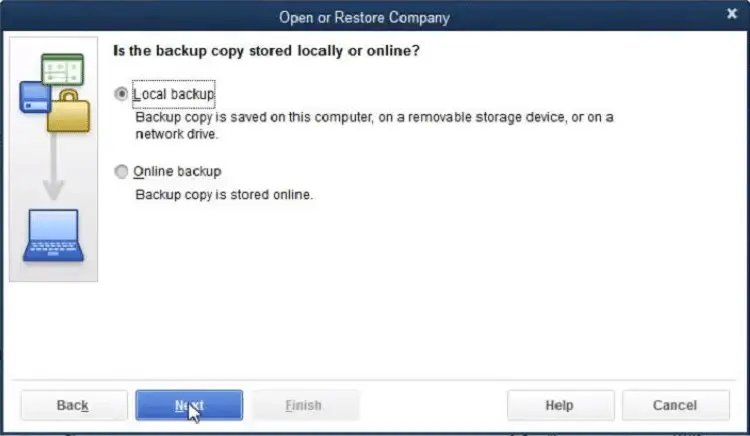
It is essential to recover your data from a backup file when the company file is corrupted. Here are the steps to restore a backup and fix QuickBooks Error -6150, -1006.
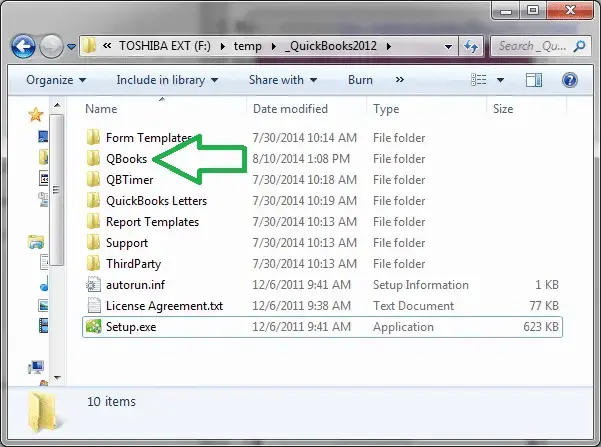
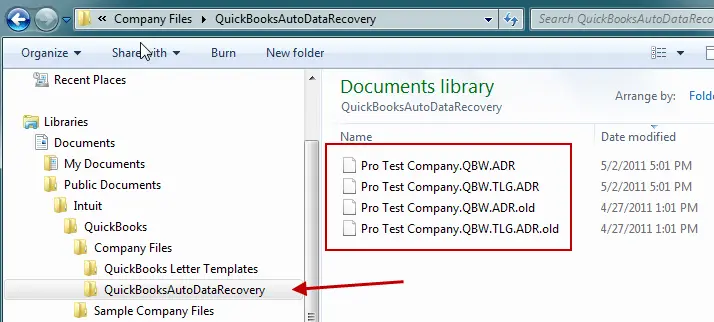
QuickBooks uses Transactional Log (.TLG) files to restore data that has been damaged. It is capable of recovering the most recent transactions. This method is applicable for users of QuickBooks Pro, Premier, and Enterprise Solutions. Follow these steps to resolve QuickBooks Error -6150, -1006:
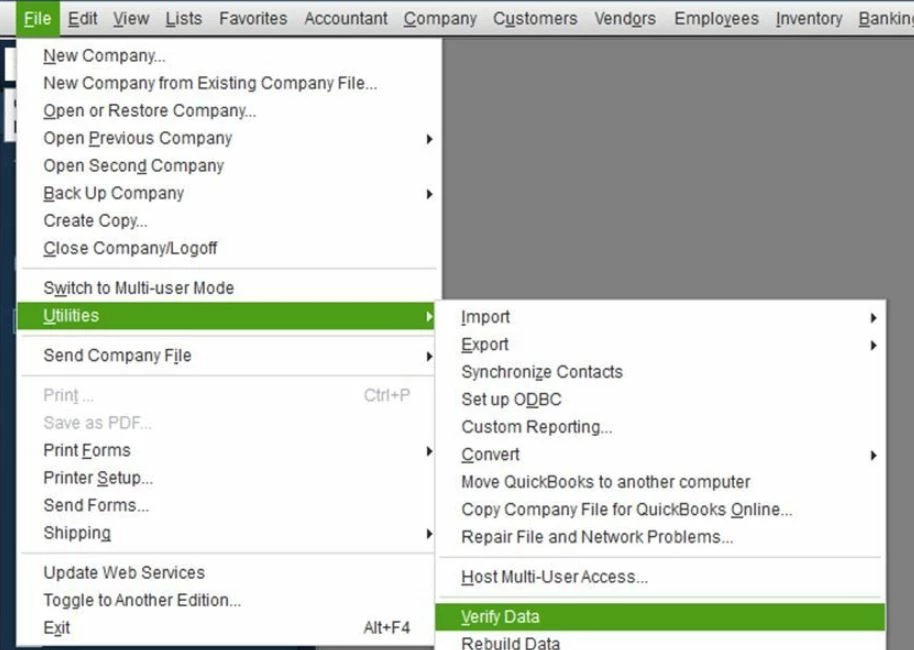
Data Service Team Tip: The Product Information screen indicates the location of your company file folder. To access it, press F2 or Ctrl+1 in the No Company Open Window.
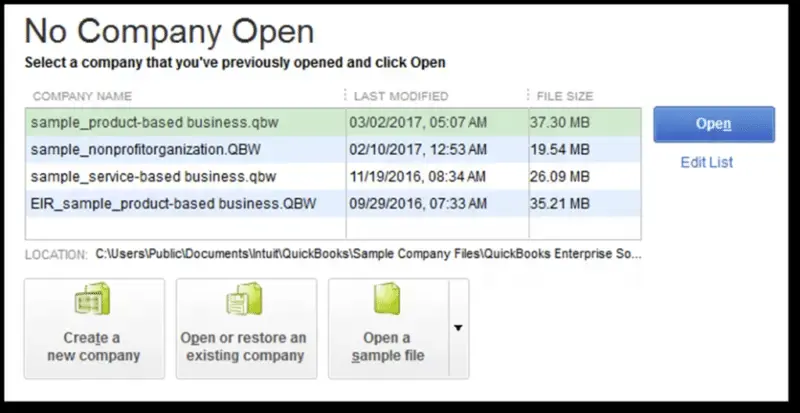
Users can utilize the QuickBooks File Doctor to resolve common issues associated with the company file. Follow the steps outlined below to do so:
Rename.ND and .TLG files will help you fix QuickBooks Error -6150, -1006. Follow these instructions to change the names of files and resolve this error.
Keep QB software updated to safeguard the financial information, guarantee payroll computations, and avoid interruptions in service. Routine updates provide updates, latest tax tables, fixes for bugs, and current improvements to ensure seamless experience.
Note: If your QuickBooks Update Stuck, resolve the update issue first before installing the latest release.
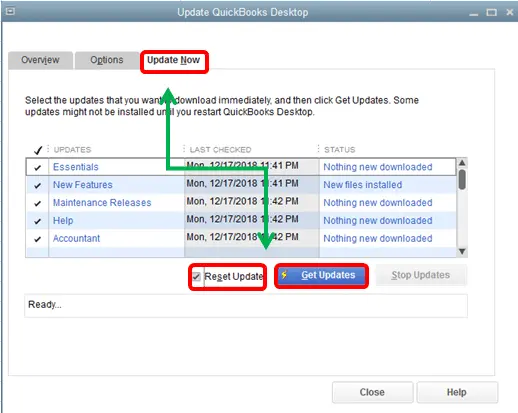
Download the specific update file if you are unable to update through the software.
Data Service Team Tip: See the instructions for installing, updating, and setting up the QuickBooks Desktop Server Manager to update your server manager.
Run the QuickBooks Database Server Manager to fix network-related problems with your company file. The causes behind the occurrence of QuickBooks Error 6150, -1006 are corrupted business files with extension QBW and improper installation of QBDT. Follow these steps to scan your folders and resolve the issue.
The QuickBooks Tool Hub contains various tools designed to address QuickBooks error code 6150 1006. Follow these steps to download, install, and use the QuickBooks File Doctor Tool.
There are a few prerequisites to resolve any QuickBooks error. Error -6150, -1006 occurs when QuickBooks tries to create, open, or use the company file. You must have a complete understanding of the same to bypass any last-minute problem:
You can avoid facing this error while using QuickBooks by considering certain prevention strategies. These are as follows:
QuickBooks Error -6150, -1006 can be a challenging hurdle for users, but the knowledge of causes and solutions can help you to navigate this error. Verify file integrity, update your QuickBooks software, or use the QuickBooks File Doctor tool to resolve it to troubleshoot Error -6150, -1006 in QuickBooks.
Frequent backups and maintenance of the company files are essential to prevent QuickBooks error 6150 -1006. If the problem persists, contact Data Service Team experts at +1(888)-718-7888 now for quick help. Minimize downtime and keep financial management streamlined with the right approach.
Yes! This error is considered a common company file problem and occurs when QuickBooks Desktop is unable to open, create, or access your company data file. It points to underlying structural corruption in the tables. It can be triggered by damaged program installations, improper file extensions, interference from security software and malware.
The time it takes to repair this issue ranges from 10 to 30 minutes based on the cause and the method required to fix it. If the issue can be resolved through an automated diagnostic tool like the QuickBooks Tool Hub, the process takes a few minutes. However, the troubleshooting and verification process can extend anywhere from 30 minutes to an hour if the company file corruption is severe and you have to resort to restoring a backup.
Yes! Users can recover a corrupted QuickBooks company file without a manual backup through built-in diagnostic and repair utilities. The approach is to run the QuickBooks File Doctor. It scans and repairs common data damage along with network file issues. QB creates internal transactional logs and can help reconstruct missing data alongside the primary company file. The severe corruption may require professional data recovery services if no backup exists.
Run the QuickBooks File Doctor tool through the QB Tool Hub to diagnose and repair file corruption. If it does not open, open a sample company file to determine if the problem lies with the application itself, and force QB to recreate fresh configuration files. Ensure the software is updated and restore a recent backup of the company file if all else fails.
No! It is not safe to continue work after this error appears. This error indicates a critical company file issue and prevents QuickBooks from properly opening the database. You can attempt to bypass this error, force changes, or enter transactions. The file is in an unstable state and can result in data loss, permanent file corruption, and unrecoverable discrepancies in the financial records.
Yes! You must use QuickBooks Auto Data Recovery as a secondary resort for this error only if you do not have a recent manual backup along with simple solutions. ADR uses the transaction log files and self-generated recovery files to rebuild your damaged company file. It allows you to bypass the QuickBooks error code 6150 1006 and recover the recent network.
If you ignore this error, you may face severe consequences for your business operations and financial data integrity. This critical company file locks you out of your account. You will be unable to access vital accounting records and process payroll if you leave it unresolved. It may also indicate underlying data corruption within the company files. It leads to permanent data loss and forces you to rely on outdated backups.




