
Are you unable to open your QuickBooks company file because of Error 6143? This error can occur when QuickBooks Desktop has trouble accessing the company file from its current location. Problems with the company file, network connection, folder permissions, or QuickBooks installation may prevent the file from opening. This guide explains the common causes and shows practical steps to troubleshoot QuickBooks Error 6143 without unnecessarily changing your company file.
This detailed blog post will help you fix error 6143 and access your company file with our concise guide. Learn causes, symptoms, and quick troubleshooting steps in the given blog post to remove this error with confidence.
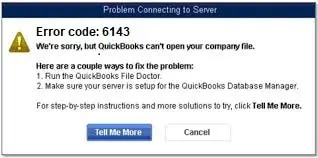
QuickBooks Error 6143 is a company-file access error that can prevent QuickBooks Desktop from opening a company file. The issue may be related to the company file itself, its location, network access, folder permissions, or the QuickBooks installation. If the error appears only with one company file, testing another company or sample file can help determine whether the problem is specific to that file.
QuickBooks Error 6143 may occur when QuickBooks Desktop cannot properly access the company file. Read the given pointers to know the additional causes:
You may notice the following outlined signs when the 6143 error occurs:
Follow the provided effective methods to resolve the underlying issues that cause QuickBooks Error Code 6143.
QuickBooks’ Verify Data utility checks the company file for data integrity issues. If it identifies a problem, Rebuild Data can attempt to repair certain types of data damage. Learn more about Verify and Rebuild Data in QuickBooks Desktop.
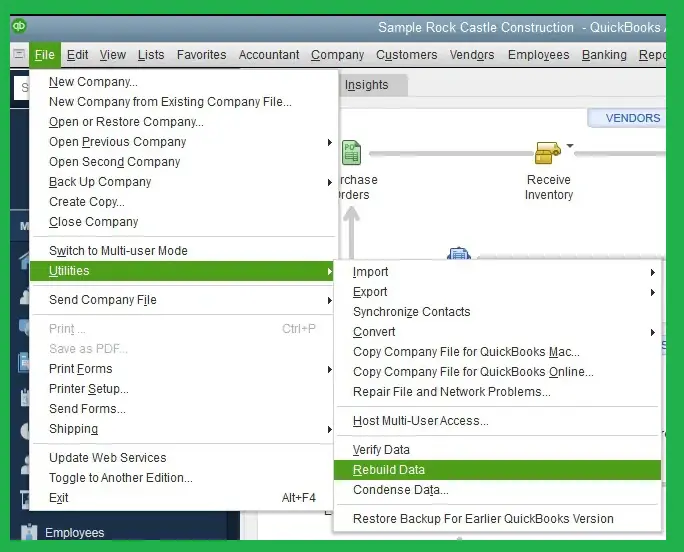
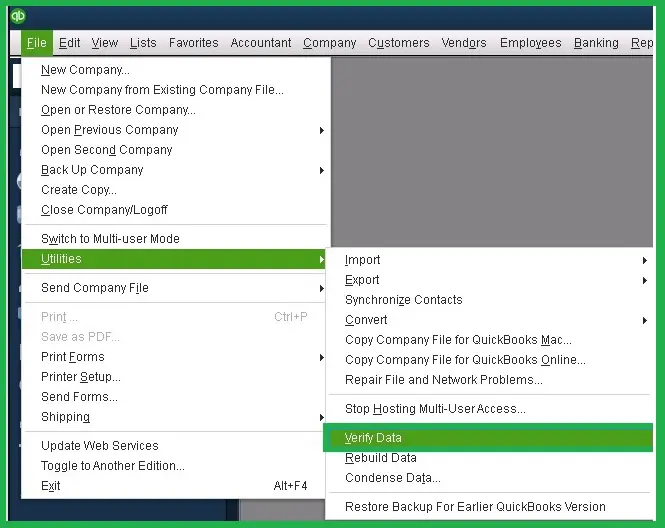
If QuickBooks does not detect any problems, click OK. If it identifies a problem with your company file, choose Rebuild Now.
You need to rename the .ND and .TLG files to refresh QuickBooks’ network and transaction log files. It may help resolve QuickBooks error 6143 caused by damaged file information.
For example: company_file.qbw.nd.OLD
Important Note: Do not rename or delete the .QBW company file itself. Only rename the .ND and .TLG files.
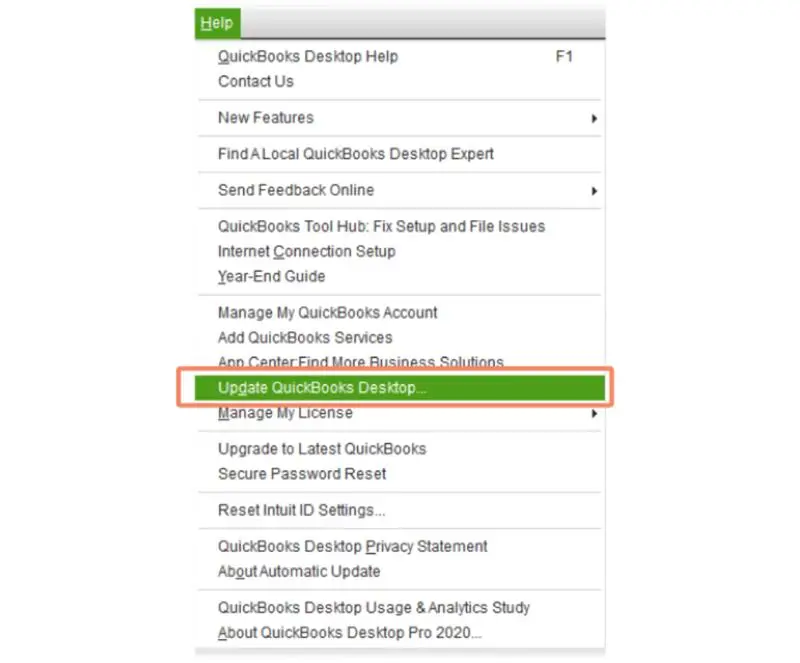
Updating QuickBooks to the latest available version can fix bugs that may cause QuickBooks Company File Error 6143. It also provides the latest program improvements and security updates. Once you have updated, restart QuickBooks and open your company file again.
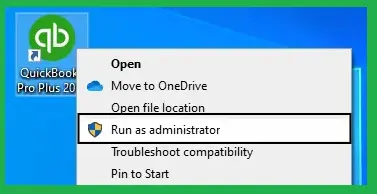
You can utilize the QuickBooks Desktop application as an administrator to see if it fixes the QB error 6143 by following the instructions outlined below:
Running File Doctor within QB can detect and repair certain company-file issues that may trigger QuickBooks Error 6143. Here are the issues to follow:
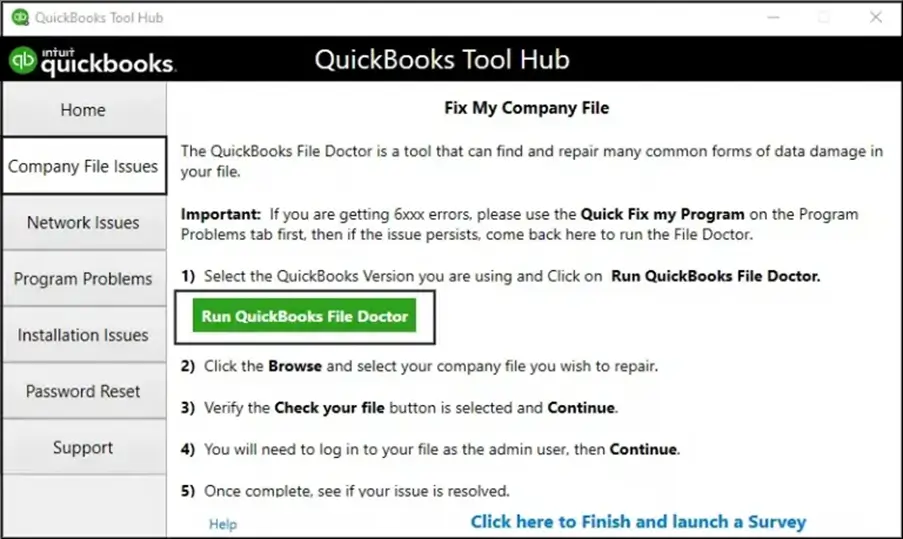
Important Note: If you can not find the QuickBooks File Doctor opening, look for QuickBooks Desktop File Doctor and launch it manually.
If the desktop copy opens but the original file does not, the problem may be related to the original file location, network path, or folder permissions rather than the company file itself.
QuickBooks Error 6143 occurs when the software is unable to open your company file. You need to remove all the running processes by following the given instructions:
This method ensures QuickBooks has the required access to your company file and helps resolve QuickBooks Error Code 6143.
If your permissions are not properly configured:
This is a valuable diagnostic step because it helps determine whether the problem is with the QuickBooks application or the specific company file.
Before fixing Error 6143, prepare your QuickBooks environment to avoid data loss and make the troubleshooting procedure easier.
It is a database validation and company file access issue that affects the workflow when the software fails to open financial data. Here are preventive tips to avoid QuickBooks Error Code 6143 in the future:
Note: Error 6143 is one of several QuickBooks company-file access errors. If you’re troubleshooting a different 6000-series issue, see our guide to QuickBooks Error 6000 Series
QuickBooks Error 6143 can prevent users from opening their company files and disrupt important financial activities. This error belongs to a group of QuickBooks company-file errors that can occur when QuickBooks cannot access the required company data correctly. Issues such as damaged company files, network connectivity problems, incorrect folder permissions, or QuickBooks installation issues can contribute to the error. You need to consider the above-discussed methods to rectify QuickBooks Error Code 6143 and restore access to your company data.
Still struggling with QuickBooks Error 6143? Let Data Service Team at +1(888)-718-7888 professionals handle the technical complexities and help you streamline your QuickBooks experience.
Renaming the .ND and .TLG files can help when damaged or outdated configuration information is preventing QuickBooks Desktop from accessing the company file. QuickBooks recreates these files when needed. Do not rename the .QBW company file.
Download and launch the Tool Hub to resolve QuickBooks Desktop Error 6143 in Desktop. Choose Company File Issues and use the Quick Fix My File tool. Alternatively, use the QuickBooks File Doctor to automatically identify and fix issues related to damaged company files.
Indeed! Error 6143 may arise when you access a company file in multi-user mode. This issue with database validation commonly occurs when the network paths are not properly configured among workstations when several computers attempt to function as the host.
If initial troubleshooting does not fix error 6143, it suggests significant data corruption in your company file within your local network system. Download and launch the QuickBooks Tool Hub to utilize the QuickBooks File Doctor tool to address this error. It is designed to identify and repair structural issues within corporate database files.
Yes! This method can resolve QuickBooks Desktop Error 6143 if the primary cause is serious damage within the current company file when you use the Restore Company option from the QB Support guidelines. It helps load a healthy backup, and the software generates a clean working file to bypass the invalid database entries.
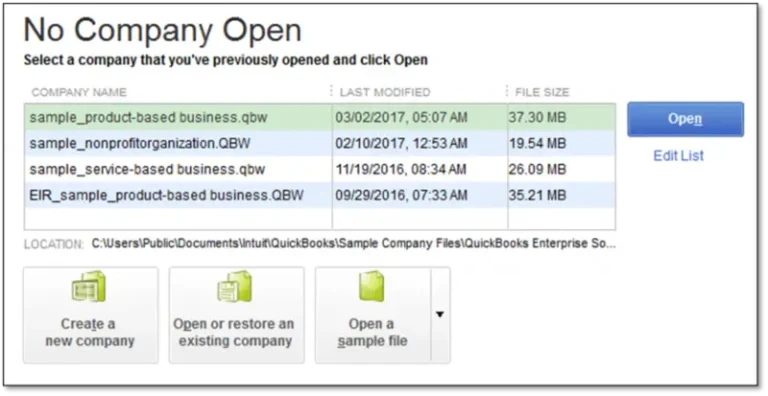
Test the ability of QuickBooks to open a different file to determine whether QuickBooks Company File Error 6143 is isolated to a single company file. It helps identify if the issue lies within the specific data files. Open QuickBooks, but do not open the project file, and hold down the Ctrl Key. Double-click the QuickBooks icon until the No Company Open window appears on your screen.
This error is related to company file problems like data damage or damaged configuration files. It can also stem from local folder permission restrictions that prevent access to the data. Use the QuickBooks Tool Hub to run the File Doctor to diagnose and repair these files, along with network issues.
If the company file remains inaccessible after standard troubleshooting, consider consulting a qualified QuickBooks data-recovery professional. Avoid repeatedly modifying the original file without a backup.

Get Free Consultation for QuickBooks Upgrade
(2021, 2022, 2023)


