Are you facing QuickBooks error PS036 in QuickBooks and is it affecting your payroll tasks? Do not worry! We will guide you to resolve this error with the detailed article below, which contains all the information you need to know. This error appears during updates or while preparing to use certain features. QuickBooks has established itself as a reliable tool for businesses of all sizes in the world of accounting software.
It is not immune to these errors that can disrupt workflow and create confusion like any software. Here, we will explore the causes of QuickBooks Error PS036, troubleshooting methods, and tips to prevent it from recurring. We aim to equip you with the knowledge needed to navigate and solve this issue with this guide.
QuickBooks Error PS036 occurs during the update process of QuickBooks Payroll. It indicates that there was an issue with the payroll service. This error appears when the software fails to download payroll updates due to various reasons, such as an outdated version of QuickBooks, internet connectivity problems, or corrupted files.
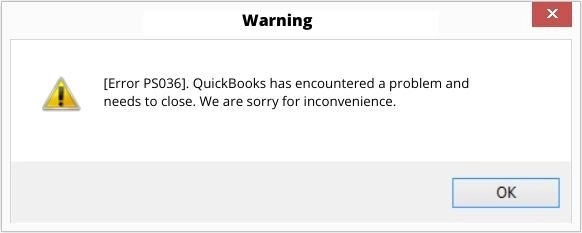
This error comes with a message: Error PS036: QuickBooks is having trouble verifying your payroll subscription. The PS036 error can hinder payroll processing and cause delays in employee payments & tax filings. QuickBooks error PS036 indicates QuickBooks is unable to verify your payroll subscription. Read this article to find quick fixes for this error.
Data Service Team Tip: Users should ensure their QuickBooks is updated to the new version and verify the integrity of the software installation to resolve this error.
QuickBooks Error PS036 occurs when the software cannot check the payroll subscription or encounter configuration mismatches. The main causes include:
Related QuickBooks Payroll Error: Another payroll update issue users may encounter is QuickBooks Error PS033, which can occur when QuickBooks has trouble downloading or installing the latest payroll tax table updates. If the issue is related to payroll subscription verification or update configuration, users should identify the exact error code before applying troubleshooting steps.
QuickBooks Error PS036 happens when payroll updates fail, blocking payments and tax submissions. This affects all QuickBooks versions, including Desktop. Here are the main signs of this error:
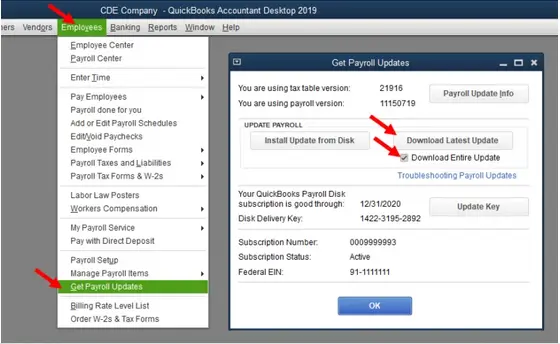
QuickBooks Error PS036 indicates an issue verifying your payroll subscription or license. Verify your payroll subscription in the Employees menu to resolve it quickly. Ensure your EIN is correct under company details, and run the Verify Data tool. Go through the easy methods to resolve this payroll error in QuickBooks within a few minutes:
The first step is to check if your payroll subscription is active or not. An inactive/expired subscription can potentially lead to the PS036 error code in QuickBooks.
QuickBooks updates are one of the best choices to access some of the finest features. If you do not have the same, there will be a constant eruption of errors and technical glitches along with other issues. Users must ensure that the software has been updated with enhancements and the latest security. The steps given below can help in verifying your software registration:
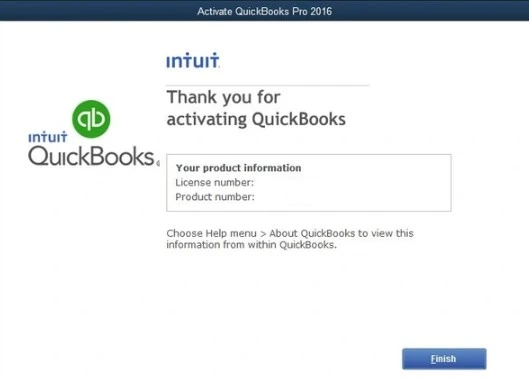
There is a turn-off update after registration as described below:
QuickBooks may unable to verify the payroll subscription when the Paysub.ini file becomes corrupted. Repair the file to refresh the payroll configuration data and regain proper validation.
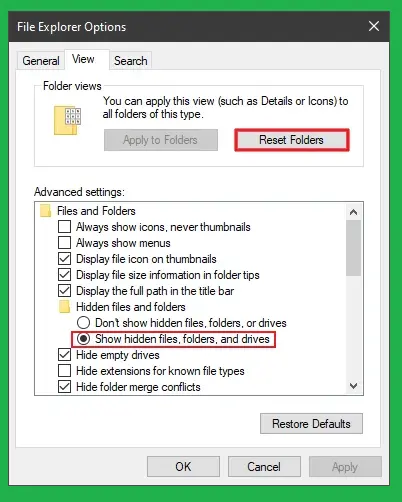
Data Service Team Tip: You need to follow the same procedure for each of the Paysub.ini files. Ensure you include additional letters or numbers in the filename to prevent duplication while performing this action. The system does not allow the use of identical file names.
The installation of damaged program components can trigger payroll errors. Users need to perform a clean install to remove these corrupted files and install QuickBooks again. Clean install QB through the Clean Install Tool to fix error PS036 in QuickBooks Desktop.
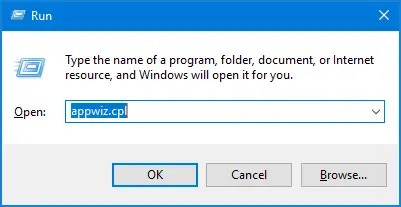
The payroll update will not occur and will result in QuickBooks error PS036 when the company file is corrupted. Use the QuickBooks File Doctor tool from the QuickBooks Tool Hub to address the data corruption. Now, follow these steps:
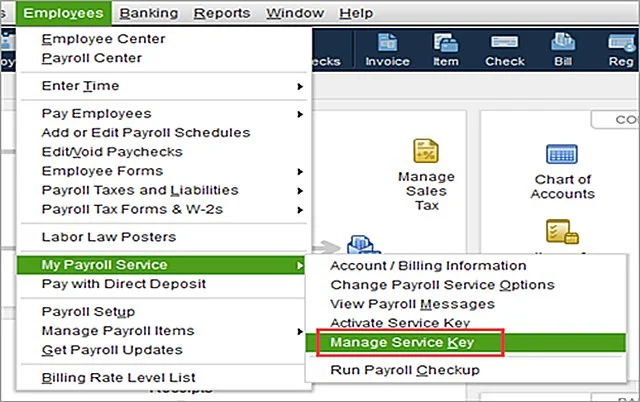
An incorrect service key can prevent payroll updates. Follow these instructions to replace it:
QuickBooks Error PS036 signifies an issue with verification of the payroll subscription. Perform these essential steps to prepare the system and then implement troubleshooting solutions:
Data Service Team Tip: This error typically appears when QuickBooks cannot confirm your active payroll service subscription, preventing you from processing payroll or accessing payroll features.
QuickBooks Error PS036 is a common payroll-related issue that occurs when there’s a problem with your payroll subscription verification. It impacts your ability to run payroll and refresh tax tables. This error occurs when the software cannot confirm your active payroll subscription with Intuit’s servers. The consequences of this error include:
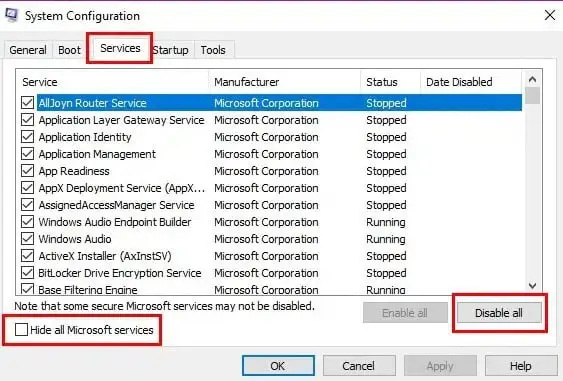
There are some QuickBooks installation files that might be interfering with the payroll updates and can result in QuickBooks error PS036. Contact us at +1(888)-718-7888 for immediate assistance.
Related Payroll Error: If QuickBooks users encounter other payroll update issues, they may also see QuickBooks Error PS038, which commonly occurs when payroll updates are stuck or when QuickBooks cannot complete the payroll update process. The troubleshooting steps may differ depending on the specific error code and its underlying cause.
Make QuickBooks Work Smarter for Your Business
Spend less time managing data and more time growing your business. Whether you need help setting up QuickBooks, cleaning up your books, reconciling accounts, or resolving errors, our team is here to make accounting easier. Get quick solutions that save time, improve accuracy, and keep your business finances on track.
This error may occur due to an inactive payroll subscription, a damaged Paysub.ini file, incorrect service keys, or outdated QuickBooks components. Users can prevent and resolve this error with the following best practices:
We hope that the above guidance on QuickBooks error PS036 clarifies all your doubts and enables you to fix this error with ease. It is crucial to understand the root of this error whether it is due to an inactive payroll subscription or outdated components. You can restore your payroll functionalities and maintain smooth operations in your business. Still have queries? Understanding how to resolve this problem is crucial to maintain uninterrupted payroll operations. Contact the Data Service Team at +1(888)-718-7888 to resolve error PS036 in QuickBooks Desktop with the help of our experts.
Error PS036 in QuickBooks means the software cannot verify the payroll subscription with server of Intuit. Firewall settings block this background connection. It remains even after an update. This is because an inactive subscription in your file prevents the table from syncing.
Yes! An expired or inactive payroll subscription is the primary cause for QuickBooks error PS036. QuickBooks connects to the server of Intuit to check the account status when you attempt to download tax tables or process payroll updates. It blocks the update and displays this error if it detects an expired subscription.
QuickBooks error PS036 is related to payroll tax table updates. The PS036 error in QuickBooks often indicates a subscription or payroll update issue. First, verify your QuickBooks subscription status online. The program must validate your service key with the Intuit server to install new tax tables. The update fails and throws this error code when network, firewall, or software glitches block this handshake.
Verify and correct your Federal Employer Identification Number in your company file to fix QuickBooks error Ps036 caused by an invalid EIN. Access your payroll settings, check that the EIN matches what the IRS has on file, and save based on your version. Restart your software to validate your payroll subscription once you have corrected the number.
Log in to your provider’s admin portal and check your subscription settings to verify your payroll service is active. Make sure that the billing information is current and check that the status reads Active with a valid renewal date.
Yes! Antivirus programs and firewalls interfere with payroll updates by misidentifying legitimate background connections and file downloads as security threats. This can block the executable files required to access external servers, restrict network ports, and lock temporary files. They are being rewritten and prevent the software from completing.
Yes, multiple payroll agreements or an inactive direct deposit agreement can interfere with subscription verification. Review your payroll services and resolve inactive agreements before updating payroll.
Yes, a damaged Paysub.ini file can prevent QuickBooks from validating payroll subscription details. Rename the affected file after closing QuickBooks, then reopen the software and retry.
Check your company file for data damage, confirm TLS 1.2 is enabled, and test your internet connection. Contact QuickBooks support if the error persists.

Get Free Consultation for QuickBooks Upgrade
(2021, 2022, 2023)


