A QuickBooks Payroll EIN mismatch error can cause payroll processing issues and create discrepancies with IRS records. Whether your Federal Employer Identification Number (EIN) was entered incorrectly or your business has undergone a change in ownership or legal structure, updating your business information is essential.
In this guide, we’ll explain how to update your EIN in Intuit QuickBooks Workforce and QuickBooks Desktop payroll to ensure your business details, including your legal name and address, accurately match IRS records.
Need help fixing a QuickBooks payroll EIN mismatch? Call +1(888)-718-7888 today and get expert assistance to update your EIN and ensure your business information matches IRS records.
Employer Identification Number (EIN) is a unique nine-digit number assigned by the Internal Revenue Services (IRS) to identify a business for tax purposes.
QuickBooks EIN is used to identify your company when processing payroll, filling payroll taxes, and submitting tax forms to the IRS. It is important to ensure that the EIN entered in QuickBooks matches your official IRS records. Any mismatch or incorrect information can lead to payroll tax filling errors, verification issues, or delays in processing payroll.
As mentioned above, your EIN is your business’s federal tax ID and QuickBooks payroll keeps it wherever required. A QuickBooks Payroll EIN mismatch error occurs when the EIN entered in your QuickBooks account does not match the information registered with the Internal Revenue Service (IRS).
This discrepancy may happen due to an incorrectly entered EIN, a recent business name or address change, or a change in business ownership or legal structure.
If QuickBooks fails to verify your EIN against IRS records, users may face payroll tax filling issues, verification failures, or delays in payroll processing.
QuickBooks payroll EIN incorrect error can further cause several issues with payroll processing and tax reporting. Since QuickBooks users your EIN to identify your business for federal tax purposes, any mismatch with IRS records may lead to complications. Some common problems include:
Have a look at the following indicators that can you learn about the QuickBooks Employer Identification Number mismatch error:
There are many factors that can cause the QuickBooks Payroll EIN incorrect error. Understanding these common causes can help you take the right steps to fix it. Have a look:
If you have entered an incorrect digit while setting up QuickBooks payroll or company account, you may see the QuickBooks payroll EIN mismatch error.
Another cause could be the mismatch of company and payroll settings, where your company file may contain a different EIN from that of entered in your payroll subscription.
Keep updating your payroll information. If your company details in QuickBooks payroll have not been updated after a business name, address, ownership, or legal structure change, the saved information may not match IRS records.
If your business information has recently changed, IRS records and QuickBooks may not reflect the updated details at the same time.
Using the wrong QuickBooks company file may result in an EIN that doesn’t match your actual business information.
Problems with your QuickBooks Payroll subscription may interfere with payroll account verification and processing.
Managing multiple businesses under one QuickBooks account can lead to confusion and incorrect EIN assignments.
Incorrect or outdated tax registration details can cause discrepancies between QuickBooks and IRS records.
Updating company EIN in QuickBooks requires when users need to correct an incorrect entered number or changing the EIN after a business restructured, changed ownership, or new IRS registration.
Remember that QuickBooks Desktop and QuickBooks Online follow a different procedure to update company EIN. Before proceeding, understand the following important points:
First, determine why you need to update your company EIN. If you accidentally entered an incorrect number, you may need to correct your existing payroll information. However, if your business has undergone a legal structure or ownership change, the IRS may require you to obtain a new EIN.
QuickBooks Desktop Payroll and QuickBooks Online Payroll follow different account management processes. If you encounter problems while managing your online payroll settings, refer to our guide on QuickBooks Online Payroll Not Working. Some company information can be edited directly, while certain EIN changes require assistance from Intuit Payroll Support.
Before creating a new payroll account, confirm whether your existing subscription can accommodate the required EIN change. This is particularly important if you have an established payroll history, employee records, and tax filing information.
After updating your company EIN, review previously submitted Forms 941, W-2, and other payroll tax documents to maintain Payroll Tax Compliance in QuickBooks. Updating your EIN in QuickBooks does not automatically correct previously filed tax returns or payments.
If your EIN change involves a new legal entity or business ownership, contact Intuit Payroll Support to confirm the required documentation and account update procedure. This helps ensure that your payroll subscription and tax records remain consistent.
Note – Never replace an existing EIN with a new one simply because your business name or address has changed. First, confirm whether the IRS requires a new EIN.
Before we jump to correct EIN in QuickBooks payroll, have a look at the things to remember to conclude everything seamlessly and avoid further errors
Practices To Follow Before Correcting QuickBooks EIN
After considering the practices above, now let’s quickly fix the QuickBooks Employer Identification Number mismatch error:
(Note – CP 575 is a digital notice that confirms your Employer Identification Number (EIN). It is available through your Business Tax Account.)
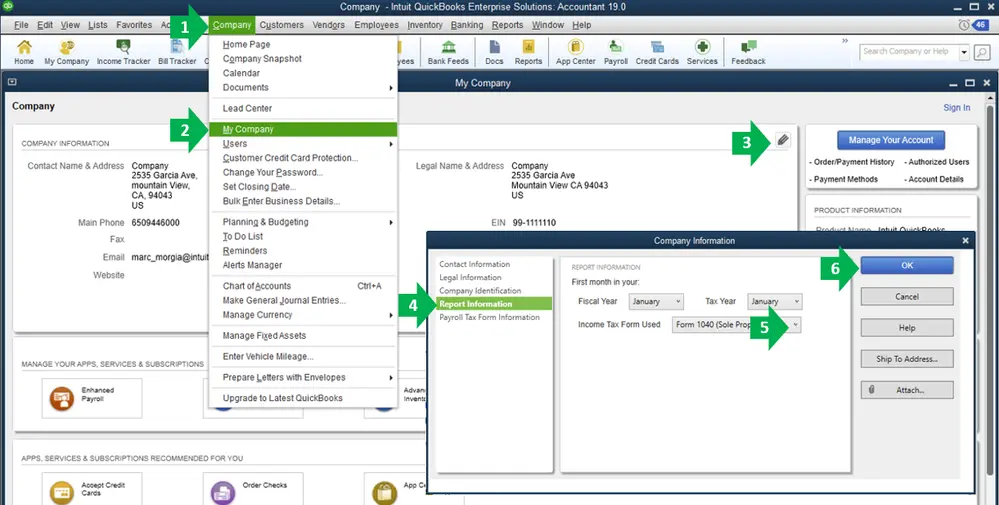
Note – An EIN change may require additional verification. If your business has changed ownership or legal structure, confirm with the IRS whether you need a new EIN before updating your payroll records.
Important – If two company files or EINs are on one subscription, you can encounter a QuickBooks payroll tax ID mismatch error or sometimes PS036.
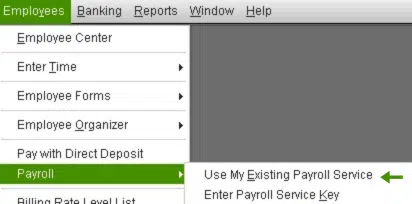
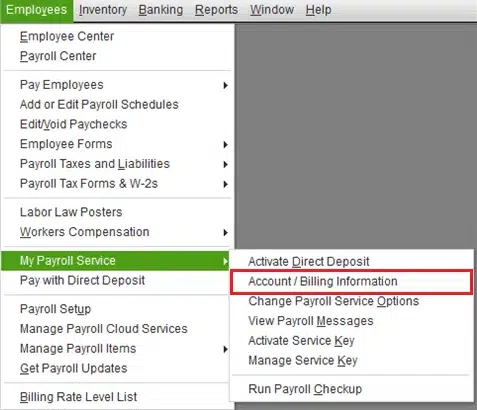
To fix QuickBooks online payroll EIN issue, here are the three ways:
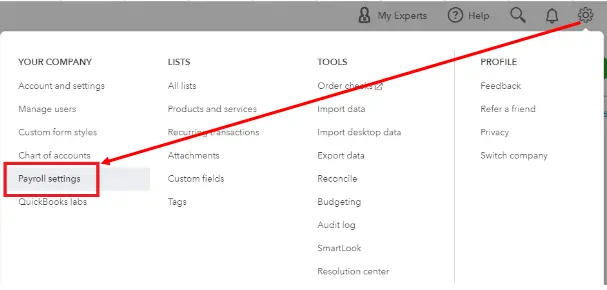
If you need additional guidance on preparing or managing federal payroll tax returns, see our guide on Form 941 in QuickBooks.
Apart from the QuickBooks Payroll EIN Mismatch error, you may face several other payroll update errors that indicate potential issues with your QuickBooks EIN, payroll subscription, or company information.
These errors can prevent QuickBooks from verifying your payroll account or downloading the latest payroll updates. Below are some common QuickBooks payroll errors, their possible causes, and quick solutions.
This error occurs when QuickBooks cannot verify your payroll subscription. It may be caused by an incorrect EIN, an inactive payroll subscription, an invalid service key, or damaged company data.
To fix it
QuickBooks Error PS032 generally appears when QuickBooks encounters problems downloading or installing payroll updates due to damaged update files, incorrect internet settings, firewall restrictions, or incorrect payroll information. Common causes include damaged payroll update files, incorrect internet settings, firewall restrictions, or incorrect payroll information.
To fix it
The error 20102 may appear when QuickBooks encounters payroll account verification or business information issues. Incorrect or mismatched EIN details and discrepancies in company information may contribute to the problem.
To fix it
QuickBooks Error 30159 occurs due to payroll service and tax table configuration problems. Incorrect EIN information, payroll subscription discrepancies, or damaged payroll configuration files may contribute to this error. Incorrect EIN information, payroll subscription discrepancies, or damaged payroll configuration files may contribute to its occurrence.
To fix it
Make QuickBooks Work Smarter for Your Business
Spend less time managing data and more time growing your business. Whether you need help setting up QuickBooks, cleaning up your books, reconciling accounts, or resolving errors, our team is here to make accounting easier. Get quick solutions that save time, improve accuracy, and keep your business finances on track.
No doubt, a QuickBooks payroll EIN mismatch error can disrupt your company payroll processing, tax filings, and business operations if not corrected timely. We hope this blog post has helped you fix this mismatch and incorrect EIN. Make sure your business information matches official IRS records before making any changes. If you’re still unable to fix the error, call our +1(888)-718-7888 to get experts’ live assistance and restore smooth QuickBooks Payroll operations.
A QuickBooks payroll EIN mismatch indicates that the Employer Identification Number you have entered in QuickBooks does not match the information registered with the IRS. This problem causes payroll verification and tax filing issues.
QuickBooks payroll may bring an incorrect EIN messages due to typing mistakes, outdated business information, or changes in business ownership or legal structure. An incorrect payroll setup or company file details can also cause this problem. To fix it, you need to verify your EIN and business information.
First, you need to verify your nine-digit EIN using your IRS confirmation letter and other official documents. Next, review your company information, payroll subscription, and tax details in QuickBooks. If the EIN cannot be edited, contact live Data Service Team experts.
Open your QuickBooks Desktop company file and review the Federal Employer Identification Number in your company information. If the EIN field cannot be edited, contact Intuit Payroll Support for the required update procedure. Keep your IRS documentation and payroll subscription details ready.
To update your EIN in QuickBooks online payroll, sign in to QuickBooks Online and move to Settings, then click Payroll Settings, and choose Federal Tax. After this, select Edit and update the EIN if the field is editable. Once done, save your changes.
Yes, an EIN mismatch can cause federal payroll tax forms or electronic tax submissions to be rejected. It may also create discrepancies in your business tax records. Verify your EIN and correct the mismatch before submitting affected payroll tax forms again.
If your EIN is correct, review your legal business name, address, and payroll subscription information. Make sure these details match your IRS records.
Changing an EIN does not automatically update previously filed payroll tax returns or issued W-2 forms. You may need to review earlier filings and determine whether corrections are necessary.
An EIN mismatch occurs when your business tax identification number does not match the IRS records or payroll account information. A payroll Service Key error generally relates to incorrect, missing, or invalid payroll subscription credentials. Both errors can interrupt payroll services but require different troubleshooting approaches.

Get Free Consultation for QuickBooks Upgrade
(2021, 2022, 2023)